# Chapter End Appendix A Windows Programming
Appendix A
Introduction to Windows Programming
To use the Direct3D API (Application Programming Interface), it is necessary to create a Windows (Win32) application with a main window, upon which we will render our 3D scenes. This appendix serves as an introduction to writing Windows applications using the native Win32 API. Loosely, the Win32 API is a set of low-level functions and structures exposed to us in the C programming language that enables us to create Windows applications. For example, to define a window class, we fill out an instance of the Win32 API WNDCLASS structure; to create a window, we use the Win32 API CreateWindow function; to notify Windows to show a particular window, we use the Win32 API function ShowWindow.
Windows programming is a huge subject, and this appendix introduces only the amount necessary for us to use Direct3D. For readers interested in learning more about Windows programming with the Win32 API, the book Programming Windows by Charles Petzold, now in its fifth edition, is the standard text on the subject. Another invaluable resource when working with Microsoft technologies is the MSDN library, which is usually included with Microsoft鈥檚 Visual Studio but can also be read online at www.msdn.microsoft.com. In general, if you come upon a Win32 function or structure that you would like to know more about, go to MSDN and search for that function or structure for its full documentation. If we mention a Win32 function or structure in this appendix and do not elaborate on it, it is an implicit suggestion that the reader look the function up in MSDN.
Appendix Objectives:
- To learn and understand the event driven programming model used in Windows programming.
- To learn the minimal code necessary to create a Windows application that is necessary to use Direct3D.

To avoid confusion, we will use a capital 鈥榃鈥?to refer to Windows the OS and we will use a lower case 鈥榳鈥?to refer to a particular window running in Windows.
A.1 OVERVIEW
As the name suggests, one of the primary themes of Windows programming is programming windows. Many of the components of a Windows application are windows, such as, the main application window, menus, toolbars, scroll bars, buttons, and other dialog controls. Therefore, a Windows application typically consists of several windows. These next subsections provide a concise overview of Windows programming concepts we should be familiar with before beginning a more complete discussion.
A.1.1 Resources
In Windows, several applications can run concurrently. Therefore, hardware resources such as CPU cycles, memory, and even the monitor screen must be shared amongst multiple applications. In order to prevent chaos from ensuing due to several applications accessing/modifying resources without any organization, Windows applications do not have direct access to hardware. One of the main jobs of Windows is to manage the presently instantiated applications and handle the distribution of resources amongst them. Thus, in order for our application to do something that might affect another running application, it must go through Windows. For example, to display a window you must call the Win32 API function ShowWindow; you cannot write to video memory directly.
A.1.2 Events, the Message Queue, Messages, and the Message Loop
A Windows application follows an event-driven programming model. Typically, a Windows application sits and waits1 for something to happen鈥攁n event. An event
can be generated in a number of ways; some common examples are key presses, mouse clicks, and when a window is created, resized, moved, closed, minimized, maximized, or becomes visible.
When an event occurs, Windows sends a message to the application the event occurred for, and adds the message to the application鈥檚 message queue, which is simply a priority queue that stores messages for an application. The application constantly checks the message queue for messages in a message loop and, when it receives one, it dispatches the message to the window procedure of the particular window the message is for. (Remember, an application can contain several windows within it.) Every window has with it an associated function called a window procedure.2 Window procedures are functions we implement which contain code that is to be executed in response to specific messages. For instance, we may want to destroy a window when the Escape key is pressed. In our window procedure we would write:
case WM_KEYDOWN: if( wParam == VK_ESCAPE ) DestroyWindow(ghMainWnd); return 0;The messages a window does not handle should be forwarded to the default window procedure, which then handles the message. The Win32 API supplies the default window procedure, which is called DefWindowProc.
To summarize, the user or an application does something to generate an event. The OS finds the application the event was targeted towards, and it sends that application a message in response. The message is then added to the application鈥檚 message queue. The application is constantly checking its message queue for messages. When it receives a message, the application dispatches it to the window procedure of the window the message is targeted for. Finally, the window procedure executes instructions in response to the message.
Figure (A.1) summarizes the event driven programming model.
A.1.3 GUI
Most Windows programs present a GUI (Graphical User Interface) that users can work from. A typical Windows application has one main window, a menu, toolbar, and perhaps some other controls. Figure A.2 shows and identifies some common GUI elements. For Direct3D game programming, we do not need a fancy GUI. In fact, all we need is a main window, where the client area will be used to render our 3D worlds.
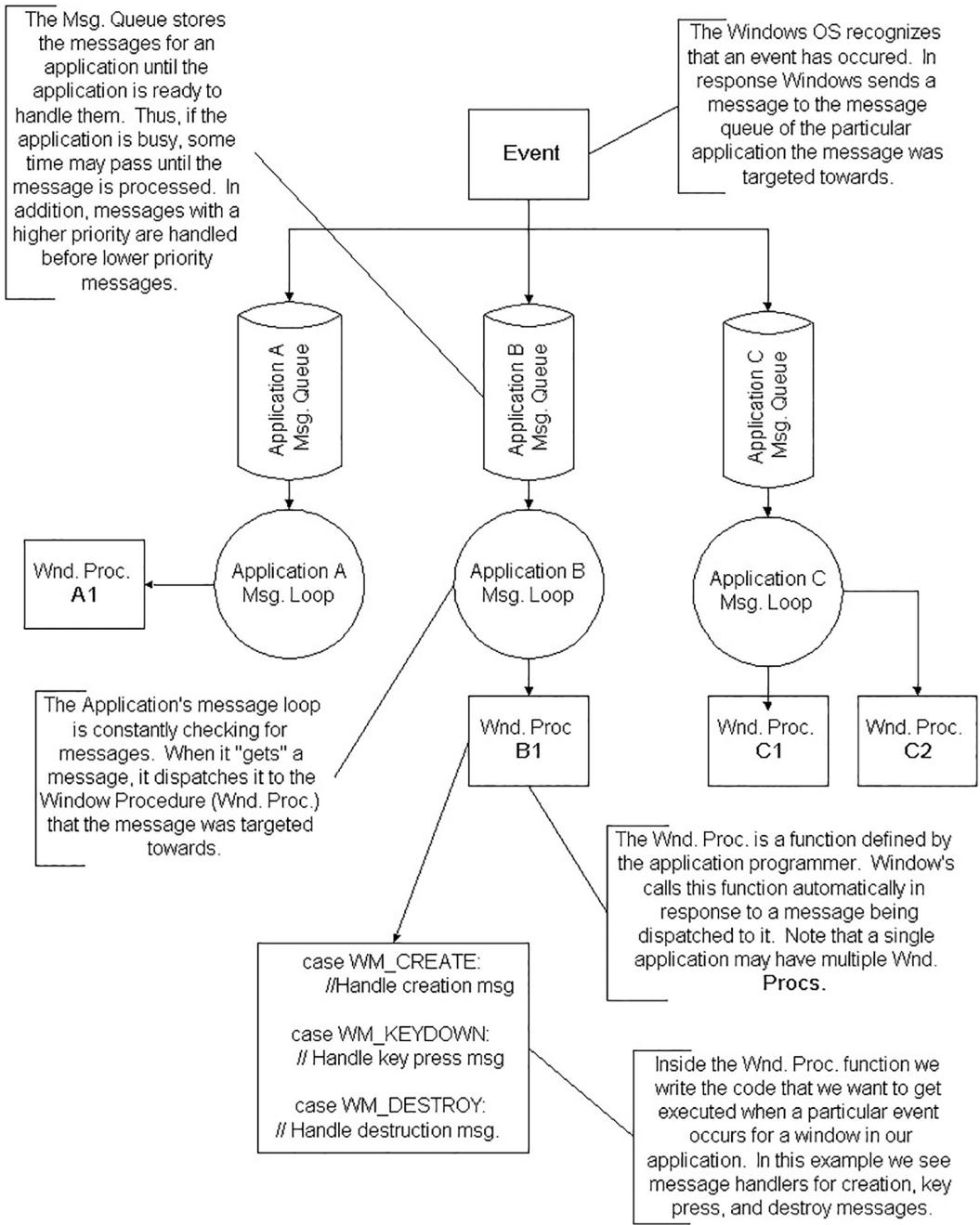
A.1. The event driven programming model.
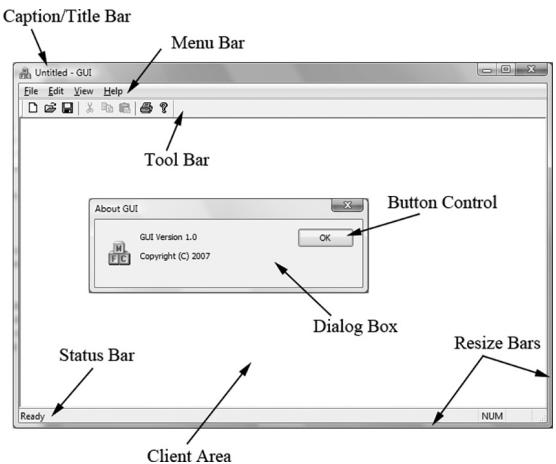
A.2. The A typical Windows application GUI. The client area is the entire large white rectangular space of the application. Typically, this area is where the user views most of the program output. When we program our Direct3D applications, we render our 3D scenes into the client area of a window.
A.1.4 Unicode
Essentially, Unicode (
const wchar t* wcstrPtr = L"Hello, World!";The L tells the compiler to treat the string literal as a string of wide-characters (i.e., as wchar_t instead of char). The other important issue is that we need to use the wide-character versions of the string functions. For example, to get the length of a string we need to use wcslen instead of strlen; to copy a string we need to use wcscpy instead of strcpy; to compare two strings we need to use wcscmp instead of strcmp. The wide-character versions of these functions work with wchar_t pointers instead of char pointers. The $\mathrm { C } { + + }$ standard library also provides a wide-character version of its string class: std::wstring. The Windows header file WinNT.h also defines:
typedef wchar_t WCHAR; // wc, 16-bit UNICODE characterA.2 BASIC WINDOWS APPLICATION
Below is the code to a fully functional, yet simple, Windows program. Follow the code as best you can, and read the explanatory comments. The next section will
explain the code a bit at a time. It is recommended that you create a project with your development tool, type the code in by hand, compile it and execute it as an exercise. Note that for Visual $\mathrm { C } { + + }$ , you must create a 鈥淲in32 application project,鈥?not a 鈥淲in32 console application project.鈥?
//
// Win32Basic.cpp by Frank Luna (C) 2008 All Rights Reserved.
//
// Illustrates the minimal amount of the Win32 code needed for
// Direct3D programming.
//
// Include the windows header file; this has all the Win32 API
// structures, types, and function declarations we need to program
// Windows.
#include <windows.h>
// The main window handle; this is used to identify a
// created window.
HWND ghMainWnd = 0;
// Wraps the code necessary to initialize a Windows
// application. Function returns true if initialization
// was successful, otherwise it returns false.
bool InitWindowsApp(HINSTANCE instanceHandle, int show);
// Wraps the message loop code.
int Run();
// The window procedure handles events our window receives.
LRESULT callback
WndProc(HWND hWnd, UINT msg, WPARAM wParam, LPARAM lParam);
// Windows equivalent to main()
int WINAPI
WinMain(HINSTANCE hInstance, HINSTANCE hPrevInstance, PSTR pCmdLine, int nShowCmd)
{ // First call our wrapper function (InitWindowsApp) to create
// and initialize the main application window, passing in the
// hInstance and nShowCmd values as arguments. if(!InitWindowsApp(hInstance, nShowCmd)) return 0;
// Once our application has been created and initialized we
// enter the message loop. We stay in the message loop until
// a WM_QUIT message is received, indicating the application
// should be terminated. return Run();
}
bool InitWindowsApp(HINSTANCE instanceHandle, int show)
// The first task to creating a window is to describe some of its // characteristics by filling out a WNDCLASS structure. WNDCLASS wc;
wc.style = CS_HREDRAW | CS_VREDRAW;
wc.lpfnWndProc = WndProc;
wc.cbClsExtra = 0;
wc.cbWndExtra = 0;
wc.hInstance = instanceof;
wc.hIcon = LoadIcon(0, IDI_APPLICATION);
wc.hCursor = LoadCursor(0, IDCArrow);
wc.hbrBackground = (HBRUSH)GetStockObject(WHITE_BRUSH);
wc.lpszClassName = 0;
wc.lpszClassName = L"BasicWndClass";// Next, we register this WNDCLASS instance with Windows so
// that we can create a window based on it.
if(!RegisterClass(&wc))
{
MessageBox(0, L"RegisterClass Failed", 0, 0);
return false;
}
// With our WNDCLASS instance registered, we can create a
// window with the CreateWindow function. This function
// returns a handle to the window it creates (an HWND).
// If the creation failed, the handle will have the value
// of zero. A window handle is a way to refer to the window,
// which is internally managed by Windows. Many of the Win32 API
// functions that operate on windows require an HWND so that
// they know what window to act on.ghMainWnd $=$ CreateWindow( L"BasicWndClass",//RegisteredWNDCLASS instance to use. L"Win32Basic",//window title WS_OVERLAPPEDWINDOW, // style flags CW_USEDEFAULT, // x-coordinate CWUSEDEFAULT, // y-coordinate CWUSEDEFAULT, // width CWUSEDEFAULT, // height 0, // parent window 0, // menu handle instanceof, // app instance 0); // extra creation parameters
if(ghMainWnd == 0)
{ MessageBox(0, L"CreateWindow Failed", 0, 0); return false; }
// Even though we just created a window, it is not initially // shown. Therefore, the final step is to show and update the
// window we just created, which can be done with the following // two function calls. Observe that we pass the handle to the // window we want to show and update so that these functions know // which window to show and update. ShowWindow(ghMainWnd, show); UpdateWindow(ghMainWnd); return true;
}
int Run() { MSG msg $=$ {0}; // Loop until we get a WM_QUIT message. The function // GetMessage will only return 0 (false) when a WM_QUIT message // is received, which effectively exits the loop. The function // returns -1 if there is an error. Also, note that GetMessage // puts the application thread to sleep until there is a // message. BOOL bRet $= 1$ while( $(\mathrm{bRet} =$ GetMessage(&msg,0,0,0)) $! = 0$ 锛?{ if(bRet $= = -1$ { MessageBox(0,L"GetMessage Failed",L"Error",MB_OK); break; } else { TranslateMessage(&msg); DispatchMessage(&msg); } } return (int)msg.wParam;
}
LRESULT callback WndProc(HWND hWnd, UINT msg, WPARAM wParam, LPARAM lParam) { // Handle some specific messages. Note that if we handle a // message, we should return 0. switch( msg ) { // In the case the left mouse button was pressed, // then display a message box. case WM_LBUTTONDOWN: MessageBox(0,L"Hello, World",L"Hello",MB_OK); return 0; // In the case the escape key was pressed, then // destroy the main application window. case WM_KEYDOWN: if(wParam $= =$ VK_ESCAPE)
DestroyWindow(ghMainWnd); return 0; // In the case of a destroy message, then send a // quit message, which will terminate the message loop. case WM Destroy: PostQuitMessage(0); return 0; } // Forward any other messages we did not handle above to the // default window procedure. Note that our window procedure // must return the return value of DefWindowProc. return DefWindowProc(hWnd, msg, wParam, lParam);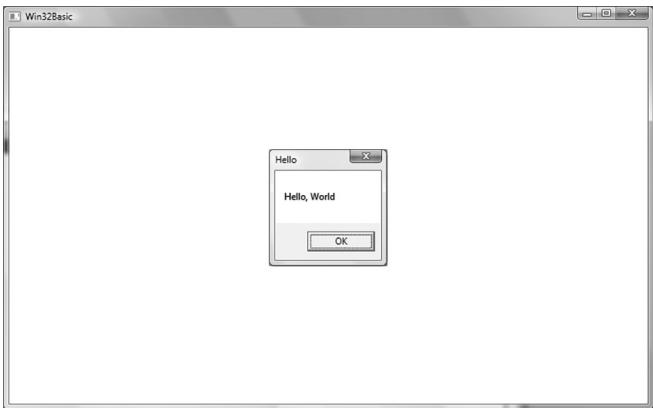
A.3. A screenshot of the above program. Note that the message box appears when you press the left mouse button in the window鈥檚 client area. Also try exiting the program by pressing the Escape key.
A.3 EXPLAINING THE BASIC WINDOWS APPLICATION
We will examine the code from top to bottom, stepping into any function that gets called along the way. Refer back to the code listing in the 鈥淏asic Windows Application鈥?section throughout the following subsections.
A.3.1 Includes, Global Variables, and Prototypes
The first thing we do is include the windows.h header file. By including the windows.h file we obtain the structures, types, and function declarations needed for using the basic elements of the Win32 API.
include <windows.h>The second statement is an instantiation of a global variable of type HWND. This stands for 鈥渉andle to a window鈥?or 鈥渨indow handle.鈥?In Windows programming, we often use handles to refer to objects maintained internally by Windows. In this sample, we will use an HWND to refer to our main application window maintained by Windows. We need to hold onto the handles of our windows because many calls to the API require that we pass in the handle of the window we want the API call to act on. For example, the call UpdateWindow takes one argument that is of type HWND that is used to specify the window to update. If we did not pass in a handle to it, the function would not know which window to update.
HWND ghMainWnd = 0;The next three lines are function declarations. Briefly, InitWindowsApp creates and initializes our main application window; Run encapsulates the message loop for our application; and WndProc is our main window鈥檚 window procedure. We will examine these functions in more detail when we come to the point where they are called.
bool InitWindowsApp(HINSTANCE instanceHandle, int show);
int Run();
LRESULT callback
WndProc(HWND hWnd, UINT msg, WPARAM wParam, LPARAM lParam);
A.3.2 WinMain
WinMain is the Windows equivalent to the main function in normal $\mathrm { C } { + + }$ programming. WinMain is prototyped as follows:
int WINAPI
WinMain(HINSTANCE hInstance, HINSTANCE hPrevInstance, PSTR pCmdLine, int nShowCmd)- hInstance: Handle to the current application instance. It serves as a way of identifying and referring to this application. Remember there may be several Windows applications running concurrently, so it is useful to be able to refer to each one.
- hPrevInstance: Not used in Win32 programming and is zero.
- pCmdLine: The command line argument string used to run the program.
- nCmdShow: Specifies how the application should be displayed. Some common commands that show the window in its current size and position, maximized, and minimized, respectively, are SW_SHOW, SW_SHOWMAXIMIZED, and SW_ SHOWMINIMIZED. See the MSDN library for a complete list of show commands.
If WinMain succeeds, it should return the wParam member of the WM_QUIT message. If the function exits without entering the message loop, it should return zero. The WINAPI identifier is defined as:
define WINAPI __cdeclThis specifies the calling convention of the function, which means how the function arguments get placed on the stack.
A.3.3 WNDCLASS and Registration
Inside WinMain we call the function InitWindowsApp. As you can guess, this function does all the initialization of our program. Let us take a closer look at this function and its implementation. InitWindowsApp returns either true or false: true if the initialization was a success and false otherwise. In the WinMain definition, we pass as arguments a copy of our application instance and the show command variable into InitWindowsApp. Both are obtained from the WinMain parameter list.
if(!InitWindowsApp(hInstance, nShowCmd))The first task at hand in initialization of a window is to describe some basic properties of the window by filling out a WNDCLASS (window class) structure. Its definition is:
typedef struct_WNDCLASS{ UINT style; WNDPROC lpfnWndProc; int cbClsExtra; int cbWndExtra; HANDLE hInstance; HICON hIcon; HCURSOR hCursor; HBRUSH hbrBackground; LPCTSTR lpszMenuName; LPCTSTR lpszClassName; } WNDCLASS;- style: Specifies the class style. In our example we use CS_HREDRAW combined with CS_VREDRAW. These two bit flags indicate that the window is to be repainted when either the horizontal or vertical window size is changed. For the complete list of the various styles with description, see the MSDN library.
wc.style = CS_HREDRAW | CS_VREDRAW;- lpfnWndProc: Pointer to the window procedure function to associate with this instance. Windows that are created based on this instance will use this window procedure. Thus, to create two windows with the same window procedure, you just create the two windows based on the same WNDCLASS instance. If you want to create two windows with different window procedures, you will need to fill out a different WNDCLASS instance
for each of the two windows. The window procedure function is explained in section A.3.6.
wc.lpfnWndProc $=$ WndProc;
- cbClsExtra and cbWndExtra: These are extra memory slots you can use for your own purpose. Our program does not require any extra space and therefore sets both of these to zero.
wc.cbClsExtra $\qquad = \quad 0$ ; wc.cbWndExtra $\qquad = \quad 0$ ;
- hInstance: This field is a handle to the application instance. Recall the application instance handle is originally passed in through WinMain.
wc.hInstance $=$ instanceHandle;
- hIcon: Here you specify a handle to an icon to use for the windows created using this window class. You can use your own designed icon, but there are several built-in icons to choose from; see the MSDN library for details. The following uses the default application icon:
wc.hIcon $=$ LoadIcon(0, IDI_APPLICATION);
- hCursor: Similar to hIcon, here you specify a handle to a cursor to use when the cursor is over the window鈥檚 client area. Again, there are several builtin cursors; see the MSDN library for details. The following code uses the standard 鈥渁rrow鈥?cursor.
wc.hCursor $=$ LoadCursor(0, IDC_ARROW);
- hbrBackground: This field is used to specify a handle to brush which specifies the background color for the client area of the window. In our sample code, we call the Win32 function GetStockObject, which returns a handle to a prebuilt white colored brush; see the MSDN library for other types of built in brushes.
wc.hbrBackground $=$ (HBRUSH)GetStockObject(WHITE_BRUSH);
- lpszMenuName: Specifies the window鈥檚 menu. Since we have no menu in our application so, we set this to zero.
wc.lpszMenuName $\qquad = \quad 0$ ;
- lpszClassName: Specifies the name of the window class structure we are creating. This can be anything you want. In our application, we named it
鈥淏asicWndClass鈥? The name is simply used to identify the class structure so that we can reference it later by its name.
wc.lpszClassName $=$ L"BasicWndClass";
Once we have filled out a WNDCLASS instance, we need to register it with Windows so that we can create windows based on it. This is done with the RegisterClass function which takes a pointer to a WNDCLASS structure. This function returns zero upon failure.
if(!RegisterClass(&wc))
{
    MessageBox(0, L"RegisterClass Failed", 0, 0);
    return false;
}
A.3.4 Creating and Displaying the Window
After we have registered a WNDCLASS variable with Windows, we can create a window based on that class description. We can refer to a registered WNDCLASS instance via the class name we gave it (lpszClassName). The function we use to create a window is the CreateWindow function, which is declared as follows:
HWND CreateWindow(
    LPCTSTR lpClassName,
    LPCTSTR lpWindowName,
    DWORD dwStyle,
    int x,
    int y,
    int nWidth,
    int nHeight,
    HWND hWndParent,
    HMENU hMenu,
    HANDLE hInstance,
    LPVOID lpParam
);
lpClassName: The name of the registered WNDCLASS structure that describes some of the properties of the window we want to create.
lpWindowName: The name we want to give our window; this is also the name that appears in the window鈥檚 caption bar.
dwStyle: Defines the style of the window. WS_OVERLAPPEDWINDOW is a combination of several flags: WS_OVERLAPPED, WS_CAPTION, WS_SYSMENU, WS_ THICKFRAME, WS_MINIMIZEBOX, and WS_MAXIMIZEBOX. The names of these flags describe the characteristics of the window they produce. See the MSDN library for the complete list of styles.
x: The $x$ position at the top left corner of the window relative to the screen. You can specify CW_USEDEFAULT for this parameter, and Windows will choose an appropriate default.
y: The y position at the top left corner of the window relative to the screen. You can specify CW_USEDEFAULT for this parameter, and Windows will choose an appropriate default.
nWidth: The width of the window in pixels. You can specify CW_USEDEFAULT for this parameter, and Windows will choose an appropriate default.
nHeight: The height of the window in pixels. You can specify CW_USEDEFAULT for this parameter, and Windows will choose an appropriate default.
hWndParent: Handle to a window that is to be the parent of this window. Our window has no relationship with any other windows, and therefore we set this value to zero.
hMenu: A handle to a menu. Our program does not use a menu, so we specify 0 for this field.
hInstance: Handle to the application the window will be associated with.
lpParam: A pointer to user-defined data that you want to be available to a WM_CREATE message handler. The WM_CREATE message is sent to a window when it is being created, but before CreateWindow returns. A window handles the WM_CREATE message if it wants to do something when it is created (e.g., initialization).

When we specify the $( x , y )$ coordinates of the window鈥檚 position, they are relative to the upper-left corner of the screen. Also, the positive x-axis runs to the right as usual but the positive y-axis runs downward. Figure (A.4) shows this coordinate system, which is called screen coordinates, or screen space.
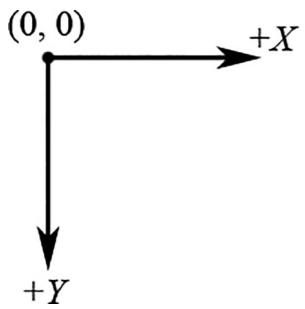
A.4. Screen space.
CreateWindow returns a handle to the window it creates (an HWND). If the creation failed, the handle will have the value of zero (null handle). Remember that the handle is a way to refer to the window, which is managed by Windows. Many of the API calls require a HWND so that it knows what window to act on.
ghMainWnd $=$ CreateWindow(L"BasicWndClass",L"Win32Basic", WS_OVERLAPPEDWINDOW, CW_USEDEFAULT, CW_USEDEFAULT, CW_USEDEFAULT, CW_USEDEFAULT, 0,0,instanceHandle锛?); if(ghMainWnd $\equiv = 0$ 锛?{ MessageBox(0,L"CreateWindowFAILED",0,0); return false; }
The last two function calls in the InitWindowsApp function have to do with displaying the window. First we call ShowWindow and pass in the handle of our newly created window so that Windows knows which window to show. We also pass in an integer value that defines how the window is to be initially shown (e.g., minimized, maximized, etc.). This value should be nShowCmd, which is a parameter of WinMain. After showing the window, we should refresh it. UpdateWindow does this; it takes one argument that is a handle to the window we wish to update.
ShowWindow(ghMainWnd, show); UpdateWindow(ghMainWnd);If we made it this far in InitWindowsApp, then the initialization is complete; we return true to indicate everything went successfully.
A.3.5 The Message Loop
Having successfully completed initialization we can begin the heart of the program鈥攖he message loop. In our Basic Windows Application, we have wrapped the message loop in a function called Run.
int Run()
{
    MSG msg = {0};
    BOOL bRet = 1;
    while ( (bRet = GetMessage(&msg, 0, 0, 0)) != 0 )
        {
            if (bRet == -1)
            {
                MessageBox(0, L"GetMessage Failed", L"Error", MB_OK);
            break;
        }
    else
        break;
}{ TranslateMessage(&msg); DispatchMessage(&msg); } return (int) msg.wParam;The first thing done in Run is an instantiation of a variable called msg of type MSG, which is the structure that represents a Windows message. Its definition is as follows:
typedef struct tagMSG{ HWND hwnd; UINT message; WPARAM wParam; LPARAM lParam; DWORD time; POINT pt; } MSG;- hwnd: The handle to the window whose window procedure is to receive the message.
- message: A predefined constant value identifying the message (e.g., WM_QUIT).
- wParam: Extra information about the message. This is dependent upon the specific message.
- lParam: Extra information about the message. This is dependent upon the specific message.
- time: The time the message was posted.
- pt: The $( x , y )$ coordinates of the mouse cursor, in screen coordinates, when the message was posted.
Next, we enter the message loop. The GetMessage function retrieves a message from the message queue, and fills out the msg argument with the details of the message. The second, third, and fourth parameters of GetMessage may be set to zero, for our purposes. If an error occurs in GetMessage, then GetMessage returns -1. If a WM_QUIT message is received, then GetMessage returns 0, thereby terminating the message loop. If GetMessage returns any other value, then two more functions get called: TranslateMessage and DispatchMessage. TranslateMessage has Windows perform some keyboard translations; specifically, virtual key to character messages. DispatchMessage finally dispatches the message off to the appropriate window procedure.
If the application successfully exits via a WM_QUIT message, then the WinMain function should return the wParam of the WM_QUIT message (exit code).
A.3.6 The Window Procedure
We mentioned previously that the window procedure is where we write the code that we want to execute in response to a message our window receives. In the Basic Windows Application program, we name the window procedure WndProc and it is prototyped as:
LRESULT CALLBACK
WndProc(HWND hWnd, UINT msg, WPARAM wParam, LPARAM lParam);
This function returns a value of type LRESULT (defined as an integer), which indicates the success or failure of the function. The CALLBACK identifier specifies that the function is a callback function, which means that Windows will be calling this function outside of the code space of the program. As you can see from the Basic Windows Application source code, we never explicitly call the window procedure ourselves鈥擶indows calls it for us when the window needs to process a message.
The window procedure has four parameters in its signature:
- hWnd: The handle to the window receiving the message.
- msg: A predefined value that identifies the particular message. For example, a quit message is defined as WM_QUIT. The prefix WM stands for 鈥淲indow Message.鈥?There are over a hundred predefined window messages; see the MSDN library for details.
- wParam: Extra information about the message which is dependent upon the specific message.
- lParam: Extra information about the message which is dependent upon the specific message.
Our window procedure handles three messages: WM_LBUTTONDOWN, WM_KEYDOWN, and WM_DESTROY messages. A WM_LBUTTONDOWN message is sent when the user clicks the left mouse button on the window鈥檚 client area. A WM_KEYDOWN message is sent to a window in focus when a key is pressed. A WM_DESTROY message is sent when a window is being destroyed.
Our code is quite simple; when we receive a WM_LBUTTONDOWN message we display a message box that prints out 鈥淗ello, World鈥?
case WM_LBUTTONDOWN:
    MessageBox(0, L"Hello, World", L"Hello", MB_OK);
    return 0;
When our window gets a WM_KEYDOWN message, we test if the Escape key was pressed, and if it was, we destroy the main application window using the DestroyWindow function. The wParam passed into the window procedure specifies the virtual key code of the specific key that was pressed. Think of virtual key codes as an identifier for a particular key. The Windows header files have a list of virtual key code constants we can use to then test for a particular key; for example to test if the escape key was pressed, we use the virtual key code constant VK_ESCAPE.
case WM_KEYDOWN: if( wParam == VK_ESCAPE ) DestroyWindow(ghMainWnd); return 0;Remember, the wParam and lParam parameters are used to specify extra information about a particular message. For the WM_KEYDOWN message, the wParam specifies the virtual key code of the specific key that was pressed. The MSDN library will specify the information the wParam and lParam parameters carry for each Windows message.
When our window gets destroyed, we post a WM_QUIT message with the PostQuitMessage function (which terminates the message loop):
case WMDESTROY: PostQuitMessage(0); return 0;At the end of our window procedure, we call another function named DefWindowProc. This function is the default window procedure. In our Basic Windows Application program, we only handle three messages; we use the default behavior specified in DefWindowProc for all the other messages we receive but do not necessarily need to handle ourselves. For example, the Basic Windows Application program can be minimized, maximized, resized, and closed. This functionality is provided to us through the default window procedure, as we did not handle the messages to perform this functionality.
A.3.7 The MessageBox Function
There is one last API function we have not yet covered, and that is the MessageBox function. This function is a very handy way to provide the user with information and to get some quick input. The declaration to the MessageBox function looks like this:
int MessageBox( HWND hWnd, // Handle of owner window, may specify null. LPCTSTR lpText, // Text to put in the message box. LPCTSTR lpCaption, // Text to put for the title of the message box. UINT uType // Style of the message box. );The return value for the MessageBox function depends on the type of message box. See the MSDN library for a list of possible return values and styles; one possible style is a Yes/No message box; see Figure A.5.
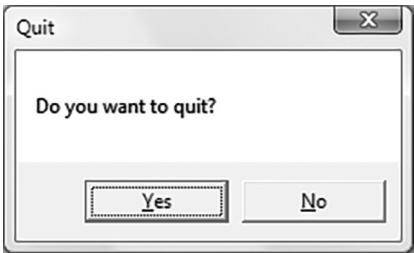
A.5. Yes/No message box.
A.4 A BETTER MESSAGE LOOP
Games are very different application than traditional Windows applications such as office type applications and web browsers. Typically, games do not sit around waiting for a message, but are constantly being updated. This presents a problem, because if there are no messages in the message queue, the function GetMessage puts the thread to sleep and waits for a message. For a game, we do not want this behavior; if there are no Windows messages to be processed, then we want to run our own game code. The fix is to use the PeekMessage function instead of GetMessage. The PeekFunction message returns immediately if there are no messages. Our new message loop is as follows:
int Run()
{
    MSG msg = {0};
    while(msg.message != WM_QUIT)
    {
        // If there are Window messages then process them.
        if( PeekMessage( &msg, 0, 0, 0, PM_REMOVE ))
        {
            TranslateMessage( &msg );
            DispatchMessage( &msg );
        }
        // Otherwise, do animation/game stuff.
        else
        {
            }
        }
    return (int)msg.wParam;
}
After we instantiate msg, we enter into an endless loop. We first call the API function PeekMessage, which checks the message queue for a message. See MSDN for the parameter descriptions. If there is a message it returns true and we handle the message. If there are no messages, PeekMessage returns false and we execute our own specific game code.
A.5 SUMMARY
- To use Direct3D we must create a Windows application that has a main window onto which we can render our 3D scenes. Furthermore, for games we create a special message loop that checks for messages. If there are messages, it processes them; otherwise, it executes our game logic.
- Several Windows applications can be running concurrently, and therefore Windows must manage resource between them and direct messages to the applications for which they were intended. Messages are sent to an application鈥檚 message queue when an event (key press, mouse click, timer, etc.) has occurred for that application.
- Every Windows application has a message queue in which messages an application receives are stored. The application鈥檚 message loop constantly checks the queue for messages and dispatches them off to their intended window procedure. Note that a single application can have several windows within it.
- The window procedure is a special callback function we implement that Windows calls when a window in our application receives a message. In the window procedure, we write the code we want to be executed when a window in our application receives a particular message. Messages we do not specifically handle are forwarded to a default window procedure for default handling.
A.6 EXERCISES
- Modify the program in $\ S \mathrm { A } . 2$ to use a different icon, cursor, and background color. (Hint: Look up the LoadIcon, LoadCursor, and GetStockObject functions in MSDN.)
- Modify the program in $\ S \mathrm { A } . 2$ by handling the WM_CLOSE message. This message is sent to a window or application indicating that the window or application
should close. Use the message box function to ask the user if they really want to exit by displaying a Yes/No styled message box. If the user chooses 鈥淵es,鈥?then destroy the window; otherwise do not destroy the window. You could also use this technique to ask the user if they want to save their work before closing.
- Modify the program in $\ S \mathrm { A } . 2$ by handling the WM_CREATE message. This message is sent to a window when it is being created, but before CreateWindow returns. Output a message, via the message box function, indicating that the window has been created.
- Look up the Sleep function in MSDN and summarize, in your own words, what the function does.
- Look up the messages WM_SIZE and WM_ACTIVATE in MSDN and summarize, in your own words, when the messages are sent.
Hi gh Level Sha der La ngua ge Ref erence
B.1 VARIABLE TYPES
B.1.1 Scalar Types
- bool: True or false value. Note that the HLSL provides the true and false keywords like in $\mathrm { C } { + + }$ .
- int: 32-bit signed integer.
- half: 16-bit floating point number.
- float: 32-bit floating point number.
- double: 64-bit floating point number.
Note:
Some platforms might not support int, half, and double. If this is the case these types will be emulated using float.
B.1.2 Vector Types
- float2: 2D vector, where the components are of type float.
- float3: 3D vector, where the components are of type float.
- float4: 4D vector, where the components are of type float.

You can create vectors where the components are of a type other than float. For example: int2, half3, bool4.
We can initialize a vector using an array like syntax or constructor like syntax:
float3 v = {1.0f, 2.0f, 3.0f};
float2 w = float2(x, y);
float4 u = float4(w, 3.0f, 4.0f); // u = (w.x, w.y, 3.0f, 4.0f)
We can access a component of a vector using an array subscript syntax. For example, to set the ith component of a vector vec we would write:
$\operatorname{vec}[i] = 2.0f;$
In addition, we can access the components of a vector vec, as we would access the members of a structure, using the defined component names x, y, z, w, r, g, b, and a.
$\begin{array}{rl} & \mathrm{vec.x = vec.r = 1.0f;}\\ & \mathrm{vec.y = vec.g = 2.0f;}\\ & \mathrm{vec.z = vec.b = 3.0f;}\\ & \mathrm{vec.w = vec.a = 4.0f;} \end{array}$
The names r, g, b, and a refer to the exact same component as the names x, y, z, and $\mathtt { w }$ , respectively. When using vectors to represent colors, the RGBA notation is more desirable since it reinforces the fact that the vector is representing a color.
B.1.2.1 Swizzles
Consider the vector $\mathbf { u } = ( u _ { x } , u _ { y } , u _ { z } , u _ { w } )$ and suppose we want to copy the components of u to a vector v such that $\mathbf { v } = ( u _ { \boldsymbol { w } } , u _ { \boldsymbol { y } } , u _ { \boldsymbol { y } } , u _ { \boldsymbol { x } } )$ . The most immediate solution would be to individually copy each component of $\mathbf { u }$ over to v as necessary. However, the HLSL provides a special syntax for doing these kinds of out of order copies called swizzles:
float4 u = {1.0f, 2.0f, 3.0f, 4.0f};
float4 v = {0.0f, 0.0f, 5.0f, 6.0f};
v = u.wyyx; // v = {4.0f, 2.0f, 2.0f, 1.0f}
Another example:
float4 u = {1.0f, 2.0f, 3.0f, 4.0f};
float4 v = {0.0f, 0.0f, 5.0f, 6.0f};
v = u.wzyx; // v = {4.0f, 3.0f, 2.0f, 1.0f}
When copying vectors, we do not have to copy every component over. For example, we can only copy the x- and y-components over as this code snippet illustrates:
float4 u = {1.0f, 2.0f, 3.0f, 4.0f};float4 v = {0.0f, 0.0f, 5.0f, 6.0f};
v.xy = u; // v = {1.0f, 2.0f, 5.0f, 6.0f}B.1.3 Matrix Types
We can define an $m \times n$ matrix, where m and n are between 1 and 4, using the following syntax:
floatmxn matmxn;
鈽?Examples:
- float2x2: $2 \times 2$ matrix, where the entries are of type float.
- float3x3: $3 \times 3$ matrix, where the entries are of type float.
- float $4 \times 4$ : $4 \times 4$ matrix, where the entries are of type float.
- float3x4: $3 \times 4$ matrix, where the entries are of type float.

You can create matrices where the components are of a type other than float. For example: int2x2, half3x3, bool4x4.
We can access an entry in a matrix using a double array subscript syntax. For example, to set the ijth entry of a matrix M we would write:
M[i][j] = value;In addition, we can refer to the entries of a matrix M as we would access the members of a structure. The following entry names are defined:
One-Based Indexing:
M._11 = M._12 = M._13 = M._14 = 0.0f;
M._21 = M._22 = M._23 = M._24 = 0.0f;
M._31 = M._32 = M._33 = M._34 = 0.0f;
M._41 = M._42 = M._43 = M._44 = 0.0f;
Zero-Based Indexing:
M._m00 = M._m01 = M._m02 = M._m03 = 0.0f;
M._m10 = M._m11 = M._m12 = M._m13 = 0.0f;
M._m20 = M._m21 = M._m22 = M._m23 = 0.0f;
M._m30 = M._m31 = M._m32 = M._m33 = 0.0f;
Sometimes we want to refer to a particular row vector in a matrix. We can do so using a single array subscript syntax. For example, to extract the ith row vector in a $3 \times 3$ matrix M, we would write:
float3ithRow $=$ M[i]锛?/get theith row vector in M
In this next example, we insert three vectors into the first, second and third row of a matrix:
float3 N = normalize(pIn.normalW);
float3 T = normalize(pIn.tangentW - dot(pIn.tangentW, N) * N);
float3 B = cross(N, T);
float3x3 TBN;
TBN[0] = T; // sets row 1
TBN[1] = B; // sets row 2
TBN[2] = N; // sets row 3
We can also construct a matrix from vectors:
float3 N = normalize(pIn.normalW);
float3 T = normalize(pIn.tangentW - dot(pIn.tangentW, N) * N);
float3 B = cross(N, T);
float3x3 TBN = float3x3(T, B, N);
Instead of using float4 and float4x4 to represent 4D vectors and $4 \times 4$ matrices, you can equivalently use the vector and matrix type:
vector u = {1.0f, 2.0f, 3.0f, 4.0f};
matrix M; // 4x4 matrix
B.1.4 Arrays
We can declare an array of a particular type using familiar $\mathrm { C } { + + }$ syntax, for example:
float M[4][4];
half p[4];
float3 v[12]; // 12 3D vectors
B.1.5 Structures
Structures are defined exactly as they are in $\mathrm { C } { + + }$ . However, structures in the HLSL cannot have member functions. Here is an example of a structure in the HLSL:
struct SurfaceInfo {
    float3 pos;
    float3 normal;
    float4 diffuse;
    float4 spec;
};
B.1.6 The typedef Keyword
The HLSL typedef keyword functions exactly the same as it does in $\mathrm { C } { + } { + }$ . For example, we can give the name point to the type vector<float, $\Im >$ using the following syntax:
typedef float3 point;
Then instead of writing:
float3 myPoint;
We can just write:
point myPoint;
Here is another example showing how to use the typedef keyword with the HLSL const keyword (which works as in $\mathrm { C } { + + }$ ):
typedef const float CFLOAT;
B.1.7 Variable Prefixes
The following keywords can prefix a variable declaration.
- static: Essentially the opposite of extern; this means that the shader variable will not be exposed to the $\mathrm { C } { + + }$ application.
static float3 v = {1.0f, 2.0f, 3.0f};
- uniform: This means that the variable does not change per vertex/pixel鈥攊t is constant for all vertices/pixels until we change it at the $\mathrm { C } { + + }$ application level. Uniform variables are initialized from outside the shader program (e.g., by the $\mathrm { C } { + + }$ application).
- extern: This means that the $\mathrm { C } { + + }$ application can see the variable (i.e., the variable can be accessed outside the shader file by the $\mathrm { C } { + + }$ application code. Global variables in a shader program are, by default, uniform and extern.
- const: The const keyword in the HLSL has the same meaning it has in $\mathrm { C } { + + }$ That is, if a variable is prefixed with the const keyword then that variable is constant and cannot be changed.
const float pi $= \ 3 . 1 4 \mathrm { f }$ ;
B.1.8 Casting
The HLSL supports a very flexible casting scheme. The casting syntax in the HLSL is the same as in the C programming language. For example, to cast a float to a matrix we write:
float $\mathrm { ~ \underline { ~ } { ~ f ~ } ~ } = \mathrm { ~ \underline { ~ } { ~ 5 ~ } ~ } . 0 \mathrm { ~ f ~ }$ ; float4x4 m = (float4x4)f; // copy f into each entry of m.
What this scalar-matrix cast does is copy the scalar into each entry of the matrix. Consider the following example:
float3 n = float3(...);
float3 v = 2.0f\*n - 1.0f;
The $2 . 0 \mathrm { f } ^ { \star } \mathrm { n }$ is just scalar-vector multiplication, which is well defined. However, to make this a vector equation, the scalar 1.0f is augmented to the vector (1.0f, 1.0f, 1.0f). So the above statement is like:
float3 v = 2.0f\*n - float3(1.0f, 1.0f, 1.0f);For the examples in this book, you will be able to deduce the meaning of the cast from the syntax. For a complete list of casting rules, search the SDK documentation index for 鈥淐asting and Conversion鈥?.
B.2 KEYWORDS AND OPERATORS
B.2.1 Keywords
For reference, here is a list of the keywords the HLSL defines:
asrm, bool, compile, const, decl, do, double, else, extern, false, float, for, half, if, in, inline, inout, int, matrix, out, pass, pixelshader, return, sampler, shared, static, string, struct, technique, texture, true, typedef, uniform, vector, vertexshader, void, volatile, whileThis next set of keywords displays identifiers that are reserved and unused, but may become keywords in the future:
auto, break, case, catch, char, class, const_cast, continue, default, delete, dynamic_cast, enum, explicit, friend, goto, long, mutable, namespace, new, operator, private, protected, public, register, reinterpret_cast, short, signed, sizeof, static_cast, switch, template, this, throw, try, typename, union, unsigned, using, virtualB.2.2 Operators
HLSL supports many familiar $\mathrm { C } { + } { + }$ operators. With a few exceptions noted below, they are used exactly the same way as they are in $\mathrm { C } { + + }$ . The following table, lists the HLSL operators:
<table><tr><td>[ ]</td><td>.</td><td>></td><td><</td><td><=</td><td>>=</td></tr><tr><td>!=</td><td>==</td><td>!</td><td>&&</td><td>||</td><td>? :</td></tr><tr><td>+</td><td>+=</td><td>-</td><td>--=</td><td></td><td>=</td></tr><tr><td>/</td><td>/=</td><td>%</td><td>%=</td><td>++</td><td>--</td></tr><tr><td>=</td><td>()</td><td>,</td><td></td><td></td><td></td></tr></table>
Although the operators鈥?behavior is very similar to $\mathrm { C } { + + }$ , there are some differences. First of all, the modulus $\%$ operator works on both integer and floating-point types. And in order to use the modulus operator, both the left hand side value and right hand side value must have the same sign (e.g., both sides must be positive or both sides must be negative).
Secondly, observe that many of the HLSL operations work on a per component basis. This is due to the fact that vectors and matrices are built into the language and these types consist of several components. By having the operations work on a component level, operations such as vector/matrix addition, vector/matrix subtraction, and vector/matrix equality tests can be done using the same operators we use for scalar types. See the following examples.
Note:
The operators behave as expected for scalars, that is, in the usual $C + +$ way.
float4 u = {1.0f, 0.0f, -3.0f, 1.0f};
float4 v = {-4.0f, 2.0f, 1.0f, 0.0f};
// adds corresponding components
float4 sum = u + v; // sum = (-3.0f, 2.0f, -2.0f, 1.0f)
Incrementing a vector increments each component:
// before increment: sum = (-3.0f, 2.0f, -2.0f, 1.0f)
sum++; // after increment: sum = (-2.0f, 3.0f, -1.0f, 2.0f)
Multiplying vectors component wise:
float4 u = {1.0f, 0.0f, -3.0f, 1.0f};
float4 v = {-4.0f, 2.0f, 1.0f, 0.0f};
// multiply corresponding components
float4 product = u * v; // product = (-4.0f, 0.0f, -3.0f, 0.0f)
Note:
If you have two matrices:
float4x4 A; float4x4 B;
The syntax $\tt { A } ^ { \star } \tt { B }$ does componentwise multiplication, not matrix multiplication. You need to use the mul function for matrix multiplication.
Comparison operators are also done per component and return a vector or matrix where each component is of type bool. The resulting 鈥渂ool鈥?vector contains the results of each compared component. For example:
float4 u = { 1.0f, 0.0f, -3.0f, 1.0f};
float4 v = {-4.0f, 0.0f, 1.0f, 1.0f};
float4 b = (u == v); // b = (false, true, false, true)
Finally, we conclude by discussing variable promotions with binary operations:
- For binary operations, if the left hand side and right hand side differ in dimension, then the side with the smaller dimension is promoted (cast) to have the same dimension as the side with the larger dimension. For example, if $_ \textrm { x }$ is of type float and y is of type float3, in the expression $( { \textbf { x } } + { \textbf { \textit { y } } } )$ , the variable $_ \textrm { x }$ is promoted to float3 and the expression evaluates to a value of type float3. The promotion is done using the defined cast, in this case we are casting Scalar-to-Vector, therefore, after $_ \textrm { x }$ is promoted to float3, $\begin{array} { r } { { { \mathchoice { \mathrm { ~ \displaystyle ~ x ~ } } { \mathrm { ~ \textstyle ~ x ~ } } { \mathrm { ~ \scriptstyle ~ x ~ } } { \mathrm { ~ \scriptscriptstyle ~ x ~ } } } } = \quad ( { { \mathchoice { \mathrm { ~ \displaystyle ~ x ~ } } { \mathrm { ~ \textstyle ~ x ~ } } { \mathrm { ~ \scriptstyle ~ x ~ } } { \mathrm { ~ \scriptscriptstyle ~ x ~ } } } } , { { \mathchoice { \mathrm { ~ \displaystyle ~ x ~ } } { \mathrm { ~ \textstyle ~ x ~ } } { \mathrm { ~ \scriptstyle ~ x ~ } } { \mathrm { ~ \scriptscriptstyle ~ x ~ } } } } , } \end{array}$ x) as the Scalar-to-Vector cast defines. Note that the promotion is not defined if the cast is not defined. For example, we can鈥檛 promote float2 to float3 because there exists no such defined cast.
- For binary operations, if the left hand side and right hand side differ in type. Then the side with the lower type resolution is promoted (cast) to have the same type as the side with the higher type resolution. For example, if $_ \textrm { x }$ is of type int and y is of type half, in the expression $( { \textbf { x } } + { \textbf { \textit { y } } } )$ , the variable $_ \textrm { x }$ is promoted to a half and the expression evaluates to a value of type half.
B.3 PROGRAM FLOW
The HLSL supports many familiar $\mathrm { C } { + } { + }$ statements for selection, repetition, and general program flow. The syntax of these statements is exactly like $\mathrm { C } { + + }$ .
The Return Statement:
return (expression);
The If and If鈥lse Statements:
if(condition)
{ statement(s);
}
if(condition)
{ statement(s);
} else
{ statement(s);
The for statement:
for(initial; condition; increment)
{ statement(s); }
The while statement:
while(condition) { statement(s); }The do鈥hile statement:
do
{statement(s);}while(condition);
B.4 FUNCTIONS
B.4.1 User Defined Functions
Functions in the HLSL have the following properties:
- Functions use a familiar $\mathrm { C } { + + }$ syntax.
- Parameters are always passed by value.
- Recursion is not supported.
- Functions are always inlined.
Furthermore, the HLSL adds some extra keywords that can be used with functions. For example, consider the following function written in the HLSL:
bool foo(in const bool b, // input bool
out int r1, // output int
inout float r2) // input/output float
{
if (b) // test input value
{
r1 = 5; // output a value through r1
}
else
{
r1 = 1; // output a value through r1
}
// since r2 is inout we can use it as an input
// value and also output a value through it
r2 = r2 * r2 * r2;
return true;
}
The function is almost identical to a $\mathrm { C } { + } { + }$ function except for the in, out, and inout keywords.
- in: Specifies that the argument (particular variable we pass into a parameter) should be copied to the parameter before the function begins. It is not necessary to explicitly specify a parameter as in because a parameter is in by default. For example, the following are equivalent:
float square(in float x)
{
    return x * x;
}
And without explicitly specifying in:
float square(float x)
{
    return x * x;
}- out: Specifies that the parameter should be copied to the argument when the function returns. This is useful for returning values through parameters. The out keyword is necessary because the HLSL doesn鈥檛 allow us to pass by reference or to pass a pointer. We note that if a parameter is marked as out the argument is not copied to the parameter before the function begins. In other words, an out parameter can only be used to output data鈥攊t can鈥檛 be used for input.
void square(in float x, out float y)
{
    y = x * x;
}
Here we input the number to be squared through $_ \textrm { x }$ and return the square of $_ \textrm { x }$ through the parameter y.
- inout: Shortcut that denotes a parameter as both in and out. Specify inout if you wish to use a parameter for both input and output.
void square (inout float x)
{
    x = x * x;
}
Here we input the number to be squared through $_ \textrm { x }$ and also return the square of $_ \textrm { x }$ through $_ \textrm { x }$ .
B.4.2 Built-in Functions
The HLSL has a rich set of built in functions that are useful for 3D graphics. The following table describes an abridged list of them.
<table><tr><td>S. No.</td><td>Function</td><td>Description</td></tr><tr><td>1.</td><td>abs(x)</td><td>Returns |x|.</td></tr><tr><td>2.</td><td>ceil(x)</td><td>Returns the smallest integer 鈮?x.</td></tr><tr><td>3.</td><td>cos(x)</td><td>Returns the cosine of x, where x is in radians.</td></tr><tr><td>4.</td><td>clamp(x, a, b)</td><td>Clamps x to the range [a, b] and returns the result.</td></tr><tr><td>5.</td><td>clip(x)</td><td>This function can only be called in a pixel shader, and it discards the current pixel from further processing if x < 0.</td></tr><tr><td>6.</td><td>cross(u, v)</td><td>Returns u 脳 v.</td></tr><tr><td>7.</td><td>ddx(p)</td><td>Estimates screen space partial derivative 鈭俻/鈭倄. This allows you can determine how per pixel quantities p vary from pixel to pixel in the screen space x-direction.</td></tr><tr><td>8.</td><td>ddy(p)</td><td>Estimates screen space partial derivative 鈭俻/鈭倅. This allows you can determine how per pixel quantities p vary from pixel to pixel in the screen space y-direction.</td></tr><tr><td>9.</td><td>degrees(x)</td><td>Converts x from radians to degrees.</td></tr><tr><td>10.</td><td>determinant(M)</td><td>Returns the determinant of a matrix.</td></tr><tr><td>11.</td><td>distance(u, v)</td><td>Returns the distance ||v - u|| between the points u and v.</td></tr><tr><td>12.</td><td>dot(u, v)</td><td>Returns u 路 v.</td></tr><tr><td>13.</td><td>floor(x)</td><td>Returns the greatest integer 鈮?x.</td></tr><tr><td>14.</td><td>frac(x)</td><td>This function returns the fractional part of a floating-point number (i.e., the mantissa). For example, if x = (235.52, 696.32) and frac(x) = (0.52, 0.32).</td></tr><tr><td>15.</td><td>length(v)</td><td>Returns ||v|.</td></tr><tr><td>16.</td><td>lerp(u, v, t)</td><td>Linearly interpolates between u and v based on the parameter t 鈭?[0, 1].</td></tr><tr><td>17.</td><td>log(x)</td><td>Returns ln(x).</td></tr><tr><td>18.</td><td>log10(x)</td><td>Returns log10(x).</td></tr><tr><td>19.</td><td>log2(x)</td><td>Returns log2(x).</td></tr><tr><td>20.</td><td>max(x, y)</td><td>Returns x if x 鈮?y, else returns y.</td></tr><tr><td>21.</td><td>min(x, y)</td><td>Returns x if x 鈮?y, else returns y.</td></tr><tr><td>22.</td><td>mul(M, N)</td><td>Returns the matrix product MN. Note that the matrix product MN must be defined. If M is a vector, it is treated as a row vector so that the vector-matrix product is defined. Likewise, if N is a vector, it is treated as a column vector so that the matrix-vector product is defined.</td></tr><tr><td>23.</td><td>normalize(v)</td><td>Returns v/||v|.</td></tr><tr><td>24.</td><td>pow(b, n)</td><td>Returns b".</td></tr><tr><td>25.</td><td>radians(x)</td><td>Converts x from degrees to radians.</td></tr><tr><td>26.</td><td>saturate(x)</td><td>Returns clamp(x, 0.0, 1.0).</td></tr><tr><td>27.</td><td>sin(x)</td><td>Returns the sine of x, where x is in radians.</td></tr><tr><td>28.</td><td>sincos(in x, out s, out c)</td><td>Returns the sine and cosine of x, where x is in radians.</td></tr><tr><td>29.</td><td>sqrt(x)</td><td>Returns sqrt(x).</td></tr><tr><td>30.</td><td>reflect(v, n)</td><td>Computes the reflection vector given the incident vector v and the surface normal n.</td></tr><tr><td>31.</td><td>refract(v, n, eta)</td><td>Computes the refraction vector given the incident vector v, the surface normal n, and the ratio of the two indices of refraction of the two materials eta.</td></tr><tr><td>32.</td><td>rsqrt(x)</td><td>Returns sqrt(x).</td></tr><tr><td>33.</td><td>tan(x)</td><td>Returns the tangent of x, where x is in radians.</td></tr><tr><td>34.</td><td>transpose(M)</td><td>Returns the transpose MT.</td></tr><tr><td>35.</td><td>Texture2D::Sample(S, texC)</td><td>Returns a color from a 2D texture map based on the SamplerState object s, and 2D texture coordinates texC.</td></tr><tr><td>36.</td><td>Texture2D::SampleLevel(S, texC, mipLevel)</td><td>Returns a color from a 2D texture map based on the SamplerState object s, 2D texture coordinates texC, and mipmap level mipLevel. This function differs from Texture2D::Sample in that the third parameter manually specifies the mipmap level to use. For example, we would specify 0 to access the topmost mipmap LOD.</td></tr><tr><td>37.</td><td>TextureCube::Sample(S, v)</td><td>Returns a color from a cube map based on the SamplerState object s, and 3D lookup vector v.</td></tr><tr><td>38.</td><td>Texture2DArray::Sample(S, texC)</td><td>Returns a color from a 2D texture array based on the SamplerState object s (recall a sampler state specifies texture filters and texture address modes), and 3D texture coordinates texC, where the first two coordinates are the usual 2D texture coordinates, and the third coordinate specifies the array index.</td></tr></table>

Most of the functions are overloaded to work with all the built-in types that the function makes sense for. For instance, abs makes sense for all scalar types and so is overloaded for all of them. As another example, the cross product cross only makes sense for 3D vectors so it is only overloaded for 3D vectors of any type (e.g., 3D vectors of ints, floats, doubles etc.). On the other hand, linear interpolation, lerp, makes sense for scalars, 2D, 3D, and 4D vectors and therefore is overloaded for all types.

If you pass in a non-scalar type into a 鈥渟calar鈥?function, that is a function that traditionally operates on scalars (e.g., cos(x)), the function will act per component. For example, if you write:
float3 v = float3(0.0f, 0.0f, 0.0f);
v = cos(v);
Then the function will act per component: $\mathbf { v } = ( \cos ( x ) , \cos ( y ) , \cos ( z ) )$ .

For further reference, the complete list of the built in HLSL functions can be found in the DirectX documentation. Search the index for 鈥淗LSL Intrinsic Functions鈥?.
B.4.3 Constant Buffer Packing
In the HLSL, constant buffer padding occurs so that elements are packed into 4D vectors, with the restriction that a single element cannot be split across two 4D vectors. Consider the following example:
// HLSL
cbuffer cb : register(b0)
{
    float3 Pos;
    float3 Dir;
};
If we have to pack the data into 4D vectors, you might think it is done like this:
vector 1: (Pos.x, Pos.y, Pos.z, Dir.x)
vector 2: (Dir.y, Dir.z, empty, empty)
However, this splits the element dir across two 4D vectors, which is not allowed by the HLSL rules鈥攁n element is not allowed to straddle a 4D vector boundary. Therefore, it has to be packed like this in shader memory:
vector 1: (Pos.x, Pos.y, Pos.z, empty)
vector 2: (Dir.x, Dir.y, Dir.z, empty)
Now suppose our $\mathrm { C } { + + }$ structure that mirrors the constant buffer was defined like so:
// C++
struct Data
{
    XMFLOAT3 Pos;
    XMFLOAT3 Dir;
};
If we did not pay attention to these packing rules, and just blindly called copied the bytes over when writing to the constant buffer with a memcpy, then we would end up with the incorrect first situation and the constant values would be wrong:
vector 1: (Pos.x, Pos.y, Pos.z, Dir.x)
vector 2: (Dir.y, Dir.z, empty, empty)
Thus we must define our $\mathrm { C } { + } { + }$ structures so that the elements copy over correctly into the HLSL constants based on the HLSL packing rules; we use 鈥減ad鈥?variables for this. We redefine the constant buffer to make the padding explicit:
cbuffer cb : register(b0)
{
    float3 Pos;
    float __pad0;
    float3 Dir;
    float __pad1;
};
Now we can define a $\mathrm { C } { + + }$ structure that matches the constant buffer exactly:
// C++
struct Data
{
    XMFLOAT3 Pos;
    float __pad0;
    XMFLOAT3 Dir;
    float __pad1;
};
If we do a memcpy now, the data gets copied over correctly to the constant buffer:
vector 1: (Pos.x, Pos.y, Pos.z, __pad0)
vector 2: (Dir.x, Dir.y, Dir.z, __pad1)
We use padding variables in our constant buffers when needed in this book. In addition, when possible we order our constant buffer elements to reduce empty space to avoid padding. For example, we define our Light structure as follows so that we do not need to pad the w-coordinates鈥攖he structure elements are ordered so that the scalar data naturally occupies the $w$ -coordinates:
struct Light {
    DirectX::XMFLOAT3 Strength;
    float FalloffStart = 1.0f;
    DirectX::XMFLOAT3 Direction;
    float FalloffEnd = 10.0f;
    DirectX::XMFLOAT3 Position;
    float SpotPower = 64.0f;
};
When written to a constant buffer, these data elements will tightly pack three 3D vectors:
vector 1: (Strength.x, Strength.y, Strength.z, FalloffStart)
vector 2: (Direction.x, Direction.y, Direction.z, FalloffEnd)
vector 3: (Position.x, Position.y, Position.z, SpotPower)
Note:
You should define your $C { + + }$ constant buffer data structures to match the memory layout of the constant buffer in shader memory so that you can do a simple memory copy.
Just to make the HLSL packing/padding clearer, let us look at a few more examples of how HLSL constants are packed. If we have a constant buffer like this:
cbuffer cb : register(b0)
{
    float3 v;
    float s;
    float2 p;
    float3 q;
};
The structure would be padded and the data will be packed into three 4D vectors like so:
vector 1: (v.x, v.y, v.z, s)
vector 2: (p.x, p.y, empty, empty)
vector 3: (q.x, q.y, q.z, empty)
Here we can put the scalar $\boldsymbol { \mathsf { S } }$ in the fourth component of the first vector. However, are are not able to fit all of $\mathbb { q }$ in the remaining slots of vector 2, so $\mathbb { q }$ has to get its own vector.
As another example, consider the constant buffer:
cbuffer cb : register(b0)
{
    float2 u;
    float2 v;
    float a0;
    float a1;
    float a2;
};
This would be padded and packed like so:
vector 1: (u.x, u.y, v.x, v.y)
vector 2: (a0, a1, a2, empty)
Arrays are handled differently. From the SDK documentation, 鈥渆very element in an array is stored in a four-component vector.鈥?So for example, if you have an array of float2:
float2 TexOffsets[8];
you might assume that two float2 elements will be packed into one float4 slot, as the examples above suggest. However, arrays are the exception, and the above is equivalent to:
float4 TexOffsets[8];
Therefore, from the $C { + + }$ code you would need to set an array of 8 XMFLOAT4s, not an array of 8 XMFLOAT2s for things to work properly. Each element wastes two floats of storage since we really just wanted a float2 array. The SDK documentation points out that you can use casting and additional address computation instructions to make it more memory efficient:
float4 array[4];
static float2 aggressivePackArray[8] = (float2[8])array;
Some Ana lyti c Geometry
In this appendix, we use vectors and points as building blocks for more complicated geometry. These topics are used in the book, but not as frequently as vectors, matrices, and transformations; hence, we have put them in an appendix, rather than the main text.
C.1 RAYS, LINES AND SEGMENTS
A line can be described by a point ${ \bf p } _ { 0 }$ on the line and a vector u that aims parallel to the line (see Figure C.1). The vector line equation is:
$$ \mathbf {p} (t) = \mathbf {p} _ {0} + t \mathbf {u} \text {f o r} t \in \mathbb {R} $$
By plugging in different values for t (t can be any real number) we obtain different points on the line.
If we restrict $t$ to nonnegative numbers, then the graph of the vector line equation is a ray with origin ${ \bf p } _ { 0 }$ and direction u (see Figure C.2).
Now suppose we wish to define a line segment by the endpoints ${ \bf p } _ { 0 }$ and $\mathbf { p } _ { 1 }$ . We first construct the vector $ { \mathbf { u } } = { \mathbf { p } } _ { 1 } - { \mathbf { p } } _ { 0 }$ from $\mathbf { p } _ { 0 }$ to $\mathbf { p } _ { 1 }$ ; see Figure C.3. Then, for $t \in [ 0 , 1 ] ,$ the graph of the equation $\mathbf { p } ( t ) = \mathbf { p } _ { 0 } + t \mathbf { u } = \mathbf { p } _ { 0 } + t ( \mathbf { p } _ { 1 } - \mathbf { p } _ { 0 } )$ is the line segment defined by ${ \bf p } _ { 0 }$ and $\mathbf { p } _ { 1 }$ . Note that if you go outside the range $t \in [ 0 , 1 ] ,$ then you get a point on the line that coincides with the segment, but which is not on the segment.
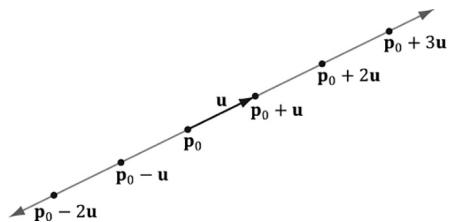
Figure C.1. A line described by a point ${ \pmb P } 0$ on the line and a vector u that aims parallel to the line. We can generate points on the line by plugging in any real number t.
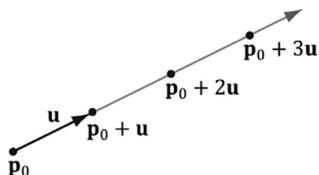
Figure C.2. A ray described by an origin ${ \sf P } 0$ and direction u. We can generate points on the ray by plugging in scalars for t that are greater than or equal to zero.
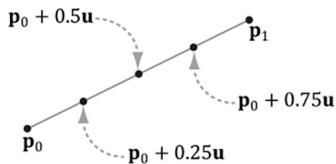
Figure C.3. We generate points on the line segment by plugging in different values for t in [0, 1]. For example, the midpoint of the line segment is given at $t = 0 . 5$ . Also note that if $\dot { t } = 0$ , we get the endpoint ${ \pmb P } _ { 0 }$ and if $t = 1$ , we get the endpoint $\pmb { \mathsf { P } } \tau$ .
C.2 PARALLELOGRAMS
Let $\mathbf { q }$ be a point, and $\mathbf { u }$ and $\mathbf { v }$ be two vectors that are not scalar multiples of one another (i.e., $\mathbf { u } \neq k \mathbf { v }$ for any scalar $k$ ). Then the graph of the following function is a parallelogram (see Figure C.4):
$$ \mathbf {p} (s, t) = \mathbf {q} + s \mathbf {u} + t \mathbf {v} \text {f o r} s, t \in [ 0, 1 ] $$
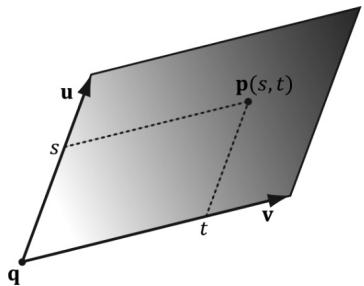
Figure C.4. Parallelogram. By plugging in different s, $t \in [ 0 , 1 ]$ we generate different points on the parallelogram.
The reason for the $\mathbf { \ddot { u } } \neq k \mathbf { v }$ for any scalar $k ^ { \dprime }$ requirement can be seen as follows: If $\mathbf { u } = k \mathbf { v }$ then we could write:
$$ \begin{array}{l} \mathbf {p} (s, t) = \mathbf {q} + s \mathbf {u} + t \mathbf {v} \\ = \mathbf {q} + s k \mathbf {v} + t \mathbf {v} \\ = \mathbf {q} + (s k + t) \mathbf {v} \\ = \mathbf {q} + \bar {\mathbf {v}} \mathbf {v} \\ \end{array} $$
which is just the equation of a line. In other words, we only have one degree of freedom. To get a 2D shape like a parallelogram, we need two degrees of freedom, so the vectors u and v must not be scalar multiples of each another.
C.3 TRIANGLES
The vector equation of a triangle is similar to that of the parallelogram equation, except that we restrict the domain of the parameters further:
$$ \mathbf {p} (s, t) = \mathbf {p} _ {0} + s \mathbf {u} + t \mathbf {v} \text {f o r} s \geq 0, t \geq 0, s + t \leq 1 $$
Observe from Figure C.5 that if any of the conditions on s and $t$ do not hold, then $\mathbf { p } ( s , t )$ will be a point 鈥渙utside鈥?the triangle, but on the plane of the triangle.
We can obtain the above parametric equation of a triangle given three points defining a triangle. Consider a triangle defined by three vertices $\mathbf { p } _ { 0 } , \mathbf { p } _ { 1 } , \mathbf { p } _ { 2 }$ . Then for s t 鈮?鈮?0 0 , , $s + t \leq 1$ a point on the triangle can be given by:
$$ \mathbf {p} (s, t) = \mathbf {p} _ {0} + s \left(\mathbf {p} _ {1} - \mathbf {p} _ {0}\right) + t \left(\mathbf {p} _ {2} - \mathbf {p} _ {0}\right) $$
We can take this further and distribute the scalars:
$$ \begin{array}{l} \mathbf {p} (s, t) = \mathbf {p} _ {0} + s \mathbf {p} _ {1} - s \mathbf {p} _ {0} + t \mathbf {p} _ {2} - t \mathbf {p} _ {0} \\ = (1 - s - t) \mathbf {p} _ {0} + s \mathbf {p} _ {1} + t \mathbf {p} _ {2} \\ = r \mathbf {p} _ {0} + s \mathbf {p} _ {1} + t \mathbf {p} _ {2} \\ \end{array} $$
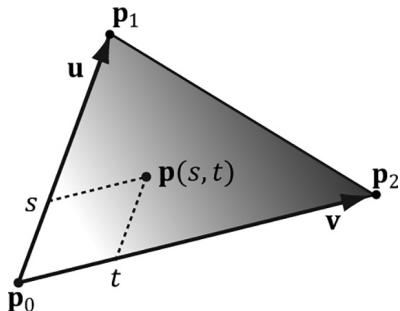
Figure C.5. Triangle. By plugging in different s, t such that $s \geq 0$ , $t \geq 0$ , $s + t \leq 1$ , we generate different points on the triangle.
where we have let $r = ( 1 - s - t )$ . The coordinates $( r , s , t )$ are called barycentric coordinates. Note that $r + s + t = 1$ and the barycentric combination $\mathbf { p } ( r , s , t ) = r \mathbf { p } _ { 0 } +$ $s { \bf p } _ { 1 } + t { \bf p } _ { 2 }$ expresses the point p as a weighted average of the vertices of the triangle. There are interesting properties of barycentric coordinates, but we do not need them for this book; the reader may wish to further research barycentric coordinates.
C.4 PLANES
A plane can be viewed as an infinitely thin, infinitely wide, and infinitely long sheet of paper. A plane can be specified with a vector n and a point ${ \bf p } _ { 0 }$ on the plane. The vector n, not necessarily unit length, is called the plane鈥檚 normal vector and is perpendicular to the plane; see Figure C.6. A plane divides space into a positive half-space and a negative half-space. The positive half space is the space in front of the plane, where the front of the plane is the side the normal vector emanates from. The negative half space is the space behind the plane.
By Figure C.6, we see that the graph of a plane is all the points $\mathbf { p }$ that satisfy the plane equation:
$$ \mathbf {n} \cdot (\mathbf {p} - \mathbf {p} _ {0}) = 0 $$
When describing a particular plane, the normal n and a known point $\mathbf { p } _ { 0 }$ on the plane are fixed, so it is typical to rewrite the plane equation as:
$$ \mathbf {n} \cdot (\mathbf {p} - \mathbf {p} _ {0}) = \mathbf {n} \cdot \mathbf {p} - \mathbf {n} \cdot \mathbf {p} _ {0} = \mathbf {n} \cdot \mathbf {p} + d = 0 $$
where $d = - \mathbf { n } \cdot \mathbf { p } _ { 0 }$ . If $\mathbf { n } = ( a , b , c )$ and ${ \bf p } = ( x , y , z )$ , then the plane equation can be written as:
$$ a x + b y + c z + d = 0 $$
If the plane鈥檚 normal vector n is of unit length, then $d = - \mathbf { n } \cdot \mathbf { p } _ { 0 }$ gives the shortest signed distance from the origin to the plane (see Figure C.7).
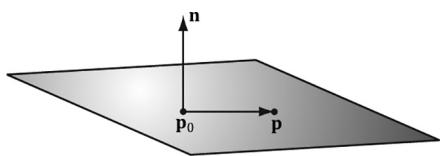
Figure C.6. A plane defined by a normal vector n and a point ${ \sf P } 0$ on the plane. If $\mathsf { \Pi } _ { \mathsf { P 0 } }$ is a point on the plane, then the point $\mathsf { P }$ is also on the plane if and only if the vector $\mathsf { P } ^ { - } \mathsf { P } 0$ is orthogonal to the plane鈥檚 normal vector.
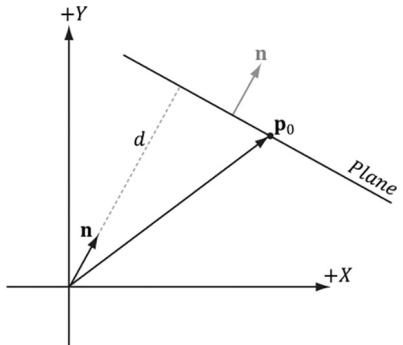
Figure C.7. Shortest distance from a plane to the origin.

To make the pictures easier to draw, we sometimes draw our figures in 2D and use a line to represent a plane. A line, with a perpendicular normal, can be thought of as a 2D plane since the line divides the 2D space into a positive half space and negative half space.
C.4.1 DirectX Math Planes
When representing a plane in code, it suffices to store only the normal vector n and the constant $d$ . It is useful to think of this as a 4D vector, which we denote as $( \mathbf { n } , d ) = ( a , b , c , d )$ . Therefore, because the XMVECTOR type stores a 4-tuple of floating-point values, the DirectX Math library overloads the XMVECTOR type to also represent planes.
C.4.2 Point/Plane Spatial Relation
Given any point p, observe from Figure C.6 and Figure C.8 that
- If $\mathbf { n } \cdot ( \mathbf { p } - \mathbf { p } _ { 0 } ) = \mathbf { n } \cdot \mathbf { p } + d > 0$ then $\mathbf { p }$ is in front of the plane.
- If $\mathbf { n } \cdot ( \mathbf { p } - \mathbf { p } _ { 0 } ) = \mathbf { n } \cdot \mathbf { p } + d < 0$ then $\mathbf { p }$ is behind the plane.
- If $\mathbf { n } \cdot ( \mathbf { p } - \mathbf { p } _ { 0 } ) = \mathbf { n } \cdot \mathbf { p } + d = 0$ then $\mathbf { p }$ is on the plane.
These tests are useful for testing the spatial location of points relative to a plane.
This next DirectX Math function evaluates $\mathbf { n } \cdot \mathbf { p } + d$ for a particular plane and point:
XMVECTOR XMPlaneDotCoord(/ Returns $\mathbf{n}\cdot \mathbf{p} + d$ replicated in each coordinate XMVECTOR P, // plane XMVECTOR V); // point with $w = 1$ // Test the locality of a point relative to a plane.
XMVECTOR p $=$ XMVectorSet(0.0f, 1.0f, 0.0f, 0.0f);
XMVECTOR v $=$ XMVectorSet(3.0f, 5.0f, 2.0f);
float x $=$ XMVectorGetX(XMPlaneDotCoord(p, v));
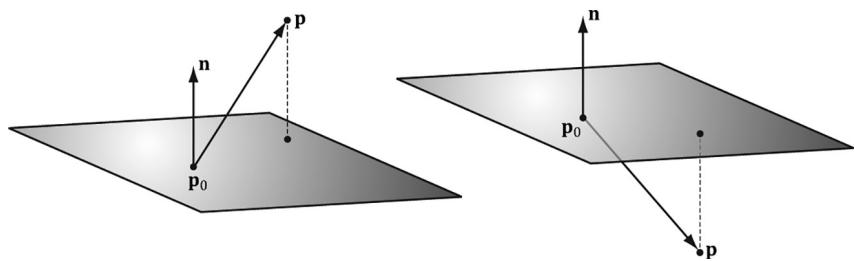
Figure C.8. Point/plane spatial relation.
if( x approximately equals 0.0f ) // v is coplanar to the plane.
if( x > 0 ) // v is in positive half-space.
if( x < 0 ) // v is in negative half-space.
Note:
We say approximately equals due to floating point imprecision.
A similar function is:
XMVECTOR XMPlaneDotNormal(XMVECTOR Plane, XMVECTOR Vec);
This returns the dot product of the plane normal vector and the given 3D vector.
C.4.3 Construction
Besides directly specifying the plane coefficients $( \mathbf { n } , d ) = ( a , b , c , d )$ , we can calculate these coefficients in two other ways. Given the normal $\mathbf { n }$ and a known point on the plane $\mathbf { p } _ { 0 }$ we can solve for the $d$ component:
$$ \mathbf {n} \cdot \mathbf {p} _ {0} + d = 0 \Rightarrow d = - \mathbf {n} \cdot \mathbf {p} _ {0} $$
The DirectX Math library provides the following function to construct a plane from a point and normal in this way:
XMVECTOR XMPlaneFromPointNormal(XMVECTOR Point, XMVECTOR Normal);The second way we can construct a plane is by specifying three distinct points on the plane.
Given the points $\mathbf { p } _ { 0 } , \mathbf { p } _ { 1 } , \mathbf { p } _ { 2 }$ , we can form two vectors on the plane:
$$ \mathbf {u} = \mathbf {p} _ {1} - \mathbf {p} _ {0} $$
$$ \mathbf {v} = \mathbf {p} _ {2} - \mathbf {p} _ {0} $$
From that we can compute the normal of the plane by taking the cross product of the two vectors on the plane. (Remember the left hand thumb rule.)
$$ \mathbf {n} = \mathbf {u} \times \mathbf {v} $$
Then, we compute $d = - \mathbf { n } \cdot \mathbf { p } _ { 0 }$
The DirectX Math library provides the following function to compute a plane given three points on the plane:
XMVECTOR XMPlaneFromPoints( XMVECTOR Point1, XMVECTOR Point2, XMVECTOR Point3);C.4.4 Normalizing a Plane
Sometimes we might have a plane and would like to normalize the normal vector. At first thought, it would seem that we could just normalize the normal vector as we would any other vector. But recall that the $d$ component also depends on the normal vector: $d = - \mathbf { n } \cdot \mathbf { p } _ { 0 }$ . Therefore, if we normalize the normal vector, we must also recalculate $d .$ . This is done as follows:
$$ d ^ {\prime} = \frac {d}{\left| \left| \mathbf {n} \right| \right|} = - \frac {\mathbf {n}}{\left| \left| \mathbf {n} \right| \right|} \cdot \mathbf {p} _ {0} $$
Thus, we have the following formula to normalize the normal vector of the plane $( \mathbf { n } , d )$ :
$$ \frac {1}{| | \mathbf {n} | |} (\mathbf {n}, d) = \left(\frac {\mathbf {n}}{| | \mathbf {n} | |}, \frac {d}{| | \mathbf {n} | |}\right) $$
We can use the following DirectX Math function to normalize a plane鈥檚 normal vector:
XMVECTOR XMPlaneNormalize(XMVECTOR P);
C.4.5 Transforming a Plane
[Lengyel02] shows that we can transform a plane $( \mathbf { n } , d )$ by treating it as a 4D vector and multiplying it by the inverse-transpose of the desired transformation matrix. Note that the plane鈥檚 normal vector must be normalized first. We use the following DirectX Math function to do this:
XMVECTOR XMPlaneTransform(XMVECTOR P, XMMATRIX M);
Sample Code:
XMMatrix T(...); // Initialize T to a desired transformation.
XMMatrix invT = XMMatrixInverse(XMMatrixDeterminant(T), T);
XMMatrix invTransposeT = XMMatrixTranspose(invT);
XMVector p = (...); // Initialize Plane.
p = XMPlaneNormalize(p); // make sure normal is normalized.
XMVector transformedPlane = XMPlaneTransform(p, &invTransposeT);
C.4.6 Nearest Point on a Plane to a Given Point
Suppose we have a point $\mathbf { p }$ in space and we would like to find the point $\mathbf { q }$ on the plane $( \mathbf { n } , d )$ that is closest to p. From Figure C.9, we see that
$$ \mathbf {q} = \mathbf {p} - \operatorname {p r o j} _ {\mathbf {n}} \left(\mathbf {p} - \mathbf {p} _ {0}\right) $$
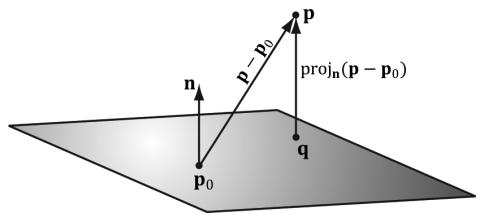
Figure C.9. The nearest point on a plane to a point p. The point ${ \pmb P } 0$ is a point on the plane.
Assuming $\lvert \lvert \mathbf { n } \rvert \rvert = 1$ so that proj n $( \mathbf { p } - \mathbf { p } _ { 0 } ) = [ ( \mathbf { p } - \mathbf { p } _ { 0 } ) \cdot \mathbf { n } ] \mathbf { n }$ , we can rewrite this as:
$$ \begin{array}{l} \mathbf {q} = \mathbf {p} - \left[ \left(\mathbf {p} - \mathbf {p} _ {0}\right) \cdot \mathbf {n} \right] \mathbf {n} \\ = \mathbf {p} - (\mathbf {p} \cdot \mathbf {n} - \mathbf {p} _ {0} \cdot \mathbf {n}) \mathbf {n} \\ = \mathbf {p} - (\mathbf {p} \cdot \mathbf {n} + d) \mathbf {n} \\ \end{array} $$
C.4.7 Ray/Plane Intersection
Given a ray $\mathbf { p } ( t ) = \mathbf { p } _ { 0 } + t \mathbf { u }$ and the equation of a plane $\mathbf { n } \cdot \mathbf { p } + d = 0$ , we would like to know if the ray intersects the plane and also the point of intersection. To do this, we plug the ray into the plane equation and solve for the parameter $t$ that satisfies the plane equation, thereby giving us the parameter that yields the intersection point:
<table><tr><td>n路p(t) + d = 0</td><td>Plug ray into plane equation</td></tr><tr><td>n路(p0+tu) + d = 0</td><td>Substitute</td></tr><tr><td>n路p0+tn路u + d = 0</td><td>Distributive property</td></tr><tr><td>tn路u = -n路p0 - d</td><td>Add -n路p0 - d to both sides</td></tr><tr><td>t = -n路p0 - d/n路u</td><td>Solve for t</td></tr></table>
If $\mathbf { n } \cdot \mathbf { u } = 0$ then the ray is parallel to the plane and there are either no solutions or infinite many solutions (infinite if the ray coincides with the plane). If $t$ is not in the interval $[ 0 , \infty )$ , the ray does not intersect the plane, but the line coincident with the ray does. If $t$ is in the interval $[ 0 , \infty )$ , then the ray does intersect the plane and the intersection point is found by evaluating the ray equation at $\begin{array} { r } { t _ { 0 } = \frac { - \mathbf { n } \cdot \bar { \mathbf { p } _ { 0 } } - d } { \mathbf { n } \cdot \mathbf { u } } } \end{array}$
The ray/plane intersection test can be modified to a segment/plane test. Given two points defining a line segment $\mathbf { p }$ and ${ \bf q } ,$ then we form the ray $\mathbf { r } ( t ) = \mathbf { p } + t ( \mathbf { q } - \mathbf { p } )$ . We use this ray for the intersection test. If $t \in [ 0 , 1 ] ,$ then the
segment intersects the plane, otherwise it does not. The DirectX Math library provides the following function:
XMVECTOR XMPlaneIntersectLine( XMVECTOR P, XMVECTOR LinePoint1, XMVECTOR LinePoint2);C.4.8 Reflecting Vectors
Given a vector I we wish to reflect it about a plane with normal n. Because vectors do not have positions, only the plane normal is involved when reflecting a vector. Figure C.10 shows the geometric situation, from which we conclude the reflection vector is given by:
$$ \mathbf {r} = \mathbf {I} - 2 (\mathbf {n} \cdot \mathbf {I}) \mathbf {n} $$
C.4.9 Reflecting Points
Points reflect differently from vectors since points have position. Figure C.11 shows that the reflected point $\mathbf { q }$ is given by:
$$ \mathbf {q} = \mathbf {p} - 2 \operatorname {p r o j} _ {\mathbf {n}} \left(\mathbf {p} - \mathbf {p} _ {0}\right) $$
C.4.10 Reflection Matrix
Let $( { \bf n } , d ) = ( n _ { x } , n _ { y } , n _ { z } , d )$ be the coefficients of a plane, where $d = - \mathbf { n } \cdot \mathbf { p } _ { 0 }$ . Then, using homogeneous coordinates, we can reflect both points and vectors about this plane using a single $4 \times 4$ reflection matrix:
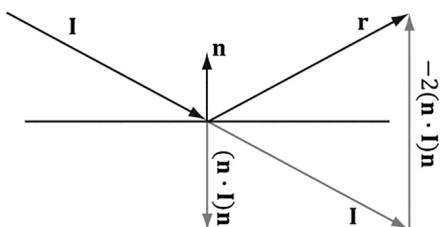
Figure C.10. Geometry of vector reflection.
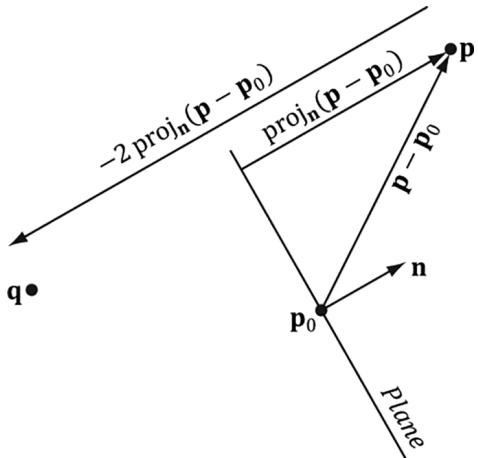
Figure C.11. Geometry of point reflection.
$$ \mathbf {R} = \left[ \begin{array}{l l l l} 1 - 2 n _ {x} n _ {x} & - 2 n _ {x} n _ {y} & - 2 n _ {x} n _ {z} & 0 \\ - 2 n _ {x} n _ {y} & 1 - 2 n _ {y} n _ {y} & - 2 n _ {y} n _ {z} & 0 \\ - 2 n _ {x} n _ {z} & - 2 n _ {y} n _ {z} & 1 - 2 n _ {z} n _ {z} & 0 \\ - 2 d n _ {x} & - 2 d n _ {y} & - 2 d n _ {z} & 1 \end{array} \right] $$
This matrix assumes the plane is normalized so that
$$ \begin{array}{l} \operatorname {p r o j} _ {\mathbf {n}} \left(\mathbf {p} - \mathbf {p} _ {0}\right) = [ \mathbf {n} \cdot (\mathbf {p} - \mathbf {p} _ {0}) ] \mathbf {n} \\ = [ \mathbf {n} \cdot \mathbf {p} - \mathbf {n} \cdot \mathbf {p} _ {0} ] \mathbf {n} \\ = [ \mathbf {n} \cdot \mathbf {p} + d ] \mathbf {n} \\ \end{array} $$
If we multiply a point by this matrix, we get the point reflection formula:
$$ \begin{array}{l} [ p _ {x}, p _ {y}, p _ {z}, 1 ] \left[ \begin{array}{l l l l} 1 - 2 n _ {x} n _ {x} & - 2 n _ {x} n _ {y} & - 2 n _ {x} n _ {z} & 0 \\ - 2 n _ {x} n _ {y} & 1 - 2 n _ {y} n _ {y} & - 2 n _ {y} n _ {z} & 0 \\ - 2 n _ {x} n _ {z} & - 2 n _ {y} n _ {z} & 1 - 2 n _ {z} n _ {z} & 0 \\ - 2 d n _ {x} & - 2 d n _ {y} & - 2 d n _ {z} & 1 \end{array} \right] \\ = \left[ \begin{array}{c} p _ {x} - 2 p _ {x} n _ {x} n _ {x} - 2 p _ {y} n _ {x} n _ {y} - 2 p _ {z} n _ {x} n _ {z} - 2 d n _ {x} \\ - 2 p _ {x} n _ {x} n _ {y} + p _ {y} - 2 p _ {y} n _ {y} n _ {y} - 2 p _ {z} n _ {y} n _ {z} - 2 d n _ {y} \\ - 2 p _ {x} n _ {x} n _ {z} - 2 p _ {y} n _ {y} n _ {z} + p _ {z} - 2 p _ {z} n _ {z} n _ {z} - 2 d n _ {z} \\ 1 \end{array} \right] ^ {T} \\ = \left[ \begin{array}{c} p _ {x} \\ p _ {y} \\ p _ {z} \\ 1 \end{array} \right] ^ {T} + \left[ \begin{array}{c} - 2 n _ {x} (p _ {x} n _ {x} + p _ {y} n _ {y} + p _ {z} n _ {z} + d) \\ - 2 n _ {y} (p _ {x} n _ {x} + p _ {y} n _ {y} + p _ {z} n _ {z} + d) \\ - 2 n _ {z} (p _ {x} n _ {x} + p _ {y} n _ {y} + p _ {z} n _ {z} + d) \\ 0 \end{array} \right] ^ {T} \\ = \left[ \begin{array}{c} p _ {x} \\ p _ {y} \\ p _ {z} \\ 1 \end{array} \right] ^ {T} + \left[ \begin{array}{c} - 2 n _ {x} (\mathbf {n} \cdot \mathbf {p} + d) \\ - 2 n _ {y} (\mathbf {n} \cdot \mathbf {p} + d) \\ - 2 n _ {z} (\mathbf {n} \cdot \mathbf {p} + d) \\ 0 \end{array} \right] ^ {T} \\ = \mathbf {p} - 2 [ \mathbf {n} \cdot \mathbf {p} + d ] \mathbf {n} \\ = \mathbf {p} - 2 \operatorname {p r o j} _ {\mathbf {n}} \left(\mathbf {p} - \mathbf {p} _ {0}\right) \\ \end{array} $$
And similarly, if we multiply a vector by this matrix, we get the vector reflection formula:
$$ [ \nu_ {x}, \nu_ {y}, \nu_ {z}, 0 ] \left[ \begin{array}{l l l l} 1 - 2 n _ {x} n _ {x} & - 2 n _ {x} n _ {y} & - 2 n _ {x} n _ {z} & 0 \\ - 2 n _ {x} n _ {y} & 1 - 2 n _ {y} n _ {y} & - 2 n _ {y} n _ {z} & 0 \\ - 2 n _ {x} n _ {z} & - 2 n _ {y} n _ {z} & 1 - 2 n _ {z} n _ {z} & 0 \\ - 2 d n _ {x} & - 2 d n _ {y} & - 2 d n _ {z} & 1 \end{array} \right] = \mathbf {v} - 2 (\mathbf {n} \cdot \mathbf {v}) \mathbf {n} $$
The following DirectX Math function can be used to construct the above reflection matrix given a plane:
XMMATRIX XMMatrixReflect(XMVECTOR ReflectionPlane);
C.5 EXERCISES
- Let $\pmb { \mathrm { p } } ( t ) = ( 1 , 1 ) + t ( 2 , 1 )$ be a ray relative to some coordinate system. Plot the points on the ray at $t = 0 . 0 , 0 . 5 , 1 . 0 , 2 . 0$ , and 5.0.
- Let ${ \bf p } _ { 0 }$ and $\mathbf { p } _ { 1 }$ define the endpoints of a line segment. Show that the equation for a line segment can also be written as ${ \bf p } ( t ) = ( 1 - t ) { \bf p } _ { 0 } + t { \bf p } _ { 1 }$ for $t \in [ 0 , 1 ]$ .
- For each part, find the vector line equation of the line passing through the two points.
(a) $\mathbf { p } _ { 1 } = ( 2 , - 1 ) , \mathbf { p } _ { 2 } = ( 4 , 1 )$
(b) $\pmb { \mathrm { p } } _ { 1 } = ( 4 , - 2 , 1 ) , \pmb { \mathrm { p } } _ { 2 } = ( 2 , 3 , 2 )$
- Let $\mathbf { L } ( t ) = \mathbf { p } + t \mathbf { u }$ define a line in 3-space. Let $\mathbf { q }$ be any point in 3-space. Prove that the distance from $\mathbf { q }$ to the line can be written as:
$$ d = \frac {\left| \left| (\mathbf {q} - \mathbf {p}) \times \mathbf {u} \right| \right|}{\left| \left| \mathbf {u} \right| \right|} $$
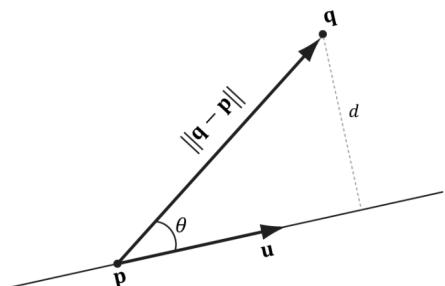
Figure C.12. Distance from q to the line.
- Let $\mathbf { L } ( t ) = ( 4 , 2 , 2 ) + t ( 1 , 1 , 1 )$ be a line. Find the distance from the following points to the line:
(a) $\mathbf { q } = ( 0 , 0 , 0 )$
(b) $\mathbf { q } = ( 4 , 2 , 0 )$
(c) $\mathbf { q } = ( 0 , 2 , 2 )$
- Let $\mathbf { p } _ { 0 } ^ { } = ( 0 , 1 , 0 ) ;$ , ${ \mathfrak { p } } _ { 1 } = ( - 1 , 3 , 6 )$ , and $\mathsf { p } _ { 2 } = ( 8 , 5 , 3 )$ be three points. Find the plane these points define.
- Let $\textstyle \left( { \frac { 1 } { \sqrt { 3 } } } , { \frac { 1 } { \sqrt { 3 } } } , { \frac { 1 } { \sqrt { 3 } } } , - 5 \right)$ be a plane. Define the locality of the following points relative to the plane: $( 3 { \sqrt { 3 } } , 5 { \sqrt { 3 } } , 0 )$ , $( 2 { \sqrt { 3 } } , { \sqrt { 3 } } , 2 { \sqrt { 3 } } )$ , and $( { \sqrt { 3 } } , - { \sqrt { 3 } } , 0 )$ .
- Let $\left( - { \frac { 1 } { \sqrt { 2 } } } , { \frac { 1 } { \sqrt { 2 } } } , 0 , { \frac { 5 } { \sqrt { 2 } } } \right)$ be a plane. Find the point on the plane nearest to the point $( 0 , 1 , 0 )$ .
- Let $\left( - { \frac { 1 } { \sqrt { 2 } } } , { \frac { 1 } { \sqrt { 2 } } } , 0 , { \frac { 5 } { \sqrt { 2 } } } \right)$ be a plane. Find the reflection of the point ( , 0 1 0, ) about the plane.
- Let $\textstyle \left( { \frac { 1 } { \sqrt { 3 } } } , { \frac { 1 } { \sqrt { 3 } } } , { \frac { 1 } { \sqrt { 3 } } } , - 5 \right)$ be a plane, and let $\mathbf { r } ( t ) = ( - 1 , 1 , - 1 ) + t ( 1 , 0 , 0 )$ be a ray. Find the point at which the ray intersects the plane. Then write a short program using the XMPlaneIntersectLine function to verify your answer.
Appendix D
Soluti ons to
Selected Exerci ses
Solutions (including figures) to selected exercises in the text may be found in the companion files. All companion files for this title are available by visiting the website for the book at HYPERLINK "
Bib li ograp hy a nd Further Rea di ng
[Angel00] Angel, Edward. Interactive Computer Graphics: A Top-Down Approach with OpenGL, Second Edition, Addison-Wesley, 2000.
[ATI1] ATI. 鈥淒ark Secrets of Shader Development or What Your Mother Never Told You About Shaders.鈥?Presentation available at
[Bilodeau10] Bilodeau, Bill. 鈥淓fficient Compute Shader Programming,鈥?Game Developers Conference, AMD slide presentation, 2010.
[Bilodeau10b] Bilodeau, Bill. 鈥淒irect3D 11 Tutorial: Tessellation,鈥?Game Developers Conference, AMD slide presentation, 2010.
[Birtwistle23] Birtwistle, Charlie and Francois Durand. 鈥淭ask Graph Renderer At Activision,鈥?Rendering Engine Architecture Conference, 2023.
[Blinn78] Blinn, James F., and Martin E. Newell. 鈥淐lipping using Homogeneous Coordinates.鈥?In Computer Graphics (SIGGRAPH 鈥?8 Proceedings), pages 245鈥?51, New York, 1978.
[Blinn96] Blinn, Jim, Jim Blinn鈥檚 Corner: A Trip Down the Graphics Pipeline, Morgan Kaufmann Publishers, Inc, San Francisco CA, 1996.
[Boyd08] Boyd, Chas. 鈥淒irectX 11 Compute Shader,鈥?Siggraph slide presentation, 2008.
[Boyd10] Boyd, Chas. 鈥淒irectCompute Lecture Series 101: Introduction to DirectCompute,鈥?2010.
[Brennan02] Brennan, Chris. 鈥淎ccurate Reflections and Refractions by Adjusting for Object Distance,鈥?Direct3D ShaderX: Vertex and Pixel Shader Tips and Tricks. Wordware Publishing Inc., 2002.
[Burg10] Burg, John van der. 鈥淏uilding an Advanced Particle System.鈥?Gamasutra, June 2000.
[Cebenoyan14] Cebenoyan, Cem. 鈥淎dvanced Visual Effects with DirectX 11: Real Virtual Texturing - Taking Advantage of DirectX 11.2 Tiled Resources,鈥?Game Developers Conference, 2014.
[Crawfis12] Crawfis, Roger. 鈥淢odern GPU Architecture.鈥?Course notes available at
[De berg00] de Berg, M., M. van Kreveld, M. Overmars, and O. Schwarzkopf. Computational Geometry: Algorithms and Applications Second Edition. Springer-Verlag Berlin Heidelberg, 2000.
[Dietrich] Dietrich, Sim. 鈥淭exture Space Bump Maps.鈥?
[Dunlop03] Dunlop, Robert. 鈥淔PS Versus Frame Time,鈥?2003.
[DirectXMath] DirectXMath Online Documentation, Microsoft Corporation. http:// msdn.microsoft.com/en-us/library/windows/desktop/hh437833(v=vs.85).aspx
[DXSDK] Microsoft DirectX June 2010 SDK Documentation, Microsoft Corporation.
[Eberly01] Eberly, David H., 3D Game Engine Design, Morgan Kaufmann Publishers, Inc, San Francisco CA, 2001.
[Engel02] Engel, Wolfgang (Editor). Direct3D ShaderX: Vertex and Pixel Shader Tips and Tricks, Wordware Publishing, Plano TX, 2002.
[Engel04] Engel, Wolfgang (Editor). ShaderX2: Shader Programming Tips & Tricks with DirectX 9, Wordware Publishing, Plano TX, 2004.
[Engel06] Engel, Wolfgang (Editor). ShaderX5: Shader Advanced Rendering Techniques, Charles River Media, Inc., 2006.
[Engel08] Engel, Wolfgang (Editor). ShaderX6: Shader Advanced Rendering Techniques, Charles River Media, Inc., 2008.
[Farin98] Farin, Gerald, and Dianne Hansford. The Geometry Toolbox: For Graphics and Modeling. AK Peters, Ltd., 1998.
[Fernando03] Fernando, Randima, and Mark J. Kilgard. The CG Tutorial: The Definitive Guide to Programmable Real-Time Graphics. Addison-Wesley, 2003.
[Fraleigh95] Fraleigh, John B., and Raymond A. Beauregard. Linear Algebra $3 ^ { r d }$ Edition. Addison-Wesley, 1995.
[Friedberg03] Friedberg, Stephen H., Arnold J. Insel, and Lawrence E. Spence. Linear Algebra Fourth Edition. Pearson Education, Inc., 2003.
[Fung10] Fung, James. 鈥淒irectCompute Lecture Series 210: GPU Optimizations and Performance,鈥?2010.
[Giesen11] Giesen, Fabian. 鈥淭exture tiling and swizzling,鈥?2011.
[Halliday01] Halliday, David, Robert Resnick, and Jearl Walker. Fundamentals of Physics: Sixth Edition. John Wiley & Sons, Inc., 2001.
[Hargreaves2024] Hargreaves, Shawn. 鈥淩einventing the Geometry Pipeline: Mesh Shaders in DirectX 12.鈥?
[Hausner98] Hausner, Melvin. A Vector Space Approach to Geometry. Dover Publications, Inc., 1998. www.doverpublications.com
[Hoffmann75] Hoffmann, Banesh. About Vectors. Dover Publications, Inc., 1975. www. doverpublications.com
[Isidoro06] Isidoro, John R. 鈥淪hadow Mapping: GPU-based Tips and Techniques,鈥?Game Developers Conference, ATI slide presentation, 2006.
[Isidoro06b] Isidoro, John R. 鈥淓dge Masking and Per-Texel Depth Extent Propagation for Computation Culling During Shadow Mapping,鈥?ShaderX 5: Advanced Rendering Techniques. Charles River Media, 2007.
[Kilgard99] Kilgard, Mark J., 鈥淐reating Reflections and Shadows Using Stencil Buffers,鈥?Game Developers Conference, NVIDIA slide presentation, 1999.
[Kilgard01] Kilgard, Mark J. 鈥淪hadow Mapping with Today鈥檚 OpenGL Hardware,鈥?Computer Entertainment Software Association's CEDEC, NVIDIA presentation, 2001.
[Kryachko05] Kryachko, Yuri. 鈥淯sing Vertex Texture Displacement for Realistic Water Rendering,鈥?GPU Gems 2: Programming Techniques for High-Performance Graphics and General Purpose Computation. Addison-Wesley, 2005.
[Kuipers99] Kuipers, Jack B. Quaternions and Rotation Sequences: A Primer with Applications to Orbits, Aerospace, and Virtual Reality. Princeton University Press, 1999.
[Lengyel02] Lengyel, Eric. Mathematics for 3D Game Programming and Computer Graphics. Charles River Media, Inc., 2002.
[Microsoft22] Microsoft Documentation. 鈥淏lock Compression (Direct3D 10),鈥?2022.
[M枚ller08] M枚ller, Tomas, and Eric Haines. Real-Time Rendering: Third Edition. AK Peters, Ltd., 2008.
[Mortenson99] Mortenson, M.E. Mathematics for Computer Graphics Applications. Industrial Press, Inc., 1999.
[NVIDIA05] Antialiasing with Transparency, NVIDIA Corporation, 2005. ftp:// download.nvidia.com/developer/SDK/Individual_Samples/DEMOS/Direct3D9/src/ AntiAliasingWithTransparency/docs/AntiAliasingWithTransparency.pdf
[NVIDIA08] GPU Programming Guide GeForce 8 and 9 Series, NVIDIA Corporation, 2008.
[NVIDIA09] NVIDIA鈥檚 Next Generation CUDA Compute Architecture: Fermi, NVIDIA Corporation, 2009.
[NVIDIA10] DirectCompute Programming Guide, NVIDIA Corporation, 2007- 2010.
[Odonnell17] O鈥橠onnell, Yuriy. 鈥淔rameGraph: Extensible Rendering Architecture in Frostbite,鈥?Game Developers Conference, 2017.
[Oliveira10] Oliveira, Gustavo. 鈥淒esigning Fast Cross-Platform SIMD Vector Libraries,鈥?2010.
[Parent02] Parent, Rick. Computer Animation: Algorithms and Techniques. Morgan Kaufmann Publishers, 2002. www.mkp.com
[Pelzer04] Pelzer, Kurt. 鈥淩endering Countless Blades of Waving Grass,鈥?GPU Gems: Programming Techniques, Tips, and Tricks for Real-Time Graphics. Addison-Wesley, 2004.
[Pettineo12] Pettineo, Matt. 鈥淎 Closer Look at Tone Mapping,鈥?2012. https:// mynameismjp.wordpress.com/2010/04/30/a-closer-look-at-tone-mapping/
[Pettineo22] Pettineo, Matt. 鈥淕PU Memory Pools in D3D12,鈥?2022.
[Petzold99] Petzold, Charles, Programming Windows, Fifth Edition, Microsoft Press, Redmond WA, 1999.
[Pharr04] Pharr, Matt, and Greg Humphreys. Physically Based Rendering: From Theory to Implementation. Morgan Kaufmann Publishers, 2004. www.mkp.com
[Prosise99] Prosise, Jeff, Programming Windows with MFC, Second Edition, Microsoft Press, Redmond WA, 1999.
[Reed12] Reed, Nathan. 鈥淯nderstanding BCn Texture Compression Formats,鈥?2012.
[Reinhard10] Reinhard, Erik, et al. High Dynamic Range Imaging, Second Edition, Morgan Kaufmann, 2010.
[Sandy14] Sandy, Matt. 鈥淢assive virtual textures for games: Direct3D Tiled Resources,鈥?Microsoft Build Conference, 2014.
[Santrock03] Santrock, John W. Psychology 7. The McGraw-Hill Companies, Inc., 2003.
[Savchenko00] Savchenko, Sergei, 3D Graphics Programming: Games and Beyond, Sams Publishing, 2000.
[Sawicki21] Sawicki, Adam. 鈥淓fficient Use of GPU Memory in Modern Games,鈥?Digital Dragons, 2021.
[Schneider03] Schneider, Philip J., and David H. Eberly. Geometric Tools for Computer Graphics. Morgan Kaufmann Publishers, 2003. www.mkp.com
[Shirley05] Shirley, Peter. Fundamentals of Computer Graphics, 2nd ed. AK Peters, Ltd., 2005.
[Snook03] Snook, Greg. Real-Time 3D Terrain Engines using $C { + + }$ and DirectX9. Charles River Media, Inc., 2003.
[Story10] Story, Jon, and Cem Cebenoyan, 鈥淭essellation Performance,鈥?Game Developers Conference, NVIDIA slide presentation, 2010.
[Sutherland74] Sutherland, I. E., and G. W. Hodgeman. Reentrant Polygon Clipping. Communications of the ACM, 17(1):32-42, 1974.
[Thibieroz13] Thibieroz, Nick and Holger Gruen. 鈥淒irectX Performance Reloaded.鈥?Presentation at Game Developers Conference 2013.
[Tuft10] Tuft, David. 鈥淐ascaded Shadow Maps,鈥?2010.
[Uralsky05] Uralsky, Yuri. 鈥淓fficient Soft-Edged Shadows Using Pixel Shader Branching,鈥?GPU Gems 2: Programming Techniques for High-Performance Graphics and General Purpose Computation. Addison-Wesley, 2005.
[Verth04] Verth, James M. van, and Lars M. Bishop. Essential Mathematics for Games & Interactive Applications: A Programmer鈥檚 Guide. Morgan Kaufmann Publishers, 2004. www.mkp.com
[Vlachos01] Vlachos, Alex, J枚rg Peters, Chas Boyd, and Jason L. Mitchell, 鈥淐urved PN Triangles,鈥?ACM Symposium on Interactive 3D Graphics 2001, pp. 159-166, 2001. (
[Watt92] Watt, Alan, and Mark Watt, Advanced Animation and Rendering Techniques: Theory and Practice, Addison-Wesley, 1992.
[Watt00] Watt, Alan, 3D Computer Graphics, Third Edition, Addison-Wesley, 2000.
[Watt01] Watt, Alan, and Fabio Policarpo, 3D Games: Real-time Rendering and Software Technology, Addison-Wesley, 2001.
[Weinreich98] Weinreich, Gabriel, Geometrical Vectors. The University of Chicago Press, Chicago, 1998.
[Whatley05] Whatley, David. 鈥淭oward Photorealism in Virtual Botany,鈥?GPU Gems 2: Programming Techniques for High-Performance Graphics and General Purpose Computation. Addison-Wesley, 2005.
[Wloka03] Wloka, Matthias. 鈥淏atch, Batch, Batch: What Does It Really Mean?鈥?Presentation at Game Developers Conference 2003.
Index
acceleration structures, 959鈥?61
adding/subtracting, blending, 445鈥?46
address modes, texturing, 413鈥?15
adjacent triangles, 188鈥?89
adjoint of matrix, 47
Adobe Photoshop, 180
affine transformations
definition and matrix representation, 69
geometric interpretation of, 72鈥?3
homogeneous coordinates, 68
scaling and rotation, 72
translation, 69鈥?1
algebra, quaternions
conjugate and norm, 762鈥?63
conversions, 761鈥?62
definition and basic operations, 759鈥?60
inverses, 763
polar representation, 764鈥?65
properties, 761
special products, 760鈥?61
alive buffer, 854
alpha channels, 448鈥?49
alpha component, 182
ambient lighting, 350鈥?51
ambient occlusion
ambient occlusion map, 752鈥?53
ambient occlusion pass
calculation, 744
generate potential occluding points, 743
generate random samples, 742鈥?43
implementation, 744鈥?48
occlusion test, 743鈥?44
reconstruct view space position, 740鈥?41
blur pass, 748鈥?52
screen space ambient occlusion
render normals and depth pass, 738鈥?40
via ray casting, 734鈥?37
amplification shader, mesh shaders and meshlets, 896鈥?97
analytic geometry
parallelograms, 1018鈥?019
planes
construction, 1022
DirectX math planes, 1021
nearest point on a plane to given point, 1023鈥?024
normalizing a plane, 1023
point/plane spatial relation, 1021鈥?022
ray/plane intersection, 1024鈥?025
reflecting points, 1025
reflecting vectors, 1025
reflection matrix, 1025鈥?027
transforming a plane, 1023
rays, lines and segments, 1017鈥?018
triangle, 1019鈥?020
animation, 792
anisotropic filtering, 412鈥?13
any-hit shader, 931鈥?32
append and consume buffers, 528鈥?29
attenuation, 369鈥?71
axis-aligned bounding box (AABB), 603
B
back buffer, 97
backface culling, 211鈥?12
Bernstein basis functions, 569
B茅zier curve, 567鈥?69
biasing and aliasing, shadow mapping, 709鈥?11
bilinear interpolation, 410
Blender, 179鈥?80
blend factors, 440鈥?41
blending
alpha channels, 448鈥?49
blend factors, 440鈥?41
blend state, 442鈥?44
clipping pixels, 449鈥?51
equation, 438鈥?39
examples
adding/subtracting, 445鈥?46
blending and depth buffer, 447鈥?48
multiplying, 446
no color write, 445
transparency, 446鈥?47
fog, 451鈥?57
operations, 439鈥?40
particle systems and, 851鈥?52
semi-transparent water surface, 438
blend maps, 835
blend state, 442鈥?44
blur demo
blurring theory, 531鈥?34
Compute Shader program, 542鈥?46
implementation, 537鈥?41
render-to-texture, 534鈥?36
blurring theory, 531鈥?34
bone matrix palette, 795鈥?96
bone offset transforms, 803
bottom level acceleration structure (BLAS), 949鈥?51
BoundingBox::Intersects function, 630
BoundingFrustum class, 611
bounding volume hierarchies (BVH), 948鈥?49
bounding volumes and frustums
bounding boxes, 603鈥?05
DirectX math collision, 603
frustums, 608鈥?14
rotations and axis-aligned bounding boxes, 605鈥?07
spheres, 607鈥?08
box demo, 269鈥?83
bounding boxes, 603鈥?05
buffer helper, 244鈥?49
BufferLocation, 226
buffers, 186, 223鈥?28
camera class, 583鈥?85
camera system
camera class, 583鈥?85
demo comments, 589鈥?90
PSOs LIB, 590鈥?91
selected method implementations
building view matrix, 588鈥?89
derived Frustum info, 586
SetLens, 585鈥?86
transforming, 586鈥?87
XMVECTOR return variations, 585
view transform review, 581鈥?83
cap geometry, 312鈥?13
cbPerObiect锛?41
CD3DX12_DXIL_LIBRARY_SUBOBJECT sub-object, 942
CD3DX12_HIT_GROUP_SUBOBJECT sub-object, 942
CD3DX12_LOCAL_ROOT_SIGNATURE_SUBOBJECT sub-object, 942
CD3DX12_RAYTRACING_SHADER_CONFIG_SUBOBJECT subobject, 942
change-of-coordinate transformations, 583
character animation
demo, 807鈥?10
frame hierarchies, 786鈥?89
loading animation data from file
animation data, 803鈥?06
bone offset transforms, 803
header, 800
hierarchy, 803
materials, 801
M3DLoader, 806鈥?07
subsets, 801鈥?02
vertex data and triangles, 802
skinned meshes
animating the skeleton, 791鈥?93
bones to-root transform, 790鈥?91
definitions, 789鈥?90
final transform, calculation, 793鈥?95
offset transform, 791
vertex blending, 795鈥?00
checking feature support, Direct3D 12, 110
ChooseColor dialog box, 180
classical ray tracer demo
acceleration structures, 948鈥?53
scene management, 946鈥?48
ClearDepthStencilView method, 168
method, 168
clipping, 208鈥?10
pixels, 449鈥?51
closest hit shader, 932鈥?37
cofactor matrix of A, 47
color operations, 181鈥?82
column vectors, 38
COM, see Component Object Model (COM)
command queue and command lists, CPU/GPU
interaction, 115鈥?19
committed resources, 111
common data structure for triangle meshes, 885鈥?89
compiling shaders, 258鈥?62
Component Object Model (COM), 94鈥?5
compute-based, GPU particle system, 853
Compute PSO, 512鈥?13
compute queue, 116
computer color
32-bit color, 182鈥?84
128-bit color, 182
color operations, 181鈥?82
Compute Shader
append and consume buffers, 528鈥?29
blur demo
blurring theory, 531鈥?34
Compute Shader program, 542鈥?46
implementation, 537鈥?41
render-to-texture, 534鈥?36
data input and output resources
copying CS results to system memory, 522鈥?26
indexing and sampling textures, 516鈥?19
structured buffer resources, 519鈥?22
texture inputs, 513
texture outputs and unordered access views (UAVs), 513鈥?16
definition, 509
program, 542鈥?46
shared memory and synchronization, 529鈥?30
simple Compute Shader, 511
Compute PSO, 512鈥?13
thread identification system values, 526鈥?28
threads and thread groups, 510鈥?11
constant buffers
creating, 241鈥?43
descriptors, 249鈥?53
packing, 1013鈥?016
root signature and descriptor tables, 253鈥?57
updating, 243鈥?44
upload buffer helper, 244鈥?49
values, 690
constant buffer view (CBV), 242, 255
constant vectors, 23鈥?4
control point patch list, 189
coordinate matrix vs. transformations matrix, 80鈥?1
coordinate systems, 5鈥?
coordinate transformations, change of
associativity and change of, 78鈥?9
inverses and change of coordinate matrices, 79鈥?0
matrix representation, 77鈥?8
points, 76鈥?7
vectors, 76
copying CS results to system memory, 522鈥?26
copy queue, 116
CPU/GPU interaction
command queue and command lists, 115鈥?19
multithreading with commands, 123鈥?24
resource transitions, 122鈥?23
synchronization, 119鈥?21
crate demo, texturing
texture coordinates, 427鈥?28
updated HLSL, 428鈥?30
create command queue and command list, 126鈥?27
create device, 124鈥?26
create fence, 126
CreateStaticBuffer锛?24
creating
enabling and
creating SRV descriptors, 404鈥?07
loading DDS files, 398鈥?99
SRV heap and bindless texturing, 407鈥?09
texture and material lib, 400鈥?04
samplers, 415鈥?22
cross product, 14鈥?6
orthogonalization with, 16鈥?7
pseudo 2D cross product, 16
cube mapping, 641鈥?43
dynamic cube maps
camera, 658鈥?60
depth buffer, 656鈥?57
descriptors, 656
drawing, 660鈥?63
dynamic cube map helper class, 653鈥?54
extra descriptor heap space, 654鈥?55
with geometry shader, 663鈥?65
resource, 654
with vertex shader and instancing, 666
viewport and scissor rectangle, 657鈥?58
environment maps, 643鈥?46
loading and using cube maps in Direct3D, 645鈥?46
modeling reflections, 649鈥?52
texturing a sky, 646鈥?49
cubic B茅zier surfaces, 570鈥?72
cylinder mesh generation, 309鈥?13
D
data input and output resources, Compute Shader copying CS results to system memory, 522鈥?2
indexing and sampling textures, 516鈥?19
structured buffer resources, 519鈥?22
texture inputs, 513
texture outputs and unordered access views (UAVs), 513鈥?16
D3DApp class, 148鈥?51
D3DApp::MsgProc, 154
D3D12_BLEND_DESC structure, 442
D3D12_INPUT_ELEMENT_DESC structure, 220
D3D12_RESOURCE_DESC structure, 133鈥?35
DDS files, creating, 397鈥?98
DDS format, 395鈥?97
D3D12_VERTEX_BUFFER_VIEW_DESC structure, 226
Dear ImGui (ImGUI), 159
debugging direct3D applications, 170鈥?71
DefWindowProc, 981
demo application framework, 148鈥?70
D3DApp class, 148鈥?51
frame statistics, 155鈥?56
framework methods, 152鈥?54
ImGUI, 158鈥?62
鈥淚nit Direct3D鈥?Demo, 162鈥?69
message handler, 156鈥?58
new scene models, 634鈥?39
non-framework methods, 151鈥?52
depth buffer, 447鈥?48
depth buffering, 98鈥?00
DepthOrArraySize, 499
depth/stencil state
buffer and view, 133鈥?37
creating and binding, 465
depth settings, 463
formats and clearing, 460鈥?61
stencil settings, 463鈥?65
descriptor heaps, 101鈥?02, 130鈥?32
descriptor table, 255
DestDescriptor, 133
determinant of matrix
definition, 45鈥?7
matrix minors, 45
dielectric, 913
diffuse albedo color, 350
diffuse lighting, 349鈥?50
diffuse reflection, 349
digital scanners, 179鈥?80
Direct3D 12 device, 94
MinimumFeatureLevel, 125
pAdapter, 125
ppDevice, 125
riid, 125
Direct3D initialization
checking feature support, 110
common heap types, 113鈥?14
Component Object Model (COM), 94鈥?5
create command queue and command list, 126鈥?27
create device, 124鈥?26
create fence, 126
debugging direct3D applications, 170鈥?71
demo application framework, 148鈥?70
depth buffering, 98鈥?00
depth/stencil buffer and view, 133鈥?37
descriptor heaps, 130鈥?32
Direct3D 12, 94
DirectX Graphics Infrastructure (DXGI), 106鈥?09
feature levels, 105鈥?06
loading and using cube maps in, 645鈥?46
multisampling in, 104鈥?05
render target view, 132鈥?33
residency, 110鈥?11
resources, 111鈥?13
resources and descriptors, 100鈥?02
scissor rectangle, 139鈥?40
swap chain, 127鈥?30
swap chain and page flipping, 97鈥?8
textures formats, 95鈥?7
timing and animation, 140鈥?47
viewport, 138鈥?39
directional lights implementation, 375鈥?76
DirectX collision library, 603, 605
DirectX Graphics Infrastructure (DXGI), 106鈥?09
DirectX Math matrices
collision, 603
functions, 52鈥?3
library, 19
matrix types, 50鈥?2
sample program, 53鈥?5
transformation functions, 81鈥?2
DirectX Math vector, 18鈥?9
constant vectors, 23鈥?4
floating-point error, 30鈥?1
loading and storage methods, 21
min/max functions, 25
overloaded operators, 24
parameter passing, 21鈥?3
radians and degrees, 25
setter functions, 25鈥?6
vector functions, 26鈥?0
vector types, 19鈥?1
DirectX Shader Compiler (DXC), 258
DirectXTK texture loading code, 499鈥?00
dispatching, mesh shaders and meshlets, 891
dispatching rays, 954
displacement mapping, 687
domain shader, 691鈥?93
hull shader, 688鈥?91
primitive type, 687
vertex shader, 687鈥?88
display adapter, 106鈥?07
display mode, 108
distribution ray tracing, 969鈥?73
domain shader, 561鈥?62, 691鈥?93
dot product, 10鈥?2
double blending, 473
double buffering, 97
DrawIndexedInstanced parameters, 297
drawing, GPU particle system, 867鈥?70
drawing in Direct3D
box demo, 269鈥?83
compiling shaders, 258鈥?62
constant buffers
creating, 241鈥?43
descriptors, 249鈥?53
root signature and descriptor tables, 253鈥?57
updating, 243鈥?44
upload buffer helper, 244鈥?49
frame resources, 292鈥?95
geometry helper structure, 268鈥?69
indices and index buffers, 228鈥?32
linear allocator, 295鈥?96
pipeline state object, 263鈥?68
pixel shader, 238鈥?40
rasterizer state, 262鈥?63
render items, 297鈥?98
root signatures
descriptor tables, 300鈥?03
example, 305鈥?06
root constants, 303鈥?05
root descriptors, 303
root parameters, 299鈥?00
versioning, 306鈥?07
shape geometry
cylinder mesh generation, 309鈥?13
geosphere mesh generation, 314鈥?18
sphere mesh generation, 313鈥?14
shapes demo
drawing the scene, 325鈥?27
render items, 322鈥?23
root constant buffer views, 323鈥?25
vertex and index buffers, 319鈥?21
vertex buffers, 223鈥?28
vertex shader, 232鈥?35
input layout description and input signature linking, 235鈥?38
vertices and input layouts, 219鈥?22
waves demo
dynamic vertex buffers, 333鈥?36
grid indices generation, 330鈥?31
grid vertices generation, 329鈥?30
height function application, 331鈥?33
drawing instanced data, 594鈥?95
DXGI_SWAP_CHAIN_DESC structure, 127鈥?28
dynamic cube maps
camera, 658鈥?60
depth buffer, 656鈥?57
descriptors, 656
drawing, 660鈥?63
dynamic cube map helper class, 653鈥?54
extra descriptor heap space, 654鈥?55
with geometry shader, 663鈥?65
resource, 654
with vertex shader and instancing, 666
viewport and scissor rectangle, 657鈥?58
dynamic scenes/objects, 968鈥?69
dynamic vertex buffers, 333鈥?36
E
emitting particles, GPU particle system, 855鈥?60
environment maps, 643鈥?46
event-driven programming model, 980鈥?81
events, message queue, messages, and message loop, 980鈥?81
ExecuteCommandLists method, 117
explosion, particle systems, 875鈥?78
F
face normal, 342
feature levels, 105鈥?06
filters, texturing
anisotropic filtering, 412鈥?13
magnification, 409鈥?11
minification, 411鈥?12
floating-point error, 30鈥?1
fog, 451鈥?57
fogStart, 453鈥?54
4D vector, 182
FPS vs. Frame Time, 156
frame
hierarchies, character animation, 786鈥?89
of reference, 4
resources, 292鈥?95
statistics, 155鈥?56
frames being rendered per second (FPS), 155
framework methods, 152鈥?54
free buffer, 854
Fresnel effect, 352鈥?54
front buffer, 97
frustum, 200鈥?02, 608鈥?14; see also instancing and
frustum culling
culling, 614鈥?17
patches, terrain rendering, 828鈥?33
geometry helper structure, 268鈥?69
geometry shader
programming geometry shaders, 486鈥?91
stage, rendering pipeline, 208
texture arrays, 499鈥?00
loading, 501
sampling, 500鈥?01
texture subresources, 502
tree billboards demo, 491鈥?94
HLSL file, 495鈥?98
SV_PrimitiveID, 498鈥?99
vertex structure, 494
geosphere mesh generation, 314鈥?18
GPU memory, 110
GPU particle system
application update and draw, 870鈥?73
compute-based, 853
drawing, 867鈥?70
emitting particles, 855鈥?60
particle buffers, 854鈥?55
particle structure, 853鈥?54
post update, 861鈥?67
updating particles, 860鈥?61
Gram-Schmidt Orthogonalization process, 14
Gram-Schmidt process, 16, 677
Graphical User Interface (GUI), 981鈥?83
graphics cards, 719
graphics processing unit (GPU), 94
indices generation, 330鈥?31
texture coordinate generation, 431鈥?33
vertices generation, 329鈥?30
group counts, mesh shaders and meshlets, 892
GS in TreeSprite.hlsl, 491
gWorldViewProj, 241
H
halfway vector, 355
hardware instancing
drawing instanced data, 594鈥?95
instance data, 595鈥?00
instanced buffer, creation, 601鈥?02
header, 800
heap, 111
types, 113鈥?14
height, terrain rendering, 839鈥?42
height function application, waves demo, 331鈥?33
heightmaps, 685, 813鈥?15
creating, 815
RAW file, 816鈥?17
shader resource view, 817鈥?18
helix particle motion, 892鈥?93
High-Dynamic-Range (HDR) lighting, 375
high level shader language reference
arrays, 1004
casting, 1005鈥?006
matrix types, 1003
scalar types, 1001
structures, 1004
typedef keyword, 1005
variable prefixes, 1005
vector types, 1001鈥?003
HLSL
built-in functions, 1011鈥?013
keywords, 1006
HLSL file, 495鈥?98
homogeneous clip space, 206
homogeneous coordinates, 68鈥?9
homogeneous divide, 204
hull shader, 688鈥?91
constant hull shader, 556鈥?58
control point hull shader, 558鈥?60
hybrid ray tracer demo
acceleration structures, 959鈥?61
hybrid strategy, 955
rasterization pixel shader, 966鈥?68
ray tracing shaders, 961鈥?66
scene management, 955鈥?59
hybrid strategy, 955
I
IASetVertexBuffers method, 227
ID3D12CommandAllocator::Reset method, 119
ID3D12CommandQueue::ExecuteCommandList(C), 119
ID3D12GraphicsCommandList::OMSetRenderTargets
method, 168鈥?69
ID3D12Pageable resources, 110
identity
matrix, 43鈥?4
transformation, 69
IDXGIAdapter interface, 107
IDXGIFactory::CreateSwapChain method, 129
IDXGIFactory interface, 106鈥?07
IDXGIOutput interface, 107
IDXGISwapChain::Present method, 169
IDXGISwapChain::ResizeBuffers method, 154
IID_PPV_ARGS helper macro, 116鈥?17
ImGUI, 158鈥?62
index buffers, 228鈥?32
indices, 189鈥?91
index buffers and, 228鈥?32
indirect draw/dispatch, GPU particle system
command buffer, 863鈥?64
command signature, 862鈥?63
execute indirect, 865鈥?66
root constant buffer, 866鈥?67
鈥淚nit Direct3D鈥?Demo, 162鈥?69
inout modifier, 487
input assembler stage
indices, 189鈥?91
primitive topology, 186鈥?89
vertices, 185鈥?86
instance data, 595鈥?00
instanced buffer, creation, 601鈥?02
instancing and frustum culling, 194
bounding volumes and frustums
bounding boxes, 603鈥?05
DirectX math collision, 603
frustums, 608鈥?14
rotations and axis-aligned bounding boxes, 605鈥?07
spheres, 607鈥?08
hardware instancing
drawing instanced data, 594鈥?95
instance data, 595鈥?00
instanced buffer, creation, 601鈥?02
interpolation, quaternions, 771鈥?76
intersection
attributes, 929鈥?30
shader, 929鈥?31
inverse of matrix, 48鈥?0
irradiance, 347鈥?48
key frame animation, 777鈥?79
L
Lambert鈥檚 Cosine Law, 347鈥?49
large PCF kernels
alternative solution to, 729鈥?30
DDX and DDY functions, 726
solution to, 726鈥?29
left-handed coordinate system, 6鈥?
left-hand-thumb rule, 15
level of detail (LOD) system, 207, 818
light and material interaction, 340鈥?42
ambient lighting, 350鈥?51
demo
normal computation, 382鈥?84
vertex format, 381鈥?82
diffuse lighting, 349鈥?50
implementation
common helper functions, 374鈥?75
directional lights implementation, 375鈥?76
light structure, 372鈥?73
Main HLSL file, 379鈥?80
multiple lights accumulation, 377鈥?79
point lights implementation, 376
spotlights, 377
implementing materials
material data, 361鈥?68
shared resources, 359鈥?61
Lambert鈥檚 Cosine Law, 347鈥?49
light and material interaction, 340鈥?42
model recap, 357鈥?58
normal vectors
computing, 343鈥?45
transforming, 345鈥?47
parallel lights, 368鈥?69
point lights
attenuation, 369鈥?71
specular lighting
Fresnel effect, 352鈥?54
roughness, 354鈥?57
spotlights, 371鈥?72
vectors in, 347
linear allocator, 295鈥?96
linear filtering, 412
linear transformation, 62
definition, 62
matrix representation, 62鈥?3
rotation, 65鈥?8
scaling, 63鈥?5
line list, 187鈥?88
line strip, 187鈥?88
loading animation data from file
animation data, 803鈥?06
bone offset transforms, 803
header, 800
hierarchy, 803
materials, 801
M3DLoader, 806鈥?07
subsets, 801鈥?02
vertex data and triangles, 802
local coordinate system, 192鈥?99
local illumination models, 341
local root arguments, 941
local space and world space, 192鈥?96
low-poly mesh, 207
M
magnification, 409鈥?11
Main HLSL file, 379鈥?80
mapping shader code, 679鈥?85
MaterialBuffer, 365
MaterialLib, 401
MatrixAlgebra
adjoint of, 47
definition, 38鈥?0
determinant
definition, 45鈥?7
matrix minors, 45
directx math matrices
DirectX math matrix sample program, 53鈥?5
functions, 52鈥?3
matrix types, 50鈥?2
identity matrix, 43鈥?4
inverse of, 48鈥?0
matrix multiplication, 40鈥?1
associativity, 42
definition, 40鈥?1
vector-matrix multiplication, 41鈥?2
transpose of matrix, 42鈥?3
matrix minors, 45
matrix multiplication, 40鈥?1
associativity, 42
definition, 40鈥?1
vector-matrix multiplication, 41鈥?2
matrix representation, linear transformation, 62鈥?3
matrix vs. change of coordinate matrix, 80鈥?1
memory aliasing, 112
MeshGen::CreateSphere code, 313
meshlet indices, 885, 887
mesh shaders and meshlets
amplification shader, 896鈥?97
common data structure for triangle meshes, 885鈥?89
definition, 883鈥?85
dispatching, 891
pipeline state object (PSO), 889鈥?91
point sprites
group counts, 892
helix particle motion, 892鈥?93
shader code, 893鈥?96
terrain amplification and mesh shader demo demo options, 906
quad patch amplification shader, 897鈥?00
quad patch mesh shader, 900鈥?04
skirts, 904鈥?06
MessageBox function, 996鈥?97
message handler, 156鈥?58
message loop, 981, 997鈥?98
microfacet model, 354
鈥淢icrosoft Basic Render Driver,鈥?107鈥?08
minification, 411鈥?12
MinimumFeatureLevel, 125
min/max functions, 25
mip slice, 502
miss shader, 937
modeling reflections, 649鈥?52
model recap, lighting, 357鈥?58
modulation or componentwise multiplication, 180
Mudbox, 179鈥?80
multiplying, blending, 446
multisampling theory, 102鈥?05
multithreading with commands, CPU/GPU interaction, 123鈥?24
non-framework methods, 151鈥?52
normalized depth value, 205鈥?06
normalized device coordinates (NDC), 202鈥?03
normal mapping, 95鈥?6
displacement mapping
domain shader, 691鈥?93
hull shader, 688鈥?91
primitive type, 687
vertex shader, 687鈥?88
mapping shader code, 679鈥?85
motivation, 672
normal maps, 673鈥?75
tangent space and object space, transforming
between, 678鈥?79
texture/tangent space, 675鈥?77
vertex tangent space, 677
normal vectors
computing, 343鈥?45
transforming, 345鈥?47
N-patches scheme, 558
NumBuffers, 227
offset transformation, 791
128-bit color, 182
operators, 1006鈥?008
orbital camera system, 589
oriented bounding box (OBB), 605
orthogonalization, 13鈥?4
with cross product, 16鈥?7
orthogonal matrix, 66
orthogonal projection, 12
orthographic projection matrix, 703
output merger (OM) stage, 214
overloaded operators, 24
P
pAdapter, 125
parallel lights, 368鈥?69
parallelograms, 1018鈥?019
parameter passing, 21鈥?3
particle buffers, GPU particle system, 854鈥?55
particle motion, 847
particle structure, GPU particle system, 853鈥?54
particle systems
blending and particle systems, 851鈥?52
demo
explosion, 875鈥?78
rain, 873鈥?75
GPU particle system
application update and draw, 870鈥?73
compute-based, 853
drawing, 867鈥?70
emitting particles, 855鈥?60
particle buffers, 854鈥?55
particle structure, 853鈥?54
post update, 861鈥?67
updating particles, 860鈥?61
particle motion, 847
randomness, 848鈥?50
representation, 845鈥?46
pass-through shader, 558
patch geometry, 573鈥?75
patch group, 897
payload, 896
pDesc, 133
percentage closer filtering (PCF), 711鈥?16
large PCF kernels
alternative solution to, 729鈥?30
DDX and DDY functions, 726
solution to, 726鈥?29
per-pass constant buffer, 471
perspective correct interpolation, 212
perspective divide, 204
perspective projection matrix, 206
perspective projection transformation, 200
peter-panning, 709
picking
demo application, new scene models, 634鈥?39
ray/mesh intersection
ray/AABB intersection, 629鈥?30
ray/sphere intersection, 630鈥?31
ray/triangle intersection, 631鈥?33
screen to projection window transform, 623鈥?26
world/local space picking ray, 626鈥?27
PickingApp::Pick method, 633
pipeline state object (PSO), 263鈥?68, 491
mesh shaders and meshlets, 889鈥?91
pixel shader, 238鈥?40, 377, 449
stage, rendering pipeline, 213
placed resources, 111鈥?12
planar mirrors, implementation
drawing the scene, 470鈥?72
mirror, 466鈥?68
mirror depth/stencil states, 469鈥?70
winding order and reflections, 472
planar shadow, implementation
general shadow matrix, 476
parallel light shadows, 473鈥?75
point light shadows, 475鈥?76
shadow code, 477鈥?78
stencil buffer to prevent double blending, 476鈥?77
planes
construction, 1022
DirectX math planes, 1021
nearest point on a plane to given point, 1023鈥?024
normalizing a plane, 1023
point/plane spatial relation, 1021鈥?022
ray/plane intersection, 1024鈥?025
reflecting points, 1025
reflecting vectors, 1025
reflection matrix, 1025鈥?027
transforming a plane, 1023
PN triangles, 558
points, 17鈥?8
filtering, 412
lights, 369鈥?71, 376
list, 187鈥?88
point sprites, mesh shaders and meshlets
group counts, 892
helix particle motion, 892鈥?93
shader code, 893鈥?96
popping, 451鈥?52
position vector, 17
post update, GPU particle system, 861鈥?67
ppDevice, 125
presenting, 97
pResource, 133
primitive topology, 186鈥?89
primitive types, 555, 687
program flow, 1008鈥?009
programming geometry shaders, 486鈥?91
projecting vertices, 202
projection and homogeneous clip space, 199鈥?07
frustum, 200鈥?02
normalized depth value, 205鈥?06
normalized device coordinates (NDC), 202鈥?03
projecting vertices, 202
projection equations with matrix, 203鈥?04
XMMatrixPerspectiveFovLH, 206鈥?07
projection equations with matrix, 203鈥?04
projection space, 206
projective texture coordinates
code implementation, 705鈥?06
orthographic projections, 706鈥?07
points outside the frustum, 706
projective texturing, 724
pseudo 2D cross product, 16
PSOs LIB, 590鈥?91
pViews, 227
Pythagorean theorem, 9
Q
quad patch amplification shader, 897鈥?00
quad patch mesh shader, 900鈥?04
quad patch tessellation examples, 560
quaternions
algebra
conjugate and norm, 762鈥?63
conversions, 761鈥?62
definition and basic operations, 759鈥?60
inverses, 763
polar representation, 764鈥?65
properties, 761
special products, 760鈥?61
complex numbers
definitions, 756鈥?57
geometric interpretation, 757鈥?58
polar representation and rotations, 758鈥?59
DirectX math quaternion functions, 776鈥?77
interpolation, 771鈥?76
rotation demo, 777鈥?81
unit quaternions and rotations
composition, 770
matrix to quaternion rotation operator, 768鈥?70
quaternion rotation operator to matrix, 767鈥?68
rotation operator, 765鈥?67
R
radians and degrees, 25
radiant flux, 347鈥?48
rain, particle systems, 873鈥?75
randomness, particle systems, 848鈥?50
rasterization pixel shader, 966鈥?68
rasterization stage, rendering pipeline
backface culling, 211鈥?12
vertex attribute interpolation, 212鈥?13
viewport transform, 210鈥?11
rasterizer state, 262鈥?63
ray/mesh intersection
ray/AABB intersection, 629鈥?30
ray/sphere intersection, 630鈥?31
ray/triangle intersection, 631鈥?33
ray/object intersection examples, 916鈥?26
ray/box, 919鈥?25
ray/cylinder, 918鈥?21
ray/quad, 917鈥?18
ray/triangle, 926
rays, 910鈥?11
casting, ambient occlusion via, 734鈥?37
generation shader, 926鈥?29
lines and segments, 1017鈥?018
payload, 928
ray tracing
any-hit shader, 931鈥?32
classical ray tracer demo
acceleration structures, 948鈥?53
scene management, 946鈥?48
closest hit shader, 932鈥?37
concepts
ray/object intersection examples, 916鈥?26
rays, 910鈥?11
reflection, 911鈥?12
refraction, 913鈥?14
shadows, 914鈥?16
view rays, 911
dispatching rays, 954
distribution, 969鈥?73
dynamic scenes/objects, 968鈥?69
hybrid ray tracer demo
acceleration structures, 959鈥?61
hybrid strategy, 955
rasterization pixel shader, 966鈥?68
ray tracing shaders, 961鈥?66
scene management, 955鈥?59
intersection shader, 929鈥?31
library, 937鈥?38
miss shader, 937
ray generation shader, 926鈥?29
ray tracing library, 937鈥?38
shader binding table, 938鈥?41
shaders, 961鈥?66
state object, 942鈥?45
reflection, 911鈥?12
refract function, 913
refraction, 913鈥?14
rendering pipeline
basic computer color
32-bit color, 182鈥?84
128-bit color, 182
color operations, 181鈥?82
clipping, 208鈥?10
definition, 175
3D illusion, 176鈥?79
geometry shader stage, 208
input assembler stage
indices, 189鈥?91
primitive topology, 186鈥?89
vertices, 185鈥?86
model representation, 179鈥?80
output merger (OM) stage, 214
pixel shader stage, 213
rasterization stage
backface culling, 211鈥?12
vertex attribute interpolation, 212鈥?13
viewport transform, 210鈥?11
stages, 184鈥?85
tessellation stages, 207鈥?08
vertex shader stage
local space and world space, 192鈥?96
projection and homogeneous clip space, 199鈥?07
view space, 196鈥?99
render items, 297鈥?98, 322鈥?23
render target view, 132鈥?33
DestDescriptor, 133
pDesc, 133
pResource, 133
render-to-texture, 391, 534鈥?36
representation, particle systems, 845鈥?46
reserved resources, 112鈥?13
residency, 110鈥?11
resources, 980
descriptors, 392
and descriptors, Direct3Dinitialization, 100鈥?02
GPUs programming, 111鈥?13
committed resources, 111
placed resources, 111鈥?12
reserved resources, 112鈥?13
transitions, CPU/GPU interaction, 122鈥?23
right-handed coordinate systems, 6鈥?
rigid body transformation, 72
riid, 125
root arguments, 306
root constant, 255
buffer views, 323鈥?25
root descriptor, 255
root parameter, 255
root signatures, 254
descriptor tables, 253鈥?57, 300鈥?03
example, 305鈥?06
root constants, 303鈥?05
root descriptors, 303
root parameters, 299鈥?00
versioning, 306鈥?07
rotations
and axis-aligned bounding boxes, 605鈥?07
demo, quaternions, 777鈥?81
roughness, 362
specular lighting, 354鈥?57
row vectors, 38
S
sampler objects, texturing
creating samplers, 415鈥?22
static samplers, 423鈥?25
sampling textures in shader, 425鈥?27
scalar multiplication, 7, 180
geometric interpretation of, 8
scaling and rotation, affine transformations, 72
scaling matrix, 64
scene management, 955鈥?59
Schlick approximation, 352鈥?53
scissor rectangle, 139鈥?40
screen to projection window transform, 623鈥?26
selected method implementations
building view matrix, 588鈥?89
derived Frustum info, 586
SetLens, 585鈥?86
transforming, 586鈥?87
XMVECTOR return variations, 585
self intersections, 910
semi-transparent water surface, 438
SetLens, 585鈥?86
SetMeshOutputCounts function, 885
setter functions, 25鈥?6
shader binding table (SBT), 938鈥?41
shader code, 893鈥?96
shadow, 914鈥?16
shadow acne, 709
ShadowMap, 698
shadow mapping
algorithm description, 707鈥?09
biasing and aliasing, 709鈥?11
building, 716鈥?22
large PCF kernels
alternative solution to, 729鈥?30
DDX and DDY functions, 726
solution to, 726鈥?29
orthographic projections, 701鈥?03
PCF filtering, 711鈥?16
projective texture coordinates
code implementation, 705鈥?06
orthographic projections, 706鈥?07
points outside the frustum, 706
rendering scene depth, 697鈥?01
rendering the shadow map, 724鈥?25
shadow factor, 722鈥?23
test, 724
shape geometry
cylinder mesh generation, 309鈥?13
geosphere mesh generation, 314鈥?18
sphere mesh generation, 313鈥?14
shapes demo
drawing the scene, 325鈥?27
render items, 322鈥?23
root constant buffer views, 323鈥?25
vertex and index buffers, 319鈥?21
shared memory and synchronization, Compute Shader, 529鈥?30
simple Compute Shader, 511
Compute PSO, 512鈥?13
Simple Math, 82鈥?3
SizeInBytes, 226
skinned meshes
animating the skeleton, 791鈥?93
bones to-root transform, 790鈥?91
definitions, 789鈥?90
final transform, calculation, 793鈥?95
offset transform, 791
skirts, 904鈥?06
slope-scaled-bias, 709
Snell鈥檚 Law of Refraction, 913
specular lighting
Fresnel effect, 352鈥?54
roughness, 354鈥?57
specular reflection, 351
sphere mesh generation, 313鈥?14
spheres, 607鈥?08
spotlights, 371鈥?72, 377
square matrix, 45
standard basis vectors, 62鈥?3
StartSlot, 227
state object, 942鈥?45
static samplers, 423鈥?25
stenciling
depth/stencil formats and clearing, 460鈥?61
depth/stencil state
creating and binding, 465
depth settings, 463
stencil settings, 463鈥?65
planar mirrors, implementation
drawing the scene, 470鈥?72
mirror, 466鈥?68
mirror depth/stencil states, 469鈥?70
winding order and reflections, 472
planar shadow, implementation
general shadow matrix, 476
parallel light shadows, 473鈥?75
point light shadows, 475鈥?76
shadow code, 477鈥?78
stencil buffer to prevent double blending, 476鈥?77
stencil test, 461鈥?62
stencil reference value, 461
stencil test, 461鈥?62
stream type, 487
StrideInBytes, 226
structured buffer resources, 519鈥?22
subsets, 636, 801鈥?02
supersampling, 102鈥?03, 969鈥?73
surface normal, 342
SV_PrimitiveID, 498鈥?99
swap chain, 127鈥?30
page flipping and, 97鈥?8
synchronization, CPU/GPU interaction, 119鈥?21
T
tangent space and object space, transforming between, 678鈥?79
terrain amplification and mesh shader demo
demo options, 906
quad patch amplification shader, 897鈥?00
quad patch mesh shader, 900鈥?04
skirts, 904鈥?06
terrain rendering
frustum culling patches, 828鈥?33
height, 839鈥?42
heightmaps, 813鈥?15
creating, 815
RAW file, 816鈥?17
shader resource view, 817鈥?18
tessellation
displacement mapping, 825鈥?26
factors, 823鈥?25
grid construction, 819鈥?22
tangent and normal vector estimation, 826鈥?28
vertex shader, 822鈥?23
texturing, 833鈥?38
material displacement, 838鈥?39
tessellation stages, 207鈥?08
B茅zier curve, 567鈥?69
cubic B茅zier surface evaluation code, 571鈥?72
cubic B茅zier surfaces, 570鈥?71
domain shader, 561鈥?62
Hull shader
constant hull shader, 556鈥?58
control point hull shader, 558鈥?60
patch geometry, 573鈥?75
primitive types, 555
vertex shader and, 555
quad patch tessellation examples, 560
rendering pipeline, 207鈥?08
terrain rendering
displacement mapping, 825鈥?26
factors, 823鈥?25
grid construction, 819鈥?22
tangent and normal vector estimation, 826鈥?28
vertex shader, 822鈥?23
tessellating a quad, 562鈥?67
triangle patch tessellation examples, 561
texassemble, 645
texture
animation, 433鈥?34
atlas, 394
coordinates, 392鈥?95
inputs, 513
mapping, 489
matrix, 705
outputs and unordered access views (UAVs), 513鈥?16
and resource recap, 390鈥?91
tangent space, 675鈥?77
tiling, 433
texture arrays, 499鈥?00
loading, 501
sampling, 500鈥?01
texture subresources, 502
texture data sources
creating DDS files, 397鈥?98
DDS format, 395鈥?97
textured hills and waves demo
grid texture coordinate generation, 431鈥?33
texture animation, 433鈥?34
texture tiling, 433
textures
formats, 95鈥?7
address modes, 413鈥?15
crate demo
texture coordinates, 427鈥?28
updated HLSL, 428鈥?30
creating and enabling
creating SRV descriptors, 404鈥?07
loading DDS files, 398鈥?99
SRV heap and bindless texturing, 407鈥?09
texture and material lib, 400鈥?04
anisotropic filtering, 412鈥?13
magnification, 409鈥?11
minification, 411鈥?12
sampler objects
creating samplers, 415鈥?22
static samplers, 423鈥?25
sampling textures in shader, 425鈥?27
terrain rendering, 833鈥?38
material displacement, 838鈥?39
texture and resource recap, 390鈥?91
texture coordinates, 392鈥?95
texture data sources
creating DDS files, 397鈥?98
DDS format, 395鈥?97
textured hills and waves demo
grid texture coordinate generation, 431鈥?33
texture animation, 433鈥?34
texture tiling, 433
transforming textures, 430鈥?31
texturing a sky, 646鈥?49
32-bit color, 182鈥?84
thread identification system values, 526鈥?28
threads and thread groups, Compute Shader, 510鈥?11
3D illusion, 176鈥?79
3D modelers, 179
3D Studio Max, 179
three-point lighting system, 380鈥?81
timing and animation, 140鈥?47
GameTimer class, 141鈥?42
performance timer, 140鈥?41
time elapsed between frames, 142鈥?44
total time, 144鈥?47
top level acceleration structure (TLAS), 951鈥?53
transformations
affine transformations
definition and matrix representation, 69
geometric interpretation of, 72鈥?3
homogeneous coordinates, 68
scaling and rotation, 72
translation, 69鈥?1
composition of, 74
coordinate transformations, change of
associativity and change of, 78鈥?9
inverses and change of coordinate matrices, 79鈥?0
matrix representation, 77鈥?8
points, 76鈥?7
vectors, 76
DirectX Math transformation functions, 81鈥?2
linear transformation, 62
definition, 62
matrix representation, 62鈥?3
rotation, 65鈥?8
scaling, 63鈥?5
matrix vs. change of coordinate matrix, 80鈥?1
Simple Math, 82鈥?3
transforming textures, 430鈥?31
transition resource barriers, 122
translation matrix, 70
transparency, blending, 446鈥?47
transpose of matrix, 42鈥?3
tree billboards demo, 491鈥?94
HLSL file, 495鈥?98
SV_PrimitiveID, 498鈥?99
vertex structure, 494
triangle, 1019鈥?020
list, 188
mesh approximation, 179
patch tessellation examples, 561
strip, 187鈥?88
trichromatic theory, 341
triple buffering, 97
typeless formats, 96, 391
U
Unicode, 983
unit quaternions and rotations
composition, 770
matrix to quaternion rotation operator, 768鈥?70
quaternion rotation operator to matrix, 767鈥?68
rotation operator, 765鈥?67
UpdateViewMatrix method, 588
updating particles, GPU particle system, 860鈥?61
upload buffer helper, 244鈥?49
user defined functions, 1009鈥?010
variable-rate shading (VRS), 104
vector
addition, geometric interpretation of, 8
and coordinate systems, 5鈥?
coordinate transformations, change of, 76
definition, 4
on 2D plane, 4
functions, 26鈥?0
left-handed vs. right-handed coordinate systems, 6鈥?
length and unit, 9鈥?0
in lighting, 347
-matrix multiplications, 41鈥?2, 74, 79
operations, 7
scalar multiplication, geometric interpretation of, 8
types, 19鈥?1
-valued quantities, 4
vector addition, geometric interpretation of, 8
vertex shader stage, rendering pipeline
local space and world space, 192鈥?96
projection and homogeneous clip space, 199鈥?07
view space, 196鈥?99
vertex/vertices, 185鈥?86
attribute interpolation, 212鈥?13
blending, 795鈥?00
buffers, 186, 223鈥?28
data and triangles, 802
and index buffers, 319鈥?21
and input layouts, 219鈥?22
normal averaging, 344
normals, 342
shader, 232鈥?35, 687鈥?88
input layout description and input signature
linking, 235鈥?38
structure, 494
tangent space, 677
video memory (VRAM), 111
view matrix, 581
viewport, 138鈥?39
viewport transform, 210鈥?11
view rays, 911
view space, 196鈥?99
view transform, 581鈥?83
voxel global illumination, 342
VS, see vertex shader
waves demo
dynamic vertex buffers, 333鈥?36
grid indices generation, 330鈥?31
grid vertices generation, 329鈥?30
height function application, 331鈥?33
width, 223
Window procedure, 981, 995鈥?96
鈥淲indows/Win32 Application鈥?
Windows programming
application, 983鈥?87
鈥淏asic Windows Application鈥?section
creating and displaying Window, 991鈥?93
includes, global variables, and prototypes, 987鈥?88
MessageBox function, 996鈥?97
message loop, 993鈥?95
Window procedure, 995鈥?96
WinMain, 988鈥?89
WNDCLASS and registration, 989鈥?91
events, message queue, messages, and the message loop, 980鈥?81
Graphical User Interface (GUI), 981鈥?83
message loop, 997鈥?98
resources, 980
Unicode, 983
Windows Runtime Library (WRL), 95
WinMain, 988鈥?89
WM_ACTIVATE message, 156
WNDCLASS and registration, 989鈥?91
WoodCreate01.dds, 399
world/local space picking ray, 626鈥?27
world matrix, 193
world transform, 193
XMCOLOR class, 184
XMMatrixPerspectiveFovLH, 206鈥?07
XMMatrixRotationAxis function, 587
XMVECTOR, 19鈥?4, 27
parameters, 52鈥?3
XMVECTOR return variations, 585
XNA collision library, 609
z-buffering, 98
Contributors
 lloveee