Chapter 00 Preface
# Chapter_00_Preface
Introduction to 3D Game Programming With DirectX 12, Second Edition
Frank D. Luna
Mercury Learning and Information 路 Boston, Massachusetts 路 漏 2025
ISBN: 978-1-68392-916-1
By purchasing or using this book and companion files (the 鈥淲ork鈥?, you agree that this license grants permission to use the contents contained herein, including the disc, but does not give you the right of ownership to any of the textual content in the book聽/ disc or ownership to any of the information or products contained in it. This license does not permit uploading of the Work onto the Internet or on a network (of any kind) without the written consent of the Publisher. Duplication or dissemination of any text, code, simulations, images, etc. contained herein is limited to and subject to licensing terms for the respective products, and permission must be obtained from the Publisher or the owner of the content, etc., in order to reproduce or network any portion of the textual material (in any media) that is contained in the Work.
Mercury Learning And Information (鈥淢LI鈥?or 鈥渢he Publisher鈥? and anyone involved in the creation, writing, or production of the companion disc, accompanying algorithms, code, or computer programs (鈥渢he software鈥?, and any accompanying Web site or software of the Work, cannot and do not warrant the performance or results that might be obtained by using the contents of the Work. The author, developers, and the Publisher have used their best efforts to ensure the accuracy and functionality of the textual material and/or programs contained in this package; we, however, make no warranty of any kind, express or implied, regarding the performance of these contents or programs. The Work is sold 鈥渁s is鈥?without warranty (except for defective materials used in manufacturing the book or due to faulty workmanship).
The author, developers, and the publisher of any accompanying content, and anyone involved in the composition, production, and manufacturing of this work will not be liable for damages of any kind arising out of the use of (or the inability to use) the algorithms, source code, computer programs, or textual material contained in this publication. This includes, but is not limited to, loss of revenue or profit, or other incidental, physical, or consequential damages arising out of the use of this Work.
The sole remedy in the event of a claim of any kind is expressly limited to replacement of the book and/or disc, and only at the discretion of the Publisher. The use of 鈥渋mplied warranty鈥?and certain 鈥渆xclusions鈥?varies from state to state and might not apply to the purchaser of this product.
All companion files for this title are available by visiting the website for the book at sciendo.com/book/ 9781683929161 and by clicking on the 鈥淐OMPANION FILES鈥?tab.
Introduction to
3D Game Programming
With DirectX 12,
Second Edition
Frank D. Luna

Mercury Learning and Inform ation
Boston, Massachusetts
Copyright $\Theta 2 0 2 5$ by Mercury Learning And Information.
An Imprint of DeGruyter Inc. All rights reserved.
This publication, portions of it, or any accompanying software may not be reproduced in any way, stored in a retrieval system of any type, or transmitted by any means, media, electronic display, or mechanical display, including, but not limited to, photocopy, recording, Internet postings, or scanning, without prior permission in writing from the publisher.
Mercury Learning And Information
121 High Street, $3 ^ { \mathrm { r d } }$ Floor
Boston, MA 02110
F. Luna. Introduction to 3D Game Programming With DirectX 12, Second Edition.
ISBN: 978-1-68392-916-1
The publisher recognizes and respects all marks used by companies, manufacturers, and developers as a means to distinguish their products. All brand names and product names mentioned in this book are trademarks or service marks of their respective companies. Any omission or misuse (of any kind) of service marks or trademarks, etc. is not an attempt to infringe on the property of others.
Library of Congress Control Number: 2025931803
242526321 This book is printed on acid-free paper in the United States of America.
Our titles are available for adoption, license, or bulk purchase by institutions, corporations, etc.
All of our titles are available in digital format at various digital vendors. All companion files for this title are available by visiting the website for the book at sciendo.com/book/ 9781683929161 and by clicking on the 鈥淐OMPANION FILES鈥?tab. The sole obligation of Mercury Learning and Information to the purchaser is to replace the files, based on defective materials or faulty workmanship, but not based on the operation or functionality of the product.
To my nieces and nephews, Marrick, Hans, Max, Anna, Augustus, Presley, and Elyse
Contents
Acknowledgments xxvii
Introduction xxix
Intended Audience xxx
Prerequisites xxx
Required Development Tools and Hardware xxxi
Using the DirectX SDK Documentation and SDK Samples xxxi
Clarity xxxiii
Sample Programs and Online Supplements xxxiii
Demo Project Setup in Visual Studio 2022 xxxiii
Download the Book鈥檚 Source Code xxxiv
External Libraries xxxv
Create a Win32 Project xxxv
Adding the Source Code xxxv
Agility SDK xxxviii
Project Settings xxxix
Linking the DirectX Libraries xli
Copy DXC DLLs to Bin xlii
Building and Running the Code xlii
PART I MATHEMATICAL PREREQUISITES 1
Chapter 1 Vector Algebra 3
1.1 Vectors 4
1.1.1 Vectors and Coordinate Systems 5
1.1.2 Left-Handed Versus Right-Handed Coordinate Systems 6
1.1.3 Basic Vector Operations 7
1.2 Length and Unit Vectors 9
1.3 The Dot Product 10
1.3.1 Orthogonalization 13
1.4 The Cross Product 14
1.4.1 Pseudo 2D Cross Product 16
1.4.2 Orthogonalization with the Cross Product 16
1.5 Points 17
1.6 DirectX Math Vectors 18
1.6.1 Vector Types 19
1.6.2 Loading and Storage Methods 21
1.6.3 Parameter Passing 21
1.6.4 Constant Vectors 23
1.6.5 Overloaded Operators 24
1.6.6 Miscellaneous 24
1.6.7 Setter Functions 25
1.6.8 Vector Functions 26
1.6.9 Floating-Point Error 30
1.7 Summary 31
1.8 Exercises 33
Chapter 2 Matrix Algebra 37
2.1 Definition 38
2.2 Matrix Multiplication 40
2.2.1 Definition 40
2.2.2 Vector-Matrix Multiplication 41
2.2.3 Associativity 42
2.3 The Transpose of a Matrix 42
2.4 The Identity Matrix 43
2.5 The Determinant of a Matrix 44
2.5.1 Matrix Minors 45
2.5.2 Definition 45
2.6 The Adjoint of a Matrix 47
2.7 The Inverse of a Matrix 48
2.8 DirectX Math Matrices 50
2.8.1 Matrix Types 50
2.8.2 Matrix Functions 52
2.8.3 DirectX Math Matrix Sample Program 53
2.9 Summary 55
2.10 Exercises 56
Chapter 3 Transformations 61
3.1 Linear Transformations 62
3.1.1 Definition 62
3.1.2 Matrix Representation 62
3.1.3 Scaling 63
3.1.4 Rotation 65
3.2 Affine Transformations 68
3.2.1 Homogeneous Coordinates 68
3.2.2 Definition and Matrix Representation 69
3.2.3 Translation 69
3.2.4 Affine Matrices for Scaling and Rotation 72
3.2.5 Geometric Interpretation of an Affine Transformation Matrix 72
3.3 Composition of Transformations 74
3.4 Change of Coordinate Transformations 75
3.4.1 Vectors
3.4.2 Points 76
3.4.3 Matrix Representation 77
3.4.4 Associativity and Change of Coordinate Matrices 78
3.4.5 Inverses and Change of Coordinate Matrices 79
3.5 Transformation Matrix versus Change of Coordinate Matrix 80
3.6 DirectX Math Transformation Functions 81
3.7 Simple Math 82
3.8 Summary 84
3.9 Exercises 85
PART II DIRECT3D FOUNDATIONS 91
Chapter 4 Direct3D Initialization 93
4.1 Preliminaries 94
4.1.1 Direct3D 12 Overview 94
4.1.2 COM 94
4.1.3 Textures Formats 95
4.1.4 The Swap Chain and Page Flipping 97
4.1.5 Depth Buffering 98
4.1.6 Resources and Descriptors 100
4.1.7 Multisampling Theory 102
4.1.8 Multisampling in Direct3D 104
4.1.9 Feature Levels 105
4.1.10 DirectX Graphics Infrastructure 106
4.1.11 Checking Feature Support 110
4.1.12 Residency 110
4.1.13 Resources 111
4.1.14 Common Heap Types 113
4.2 CPU/GPU Interaction 115
4.2.1 The Command Queue and Command Lists 115
4.2.2 CPU/GPU Synchronization 119
4.2.3 Resource Transitions 122
4.2.4 Multithreading with Commands 123
4.3 Initializing Direct3D 124
4.3.1 Create the Device 124
4.3.2 Create the Fence 126
4.3.3 Create Command Queue and Command List 126
4.3.4 Describe and Create the Swap Chain 127
4.3.5 Create the Descriptor Heaps 130
4.3.6 Create the Render Target View 132
4.3.7 Create the Depth/Stencil Buffer and View 133
4.3.8 Set the Viewport 138
4.3.9 Set the Scissor Rectangles 139
4.4 Timing and Animation 140
4.4.1 The Performance Timer 140
4.4.2 Game Timer Class 141
4.4.3 Time Elapsed Between Frames 142
4.4.4 Total Time 144
4.5 The Demo Application Framework 148
4.5.1 D3DApp 148
4.5.2 Non-Framework Methods 151
4.5.3 Framework Methods 152
4.5.4 Frame Statistics 155
4.5.5 The Message Handler 156
4.5.6 ImGUI 158
4.5.7 The 鈥淚nit Direct3D鈥?Demo 162
4.6 Debugging Direct3D Applications 170
4.7 Summary 171
Chapter 5 The Rendering Pipeline 175
5.1 The 3D Illusion 176
5.2 Model Representation 179
5.3 Basic Computer Color 180
5.3.1 Color Operations 181
5.3.2 128-Bit Color 182
5.3.3 32-Bit Color 182
5.4 Overview of the Rendering Pipeline 184
5.5 The Input Assembler Stage 185
5.5.1 Vertices 185
5.5.2 Primitive Topology 186
5.5.2.1 Point List 187
5.5.2.2 Line Strip 187
5.5.2.3 Line List 187
5.5.2.4 Triangle Strip 187
5.5.2.5 Triangle List 188
5.5.2.6 Primitives with Adjacency 188
5.5.2.7 Control Point Patch List 189
5.5.3 Indices 189
5.6 The Vertex Shader Stage 192
5.6.1 Local Space and World Space 192
5.6.2 View Space 196
5.6.3 Projection and Homogeneous Clip Space 199
5.6.3.1 Defining a Frustum 200
5.6.3.2 Projecting Vertices 202
5.6.3.3 Normalized Device Coordinates (NDC) 202
5.6.3.4 Writing the Projection Equations with a Matrix 203
5.6.3.5 Normalized Depth Value 205
5.6.3.6 XMMatrixPerspectiveFovLH 206
5.7 The Tessellation Stages 207
5.8 The Geometry Shader Stage 208
5.9 Clipping 208
5.10 The Rasterization Stage 210
5.10.1 Viewport Transform 210
5.10.2 Backface Culling 211
5.10.3 Vertex Attribute Interpolation 212
5.11 The Pixel Shader Stage 213
5.12 The Output Merger Stage 214
5.13 Summary 214
5.14 Exercises 215
Chapter 6 Drawing in Direct3D 219
6.1 Vertices and Input Layouts 219
6.2 Vertex Buffers 223
6.3 Indices and Index Buffers 228
6.4 Example Vertex Shader 232
6.4.1 Input Layout Description and Input Signature Linking 235
6.5 Example Pixel Shader 238
6.6 Constant Buffers 241
6.6.1 Creating Constant Buffers 241
6.6.2 Updating Constant Buffers 243
6.6.3 Upload Buffer Helper 244
6.6.4 Constant Buffer Descriptors 249
6.6.5 Root Signature and Descriptor Tables 253
6.7 Compiling Shaders 258
6.8 Rasterizer State 262
6.9 Pipeline State Object 263
6.10 Geometry Helper Structure 268
6.11 Box Demo 269
6.12 Summary 283
6.13 Exercises 285
Chapter 7 Drawing in Direct3D Part II 291
7.1 Frame Resources 292
7.2 Linear Allocator 295
7.3 Render Items 297
7.4 More on Root Signatures 298
7.4.1 Root Parameters 298
7.4.2 Descriptor Tables 300
7.4.3 Root Descriptors 303
7.4.4 Root Constants 303
7.4.5 A More Complicated Root Signature Example 305
7.4.6 Root Parameter Versioning 306
7.5 Shape Geometry 307
7.5.1 Generating a Cylinder Mesh 309
7.5.1.1 Cylinder Side Geometry 309
7.5.1.2 Cap Geometry 312
7.5.2 Generating a Sphere Mesh 313
7.5.3 Generating a Geosphere Mesh 314
7.6 Shapes Demo 318
7.6.1 Vertex and Index Buffers 319
7.6.2 Render Items 322
7.6.3 Root Constant Buffer Views 323
7.6.4 Drawing the Scene 325
7.7 Waves Demo 327
7.7.1 Generating the Grid Vertices 329
7.7.2 Generating the Grid Indices 330
7.7.3 Applying the Height Function 331
7.7.4 Dynamic Vertex Buffers 333
7.8 Summary 336
7.9 Exercises 337
Chapter 8 Lighting 339
8.1 Light and Material Interaction 340
8.2 Normal Vectors 342
8.2.1 Computing Normal Vectors 343
8.2.2 Transforming Normal Vectors 345
8.3 Important Vectors in Lighting 347
8.4 Lambert鈥檚 Cosine Law 347
8.5 Diffuse Lighting 349
8.6 Ambient Lighting 350
8.7 Specular Lighting 351
8.7.1 Fresnel Effect 352
8.7.2 Roughness 354
8.8 Lighting Model Recap 357
8.9 Implementing Materials 358
8.9.1 Shared Resources 359
8.9.2 Material Data 361
8.10 Parallel Lights 368
8.11 Point Lights 369
8.11.1 Attenuation 369
8.12 Spotlights 371
8.13 Lighting Implementation 372
8.13.1 Light Structure 372
8.13.2 Common Helper Functions 374
8.13.3 Implementing Directional Lights 375
8.13.4 Implementing Point Lights 376
8.13.5 Implementing Spotlights 377
8.13.6 Accumulating Multiple Lights 377
8.13.7 The Main HLSL File 379
8.14 Lighting Demo 380
8.14.1 Vertex Format 381
8.14.2 Normal Computation 382
8.15 Summary 384
8.16 Exercises 385
Chapter 9 Texturing 389
9.1 Texture and Resource Recap 390
9.2 Texture Coordinates 392
9.3 Texture Data Sources 395
9.3.1 DDS Overview 395
9.3.2 Creating DDS Files 397
9.4 Creating and Enabling a Texture 398
9.4.1 Loading DDS Files 398
9.4.2 Texture and Material Lib 400
9.4.3 Creating SRV Descriptors 404
9.4.4 SRV Heap and Bindless Texturing 407
9.5 Filters 409
9.5.1 Magnification 409
9.5.2 Minification 411
9.5.3 Anisotropic Filtering 412
9.6 Address Modes 413
9.7 Sampler Objects 415
9.7.1 Creating Samplers 415
9.7.2 Static Samplers 423
9.8 Sampling Textures in a Shader 425
9.9 Crate Demo 427
9.9.1 Specifying Texture Coordinates 427
9.9.2 Updated HLSL 428
9.10 Transforming Textures 430
9.11 Textured Hills and Waves Demo 431
9.11.1 Grid Texture Coordinate Generation 431
9.11.2 Texture Tiling 433
9.11.3 Texture Animation 433
9.12 Summary 434
9.13 Exercises 435
Chapter 10 Blending 437
10.1 The Blending Equation 438
10.2 Blend Operations 439
10.3 Blend Factors 440
10.4 Blend State 442
10.5 Examples 444
10.5.1 No Color Write 445
10.5.2 Adding/Subtracting 445
10.5.3 Multiplying 446
10.5.4 Transparency 446
10.5.5 Blending and the Depth Buffer 447
10.6 Alpha Channels 448
10.7 Clipping Pixels 449
10.8 Fog 451
10.9 Summary 457
10.10 Exercises 458
Chapter 11 Stenciling 459
11.1 Depth/Stencil Formats and Clearing 460
11.2 The Stencil Test 461
11.3 Describing the Depth/Stencil State 462
11.3.1 Depth Settings 463
11.3.2 Stencil Settings 463
11.3.3 Creating and Binding a Depth/Stencil State 465
11.4 Implementing Planar Mirrors 466
11.4.1 Mirror Overview 466
11.4.2 Defining the Mirror Depth/Stencil States 469
11.4.3 Drawing the Scene 470
11.4.4 Winding Order and Reflections 472
11.5 Implementing Planar Shadows 472
11.5.1 Parallel Light Shadows 473
11.5.2 Point Light Shadows 475
11.5.3 General Shadow Matrix 476
11.5.4 Using the Stencil Buffer to Prevent Double Blending 476
11.5.5 Shadow Code 477
11.6 Summary 479
11.7 Exercises
Chapter 12 The Geometry Shader 485
12.1 Programming Geometry Shaders 486
12.2 Tree Billboards Demo 491
12.2.1 Overview 491
12.2.2 Vertex Structure 494
12.2.3 The HLSL File 495
12.2.4 SV_PrimitiveID 498
12.3 Texture Arrays 499
12.3.1 Overview 499
12.3.2 Sampling a Texture Array 500
12.3.3 Loading Texture Arrays 501
12.3.4 Texture Subresources 502
12.4 Summary 503
12.5 Exercises 504
Chapter 13 The Compute Shader 507
13.1 Threads and Thread Groups 510
13.2 A Simple Compute Shader 511
13.2.1 Compute PSO 512
13.3 Data Input and Output Resources 513
13.3.1 Texture Inputs 513
13.3.2 Texture Outputs and Unordered Access Views (UAVs) 513
13.3.3 Indexing and Sampling Textures 516
13.3.4 Structured Buffer Resources 519
13.3.5 Copying CS Results to System Memory 522
13.4 Thread Identification System Values 526
13.5 Append and Consume Buffers 528
13.6 Shared Memory and Synchronization 529
13.7 Blur Demo 531
13.7.1 Blurring Theory 531
13.7.2 Render-to-Texture 534
13.7.3 Blur Implementation Overview 537
13.7.4 Compute Shader Program 542
13.8 Summary 546
13.9 Exercises 548
Chapter 14 The Tessellation Stages 553
14.1 Tessellation Primitive Types 554
14.1.1 Tessellation and the Vertex Shader 555
14.2 The Hull Shader 556
14.2.1 Constant Hull Shader 556
14.2.2 Control Point Hull Shader 558
14.3 The Tessellation Stage 560
14.3.1 Quad Patch Tessellation Examples 560
14.3.2 Triangle Patch Tessellation Examples 561
14.4 The Domain Shader 561
14.5 Tessellating a Quad 562
14.6 Cubic B茅zier Quad Patches 567
14.6.1 B茅zier Curves 567
14.6.2 Cubic B茅zier Surfaces 570
14.6.3 Cubic B茅zier Surface Evaluation Code 571
14.6.4 Defining the Patch Geometry 573
14.7 Summary 575
14.8 Exercises 577
PART III TOPICS 579
Chapter 15 Building a First Person Camera 581
15.1 View Transform Review 581
15.2 The Camera Class 583
15.3 Selected Method Implementations 585
15.3.1 XMVECTOR Return Variations 585
15.3.2 SetLens 585
15.3.3 Derived Frustum Info 586
15.3.4 Transforming the Camera 586
15.3.5 Building the View Matrix 588
15.4 Demo Comments 589
15.5 PSO Lib 590
15.6 Summary 591
15.7 Exercises 591
Chapter 16 Instancing and Frustum Culling 593
16.1 Hardware Instancing 593
16.1.1 Drawing Instanced Data 594
16.1.2 Instance Data 595
16.1.3 Creating the Instanced Buffer 601
16.2 Bounding Volumes and Frustums 602
16.2.1 DirectX Math Collision 603
16.2.2 Boxes 603
16.2.2.1 Rotations and Axis-Aligned Bounding Boxes 605
16.2.3 Spheres 607
16.2.4 Frustums 608
16.2.4.1 Constructing the Frustum Planes 609
16.2.4.2 Frustum/Sphere Intersection 611
16.2.4.3 Frustum/AABB Intersection 612
16.3 Frustum Culling 614
16.4 Summary 617
16.5 Exercises 618
Chapter 17 Picking 621
17.1 Screen to Projection Window聽Transform 623
17.2 World/Local Space Picking Ray 626
17.3 Ray/Mesh Intersection 628
17.3.1 Ray/AABB Intersection 629
17.3.2 Ray/Sphere Intersection 630
17.3.3 Ray/Triangle Intersection 631
17.4 Demo Application 633
17.4.1 New Scene Models 634
17.5 Summary 639
17.6 Exercises 640
Chapter 18 Cube Mapping 641
18.1 Cube Mapping 641
18.2 Environment Maps 643
18.2.1 Loading and Using Cube Maps in Direct3D 645
18.3 Texturing a Sky 646
18.4 Modeling Reflections 649
18.5 Dynamic Cube Maps 652
18.5.1 Dynamic Cube Map Helper Class 653
18.5.2 Building the Cube Map Resource 654
18.5.3 Extra Descriptor Heap Space 654
18.5.4 Building the Descriptors 656
18.5.5 Building the Depth Buffer 656
18.5.6 Cube Map Viewport and Scissor Rectangle 657
18.5.7 Setting up the Cube Map Camera 658
18.5.8 Drawing into the Cube Map 660
18.6 Dynamic Cube Maps with the Geometry Shader 663
18.7 Dynamic Cube Maps with the Vertex Shader and Instancing 666
18.8 Summary 667
18.9 Exercises 668
Chapter 19 Normal Mapping 671
19.1 Motivation 672
19.2 Normal Maps 673
19.3 Texture/Tangent Space 675
19.4 Vertex Tangent Space 677
19.5 Transforming Between Tangent Space and Object Space 678
19.6 Normal Mapping Shader Code 679
19.7 Displacement Mapping 685
19.7.1 Primitive Type 687
19.7.2 Vertex Shader 687
19.7.3 Hull Shader 688
19.7.4 Domain Shader 691
19.8 Summary 693
19.9 Exercises 694
Chapter 20 Shadow Mapping 697
20.1 Rendering Scene Depth 697
20.2 Orthographic Projections 701
20.3 Projective Texture Coordinates 703
20.3.1 Code Implementation 705
20.3.2 Points Outside the Frustum 706
20.3.3 Orthographic Projections 706
20.4 Shadow Mapping 707
20.4.1 Algorithm Description 707
20.4.2 Biasing and Aliasing 709
20.4.3 PCF Filtering 711
20.4.4 Building the Shadow Map 716
20.4.5 The Shadow Factor 722
20.4.6 The Shadow Map Test 724
20.4.7 Rendering the Shadow Map 724
20.5 Large PCF Kernels 725
20.5.1 The DDX and DDY Functions 726
20.5.2 Solution to the Large PCF Kernel Problem 726
20.5.3 An Alternative Solution to the Large PCF Kernel Problem 729
20.6 Summary 730
20.7 Exercises 731
Chapter 21 Ambient Occlusion 733
21.1 Ambient Occlusion via Ray Casting 734
21.2 Screen Space Ambient Occlusion 738
21.2.1 Render Normals and Depth Pass 738
21.2.2 Ambient Occlusion Pass 740
21.2.2.1 Reconstruct View Space Position 740
21.2.2.2 Generate Random Samples 742
21.2.2.3 Generate the Potential Occluding Points 743
21.2.2.4 Perform the Occlusion Test 743
21.2.2.5 Finishing the Calculation 744
21.2.2.6 Implementation 744
21.2.3 Blur Pass 748
21.2.4 Using the Ambient Occlusion Map 752
21.3 Summary 753
21.4 Exercises 754
Chapter 22 Quaternions 755
22.1 Review of the Complex Numbers 756
22.1.1 Definitions 756
22.1.2 Geometric Interpretation 757
22.1.3 Polar Representation and Rotations 758
22.2 Quaternion Algebra 759
22.2.1 Definition and Basic Operations 759
22.2.2 Special Products 760
22.2.3 Properties 761
22.2.4 Conversions 761
22.2.5 Conjugate and Norm 762
22.2.6 Inverses 763
22.2.7 Polar Representation 764
22.3 Unit Quaternions and Rotations 765
22.3.1 Rotation Operator 765
22.3.2 Quaternion Rotation Operator to Matrix 767
22.3.3 Matrix to Quaternion Rotation Operator 768
22.3.4 Composition 770
22.4 Quaternion Interpolation 771
22.5 DirectX Math Quaternion Functions 776
22.6 Rotation Demo 777
22.7 Summary 782
22.8 Exercises 783
Chapter 23 Character Animation 785
23.1 Frame Hierarchies 786
23.1.1 Mathematical Formulation 787
23.2 Skinned Meshes 789
23.2.1 Definitions 789
23.2.2 Reformulating the Bones To-Root Transform 790
23.2.3 The Offset Transform 791
23.2.4 Animating the Skeleton 791
23.2.5 Calculating the Final Transform 793
23.3 Vertex Blending 795
23.4 Loading Animation Data from File 800
23.4.1 Header 800
23.4.2 Materials 801
23.4.3 Subsets 801
23.4.4 Vertex Data and Triangles 802
23.4.5 Bone Offset Transforms 803
23.4.6 Hierarchy 803
23.4.7 Animation Data 803
23.4.8 M3DLoader 806
23.5 Character Animation Demo 807
23.6 Summary 810
23.7 Exercises 811
Chapter 24 Terrain Rendering 813
24.1 Heightmaps 813
24.1.1 Creating a Heightmap 815
24.1.2 Loading a RAW File 816
24.1.3 Heightmap Shader Resource View 817
24.2 Terrain Tessellation 818
24.2.1 Grid Construction 819
24.2.2 Terrain Vertex Shader 822
24.2.3 Tessellation Factors 823
24.2.4 Displacement Mapping 825
24.2.5 Tangent and Normal Vector Estimation 826
24.3 Frustum Culling Patches 828
24.4 Texturing 833
24.4.1 Material Displacement 838
24.5 Terrain Height 839
24.6 Summary 842
24.7 Exercises 843
Chapter 25 Particle Systems 845
25.1 Particle Representation 845
25.2 Particle Motion 847
25.3 Randomness 848
25.4 Blending and Particle Systems 851
25.5 GPU Particle System 852
25.5.1 Compute-Based 853
25.5.2 Particle Structure 853
25.5.3 Particle Buffers 854
25.5.4 Emitting Particles 855
25.5.5 Updating Particles 860
25.5.6 Post Update: Prepare for Indirect Draw/Dispatch 861
25.5.6.1 Command Signature 862
25.5.6.2 Command Buffer 863
25.5.6.3 Execute Indirect 865
25.5.6.4 More on Indirect Draw/Dispatch 866
25.5.7 Drawing 867
25.5.8 Application Update and Draw 870
25.6 Demo 873
25.6.1 Rain 873
25.6.2 Explosion 875
25.7 Summary 878
25.8 Exercises 879
Chapter 26 Amplification and Mesh Shaders 881
26.1 Mesh Shaders and Meshlets 882
26.1.1 Shader Definition Details 883
26.1.2 Common Data Structure for Triangle Meshes 885
26.1.3 Mesh Shader and PSO 889
26.1.4 Dispatching Mesh Shaders 891
26.2 Mesh Shader Point Sprites 891
26.2.1 Mesh Shader Group Counts 892
26.2.2 Helix Particle Motion 892
26.2.3 Shader Code 893
26.3 Amplification Shader 896
26.4 Terrain Amplification and Mesh Shader Demo 897
26.4.1 Quad Patch Amplification Shader 897
26.4.2 Quad Patch Mesh Shader 900
26.4.3 Skirts 904
26.4.4 Demo Options 906
26.5 Summary 906
26.6 Exercises 907
Chapter 27 Ray Tracing 909
27.1 Basic Ray Tracing Concepts 910
27.1.1 Rays 910
27.1.2 View Rays 911
27.1.3 Reflection 911
27.1.4 Refraction 913
27.1.5 Shadows 914
27.1.6 Ray/Object Intersection Examples 916
27.1.6.1 Ray/Quad 917
27.1.6.2 Ray/Cylinder 918
27.1.6.3 Ray/Box 921
27.1.6.4 Ray/Triangle 926
27.2 Overview of the Ray Tracing Shaders 926
27.2.1 Ray Generation 926
27.2.2 Intersection 929
27.2.3 Any-Hit 931
27.2.4 Closest-Hit 932
27.2.5 Miss 937
27.2.6 Ray Tracing .lib 937
27.3 Shader Binding Table 938
27.4 Ray Tracing State Object 942
27.5 Classical Ray Tracer Demo 946
27.5.1 Scene Management 946
27.5.2 Acceleration Structures 948
27.5.2.1 Bottom Level Acceleration Structures 949
27.5.2.2 Top Level Acceleration Structures 951
27.5.2.3 Top Level Acceleration Structures 953
27.5.6 Dispatching Rays 954
27.6 Hybrid Ray Tracer Demo 954
27.6.1 Hybrid Strategy 955
27.6.2 Scene Management 955
27.6.3 Acceleration Structures 959
27.6.4 Ray Tracing Shaders 961
27.6.5 Rasterization Pixel Shader 966
27.8 Dynamic Scenes/Objects 968
27.9 Overview of Distribution Ray Tracing 969
27.10 Summary 973
27.11 Exercises 975
Appendix A: Introduction to Windows Programming 979
A.1 Overview 980
A.1.1 Resources 980
A.1.2 Events, the Message Queue, Messages, and the Message Loop 980
A.1.3 GUI 981
A.1.4 Unicode 983
A.2 Basic Windows Application 983
A.3 Explaining the Basic Windows Application 987
A.3.1 Includes, Global Variables, and Prototypes 987
A.3.2 WinMain 988
A.3.3 WNDCLASS and Registration 989
A.3.4 Creating and Displaying the Window 991
A.3.5 The Message Loop 993
A.3.6 The Window Procedure 995
A.3.7 The MessageBox Function 996
A.4 A Better Message Loop 997
A.5 Summary 998
A.6 Exercises 998
Appendix B: High Level Shader Language Reference 1001
B.1 Variable Types 1001
B.1.1 Scalar Types 1001
B.1.2 Vector Types 1001
B.1.2.1 Swizzles 1002
B.1.3 Matrix Types 1003
B.1.4 Arrays 1004
B.1.5 Structures 1004
B.1.6 The typedef Keyword 1005
B.1.7 Variable Prefixes 1005
B.1.8 Casting 1005
B.2 Keywords and Operators 1006
B.2.1 Keywords 1006
B.2.2 Operators 1006
B.3 Program Flow 1008
B.4 Functions 1009
B.4.1 User Defined Functions 1009
B.4.2 Built-in Functions 1011
B.4.3 Constant Buffer Packing 1013
Appendix C: Some Analytic Geometry 1017
C.1 Rays, Lines and Segments 1017
C.2 Parallelograms 1018
C.3 Triangles 1019
C.4 Planes 1020
C.4.1 DirectX Math Planes 1021
C.4.2 Point/Plane Spatial Relation 1021
C.4.3 Construction 1022
C.4.4 Normalizing a Plane 1023
C.4.5 Transforming a Plane 1023
C.4.6 Nearest Point on a Plane to a Given Point 1023
C.4.7 Ray/Plane Intersection 1024
C.4.8 Reflecting Vectors 1025
C.4.9 Reflecting Points 1025
C.4.10 Reflection Matrix 1025
C.5 Exercises 1027
Appendix D: Solutions to Selected Exercises 1029
Bibliography and Further Reading 1031
Index 1037
Acknowledgments
I would like to thank Rod Lopez, Jim Leiterman, Hanley Leung, Rick Falck, Tybon Wu, Tuomas Sandroos, Eric Sandegren, Jay Tennant and William Goschnick for reviewing earlier editions of the book. Special thanks to Remar Jones for building the 3D models and textures used in some of the demo programs available on the book鈥檚 website. Thanks to Dale E. La Force, Adam Hoult, Gary Simmons, James Lambers, and William Chin for their assistance in the past. I also want to thank the DirectX team members and other experts that participate in the DirectX discord channel. Finally, I want to thank the staff at Mercury Learning and Information.
Introducti on
Direct3D 12 is a $\mathrm { C } { + + }$ rendering library for writing high-performance 3D graphics applications using modern graphics hardware on Windows PC and Xbox platforms. Direct3D is a low-level library in the sense that its application programming interface (API) closely models the underlying graphics hardware it controls. The predominant consumer of Direct3D is the games industry, where high-level rendering engines are built on top of Direct3D. However, other industries need high performance interactive 3D graphics as well, such as medical, architectural, and scientific visualization. In addition, with every new PC being equipped with a modern graphics card, non-3D applications are beginning to take advantage of the GPU (graphics processing unit) to offload work to the graphics card for intensive calculations; this is known as general purpose GPU computing, and Direct3D provides the compute shader API for writing general purpose GPU programs.
This book presents an introduction to programming interactive computer graphics, with an emphasis on game development, using Direct3D 12. It teaches the fundamentals of Direct3D and shader programming, after which the reader will be prepared to go on and learn more advanced techniques. The book is divided into three main parts. Part I explains the mathematical tools that will be used throughout this book. Part II shows how to implement fundamental tasks in Direct3D, such as initialization; defining 3D geometry; setting up cameras; creating vertex, pixel, geometry, and compute shaders; lighting; texturing; blending; stenciling; and tessellation. Part III is largely about applying Direct3D
to implement a variety of interesting techniques and special effects, such as working with animated character meshes, picking, environment mapping, normal mapping, real-time shadows, ambient occlusion, and ray tracing.
For the beginner, this book is best read front to back. The chapters have been organized so that the difficulty increases progressively with each chapter. In this way, there are no sudden jumps in complexity leaving the reader lost. In general, for a particular chapter, we will use the techniques and concepts previously developed. Therefore, it is important that you have mastered the material of a chapter before continuing. Experienced readers can pick the chapters of interest.
Finally, you may be wondering what kinds of games you can develop after reading this book. The answer to that question is best obtained by skimming through this book and seeing the types of applications that are developed. From that you should be able to visualize the types of games that can be developed based on the techniques taught in this book and some of your own ingenuity.
INTENDED AUDIENCE
This book was designed with the following three audiences in mind:
Intermediate level $\mathrm { C } { + + }$ programmers who would like an introduction to 3D programming using the latest iteration of Direct3D.
3D programmers experienced with an API other than DirectX (e.g., OpenGL) who would like an introduction to Direct3D 12
Experienced Direct3D programmers wishing to learn the latest version of Direct3D.
PREREQUISITES
It should be emphasized that this is an introduction to Direct3D 12, shader programming, and 3D game programming; it is not an introduction to general computer programming. The reader should satisfy the following prerequisites:
High School mathematics: algebra, trigonometry, and (mathematical) functions, for example.
Competence with Visual Studio: should know how to create projects, add files, and specify external libraries to link, for example.
Intermediate $\mathrm { C } { + + }$ and data structure skills: comfortable with pointers, arrays, operator overloading, linked lists, inheritance and polymorphism.
Familiarity with Windows programming with the Win32 API is helpful, but not required; we provide a Win32 primer in Appendix A.
REQUIRED DEVELOPMENT TOOLS AND HARDWARE
We recommend the following software and hardware for the second edition of this book:
Windows 10 or later
Visual Studio 2022 or later.
A graphics card that supports Direct3D 12 ray tracing and mesh shaders. The demos in this book were tested on a Geforce RTX 3070 and on a Geforce RTX 2060.
USING THE DIRECTX SDK DOCUMENTATION AND SDK SAMPLES
Direct3D is a huge API and we cannot hope to cover all of its details in this one book. Therefore, to obtain extended information it is imperative that you learn how to use the DirectX SDK documentation. The most up to date documentation will be available on MSDN:
Figure 1 shows a screenshot of the online documentation.
The DirectX documentation covers just about every part of the DirectX API; therefore, it is very useful as a reference, but because the documentation doesn鈥檛 go into much depth or assumes some previous knowledge, it isn鈥檛 the best learning tool. However, it does get better and better with every new DirectX version released.
As said, the documentation is primarily useful as a reference. Suppose you come across a DirectX related type or function, say the function ID3D12Device::C reateCommittedResource, which you would like more information on. You simply do a search in the documentation and get a description of the object type, or in this case function; see Figure 2.
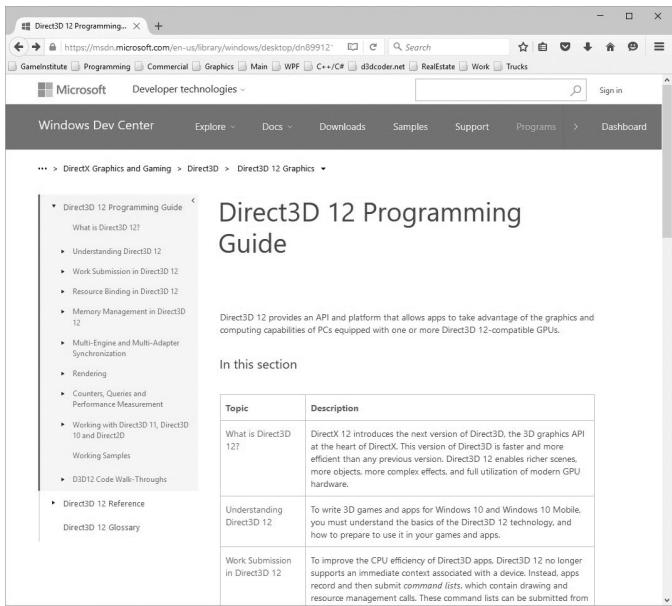
Figure 1. Direct3D Programming Guide in the DirectX documentation.
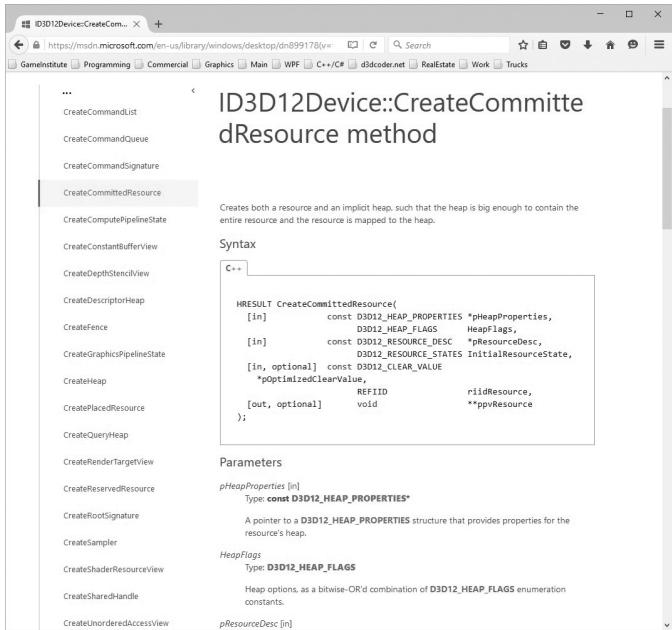
Figure 2. Getting documentation of a function.
We would also like to point out the available Direct3D 12 sample programs from Microsoft that are available online:
More samples may come in the future, and also be on the lookout for Direct3D 12 samples on NVIDIA鈥檚, AMD鈥檚, and Intel鈥檚 websites.
CLARITY
Although we strive to write efficient code and follow best Direct3D 12 programming practices, the main goal of each sample program is to demonstrate Direct3D concepts or graphics programming techniques. Writing the most optimal code was not the goal and would likely obfuscate the ideas trying to be illustrated. Keep this in mind if you are using any of the sample code in your own projects, as you may wish to rework it for better efficiency. Moreover, in order to focus on the Direct3D API, we have built minimal infrastructure on top of Direct3D. This means we hardcode values and define things in the source code that might normally be data driven. In a large 3D application, you will likely implement a rendering engine on top of Direct3D; however, the topic of this book is the Direct3D API, not rendering engine design.
SAMPLE PROGRAMS AND ONLINE SUPPLEMENTS
The website for this book (www.d3dcoder.net) plays an integral part in getting the most out of this book. On the website you will find the complete source code and project files for every samples in this book. In many cases, DirectX programs are too large to fully embed in a textbook; therefore, we only embed relevant code fragments based on the ideas being shown. It is highly recommended that the reader studies the corresponding demo code to see the program in its entirety. (We have aimed to make the demos small and focused for easy study.) As a general rule, the reader should be able to implement a chapter鈥檚 demo(s) on his or her own after reading the chapter and spending some time studying the demo code. In fact, a good exercise is trying to implement the samples on your own using the book and sample code as a reference.
DEMO PROJECT SETUP IN VISUAL STUDIO 2022
The demos for this book can be opened simply by double clicking the corresponding project file (.vcxproj) or solution file (.sln) This section describes how to create and build a project from scratch using the book鈥檚 demo application framework using Visual Studio 2022. You would do this if you wanted to make
your own demo app. (An easier method is to just copy and paste an existing demo, and change the solution and project names and GUIDs, and modify the code accordingly.) As a working example, we will show how to recreate and build the 鈥淏ox鈥?demo of Chapter 6.
Download the Book鈥檚 Source Code
First, download the book鈥檚 source code to some folder on your hard drive. For the sake of discussion, we will assume this folder is C:\d3d12book. In the source code folder, you will see several subfolders:
Demos: This folder contains the source code for each book demo. Each demo has a name as well as a prefix C# indicating which Chapter it corresponds to. For example, the Box demo is from Chapter 6, so its folder is named C6_Box.
Common: This folder contains shared source code that is reused in all of the demo projects.
External: Contains some open source libraries we use. We will elaborate on this in the next section.
Shaders: This folder contains the shaders used by the demo apps. Several demos will use the same shader files, which is why we put them in a shared location.
Textures: Image data stored on disk that some of the demos use. Several demos will use the same texture files, which is why we put them in a shared location.
Models: 3D models stored on disk that some of the demos use. Several demos will use the same model files, which is why we put them in a shared location.
bin: Each demo project is configured to output the generated binaries to this directory. We have a build step to copy the shader files a demo uses to this folder. However, you need to manually copy the Textures and Models folders into this directory.
Now, in the source code folder, create a new folder where you want to store your demos. For example, C:\d3d12book\MyDemos. This folder is where you will create new projects based on the book鈥檚 sample framework.
This directory structure is not completely necessary, but it is the structure the book demos follow. If you are comfortable with setting additional include paths, you can put your demo projects anywhere so long as you direct Visual Studio how to find the dependencies.
External Libraries
The book uses three external libraries. We will discuss these libraries later in this book, but for now we are just concerned with project setup.
DXC: This is the DirectX Shader Compiler, and it is the library we use to compile shader programs (available at
https://github.com/microsoft/ DirectXShaderCompiler/).Imgui: A GUI framework that supports various rendering APIs that can easily be integrated into our applications. For us, we are interested in the Direct3D 12 backend. This is used for displaying debug information and toggling optional features. It is available at
https://github.com/ocornut/imgui .DirectXTK12 (DirectX Toolkit): This is a Microsoft open source project that provides various utility code for writing Direct3D 12 applications. We will use some of these utilities in this book. It is available at
https://github.com/ microsoft/DirectXTK12.
For convenience, we have included these open source libraries in the book鈥檚 source directory \d3d12book\External, but potentially newer versions can be obtained directly from the links above.
Create a Win32 Project
First launch Visual Studio 2022, then go to the main menu and select File-> New- $\cdot >$ Project.
The New Project dialog box will appear (Figure 3). Select $\mathrm { C } { + + }$ , Windows, and Desktop projects from the dropdowns and choose the 鈥淲indows Desktop Wizard鈥?item. Now hit Next.
A new dialog box will appear. Give the project a name and specify the location and press Create. On the new sub-dialog that appears, choose 鈥淓mpty Project鈥?and 鈥淒esktop Application, as shown in Figure 4. Then press OK. At this point, you have successfully created an empty Win32 project, but there are still some things to do before you can build a DirectX project demo.
Adding the Source Code
Our project is created, and we can now add our source code files to the project and build it. First, copy the 鈥淏ox鈥?demo source code (d3d12book\Demos\C6_Box) BoxApp.h/.cpp to your project鈥檚 directory. Next, create the project filter hierarchy as shown in Figure 5; a filter can be created by right clicking on the project/filter name under the Solution Explorer and selecting Add $>$ New Filter.
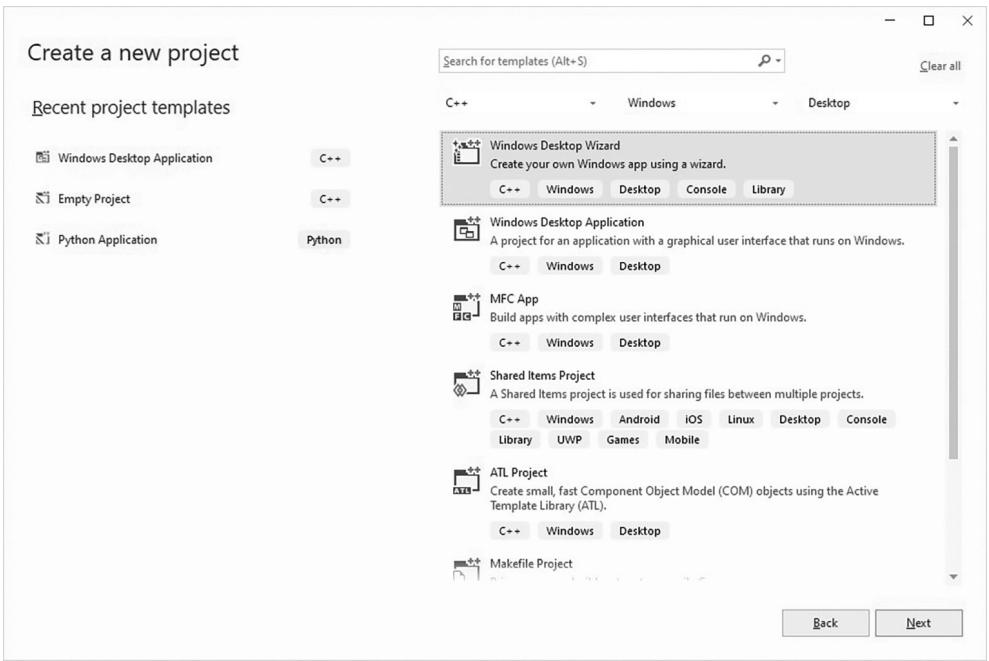
Figure 3. New Project creation.
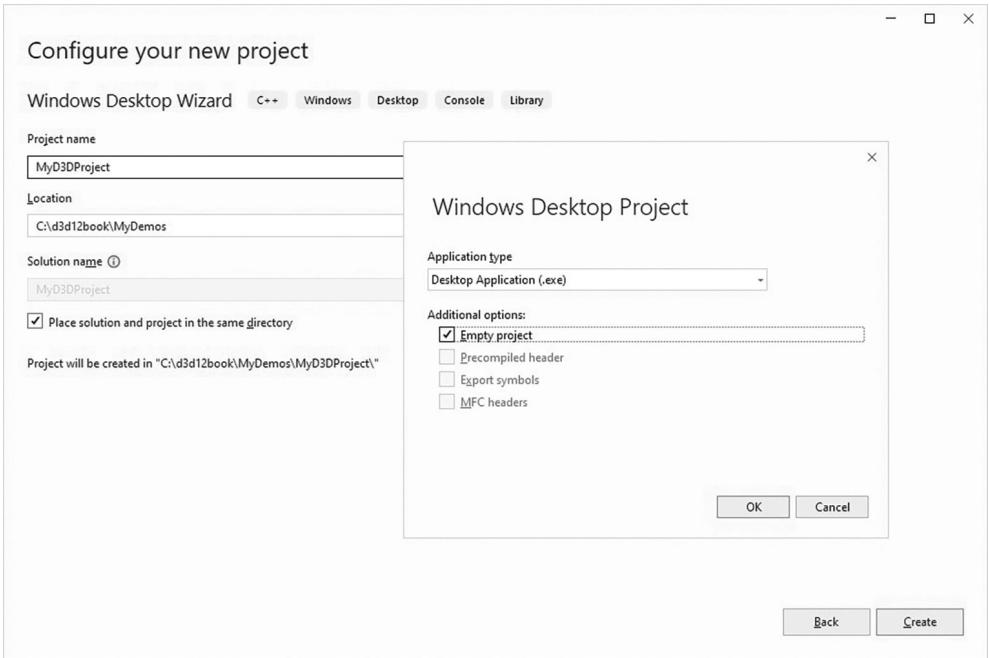
Figure 4. New Project settings.
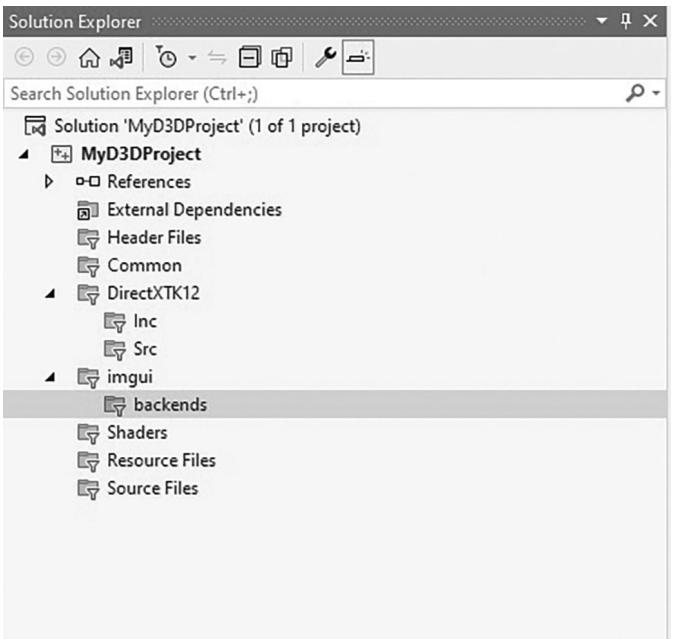
Figure 5. Solution Explorer after adding the appropriate filters.
Now, follow these steps to add the code to your project.
Right click on the project name under the Solution Explorer and select Add > Existing Item鈥?from the dropdown menu and add BoxApp.h/.cpp to the project.
Right click on the Shaders filter under the Solution Explorer and select Add > Existing Item鈥?from the dropdown menu, navigate to \d3d12book\Shaders and add BasicColor.hlsl to the project.
Right click on the Common filter under the Solution Explorer and select Add $>$ Existing Item鈥?from the dropdown menu, navigate to \d3d12book\ Common and add all the .h/.cpp files from that directory to the project.
Right click on the DirectXTK12\Inc filter under the Solution Explorer and select Add $>$ Existing Item鈥?from the dropdown menu, navigate to \ d3d12book\External\DirectXTK12\Inc and add all the .h/.cpp files from that directory to the project. Likewise, do the same thing for DirectXTK12\Src, but note that you do not need to add the subdirectory Src\Shaders.
Right click on the imgui filter under the Solution Explorer and select Add > Existing Item鈥?from the dropdown menu, navigate to \d3d12book\External\ imgui and add all the .h/.cpp files from that directory to the project. Similarly, also add \d3d12book\External\imgui\backends\ imgui_impl_dx12.h/.cpp and \d3d12book\External\imgui\backends\imgui_impl_win32.h/.cpp to the imgui\backends filter.
Agility SDK
Typically, new DirectX versions ship with Windows updates as part of the OS. In order to get access to newer features faster, the idea of the Agility SDK was introduced. This is obtained from a Nuget package (see Figure 6). Right click on the project name under the Solution Explorer and select 鈥淢anage Nuget Packages鈥︹€?Under 鈥淏rowse鈥?search for 鈥渁gility sdk鈥?and choose Microsoft. Direct3D.D3D12, and then press the Install button. At the time of writing this book, we used version 1.614.1.
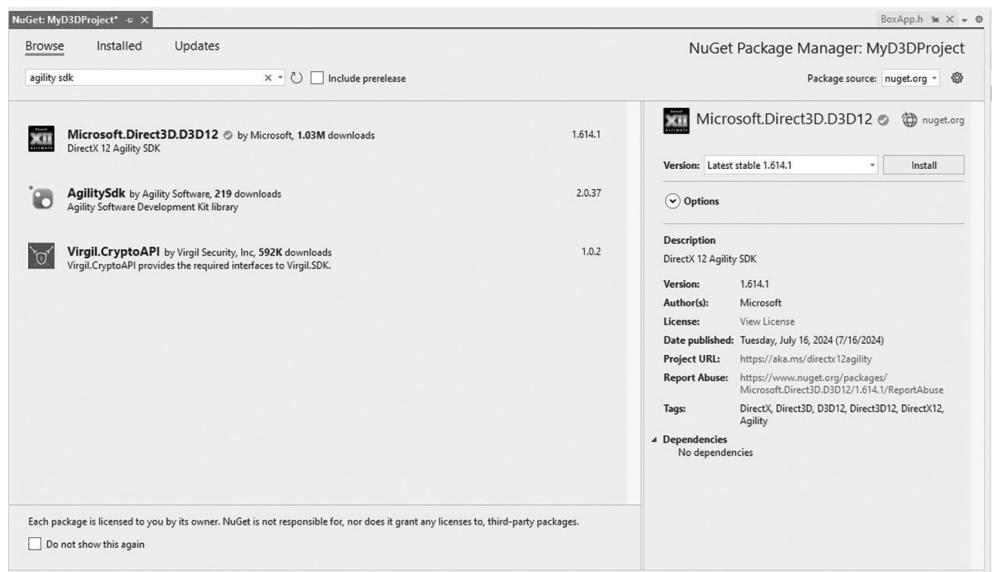
Figure 6. Installing the Agility SDK.
After installing, right click on the project name under the Solution Explorer, select Properties, and verify you have a D3D12 NuGet item as shown in Figure 7. This is the path for the newer DirectX SDK code and DLLs from the Agility SDK.
One important thing to note is that the code must specify the agility SDK version. So, if you upgrade a project to a newer version, you will need to update the following code in Common/d3dApp.cpp as well:
// Required exports for DX12-Agility SDK
// https://devblogs.microsoft.com/directx/gettingstarted-dx12agility/
extern "C" { __declspec(dllexport) extern const UINT D3D12SDKVersion = 614; }
extern "C" { __declspec(dllexport) extern const char* D3D12SDKPath = ".\D3D12\"; }
All of the existing projects in this book are built against version 1.614.1.
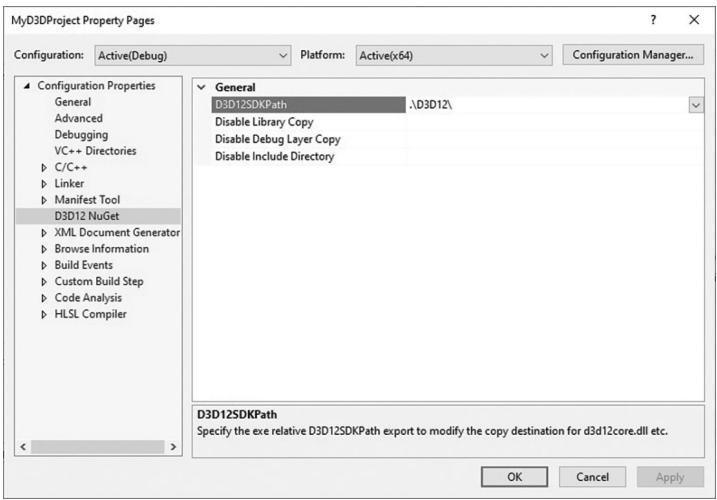
Figure 7. Agility SDK path.
Project Settings
Figure 8 shows our general application settings for the debug configuration. In particular, there are three changes from the default.
Output Directory: We output our executables to the bin folder (i.e., \d3d12book\bin).
Target Name: The executable name is built from the project name with _debug and _release, for debug and release configurations, respectively.
$\mathrm { C } { + + }$ Language Standard: We used ISO $C { + } { + } I 7$ Standard $( / s t d { : } c + + 1 7 )$ for this book, but $c + + 2 0$ should also work.
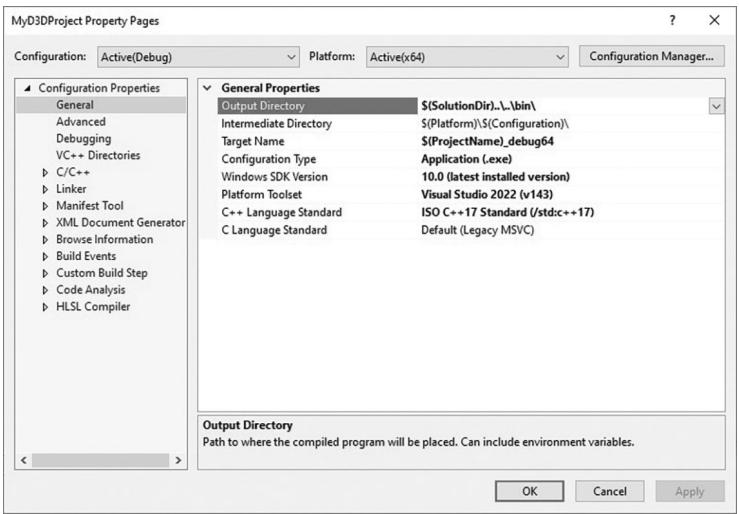
Figure 8. General Properties.
Because we output our executables to \d3d12book\bin, we also need to set the working directory to be the same, as shown in Figure 9.
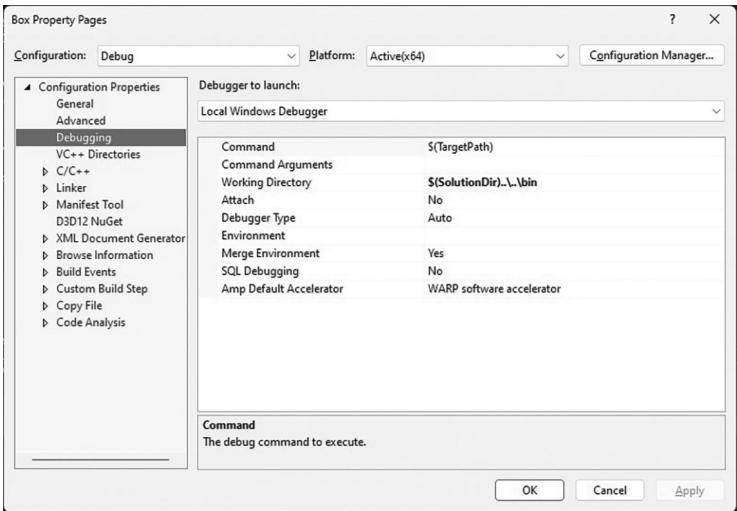
Figure 9. Setting the working directory.
Next, we need to set the 鈥淎dditional Include Directories鈥?for the external code we are using; see Figure 10.
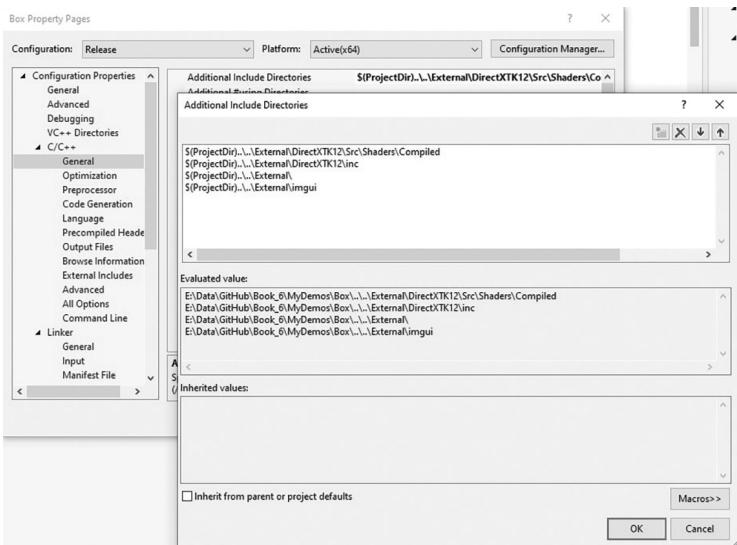
Figure 10. Include paths to the external code projects.
Finally, it is convenient to edit the shader files (.hlsl extension) that a demo uses in Visual Studio. But when it is changed, we want to make sure the updated shader file gets copied over to the \d3d12book\bin\Shaders directory. Therefore, we make
a custom build step for each shader file added to the project; see Figure 11 and Figure 12.
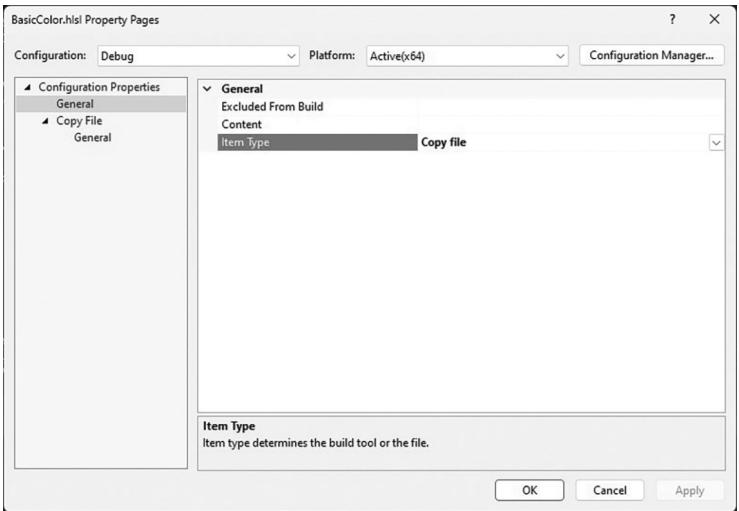
Figure 11. Changing the Item Type to 鈥淐opy file.鈥? 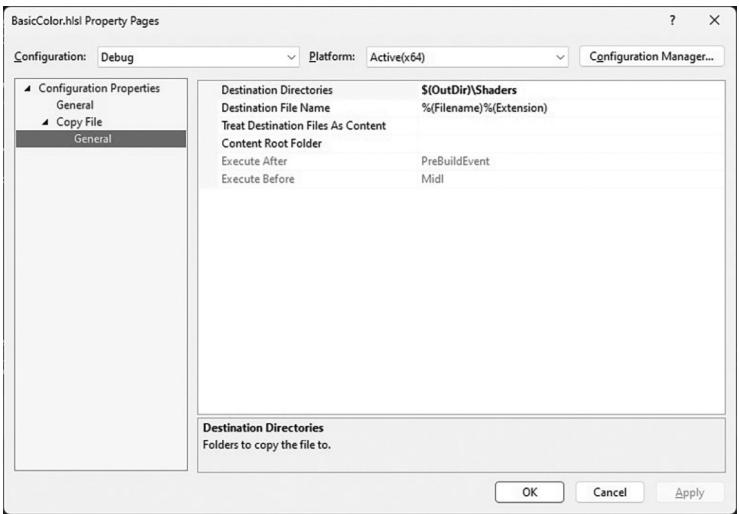
Figure 12. Specifying where to copy shader files.
Linking the DirectX Libraries
We link the necessary library files through the source code using #pragmas in Common/d3dApp.h like so:
// Link necessary d3d12 libraries. #pragma comment(lib,"d3dcompiler.lib")
pragma comment.lib, "D3D12.lib") #pragma comment.lib, "dxgi.lib")For making demo applications, this saves us from the additional step of opening the project property pages and specifying additional dependencies under the Linker settings.
Copy DXC DLLs to Bin
Because our demos need to compile shader code, one final step before we can build is to copy the DXC (DirectX Shader Compiler) DLLs to our working directory. Specifically, we need to copy \d3d12book\External\dxc\bin\x64\dxil.dll and \d3d12book\External\dxc\bin\x64\dxcompiler.dll to \d3d12book\bin.
Building and Running the Code
At this point, setup is complete, and you can now go to the main menu, and select Debug- $\cdot >$ Start Debugging to compile, link, and execute the demo. The application in Figure 13 should appear.
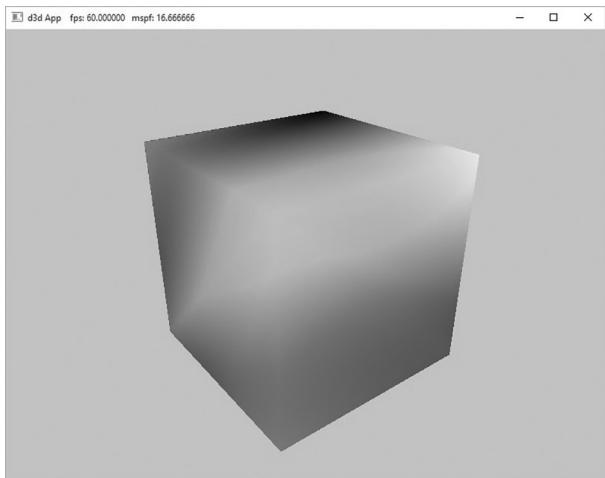
Figure 13. Screenshot of the 鈥淏ox鈥?demo.

A lot of the code in the Common directory is built up over the course of the book. So, we recommend that you do not start looking through the code. Instead, wait until you are reading the chapter in the book where that code is covered.
Contributors
 lloveee